
Master B2B Outreach: Learn How to Avoid Spam Folder in 2026
You wrote the sequence. You bought or built the list. You launched the campaign. Then the numbers looked wrong fast. Opens fell off, replies stalled, and a few prospects told you they found your email in junk.
That usually isn’t a copy problem. It’s a systems problem.
Most advice on how to avoid spam folder placement is scattered. One guide tells you to fix SPF. Another tells you to avoid the word “free.” Another says to warm up your domain. All of that matters, but not equally, and not at the same time. For B2B cold outreach, mailbox providers judge the whole sending pattern. They look at authentication, list quality, engagement, formatting, and behavior together.
The playbook below is the order we use for cold outreach campaigns: lock down the technical base, warm reputation carefully, protect list quality, send content that gets replies, and monitor the system continuously.
Build Your Technical Foundation for Deliverability
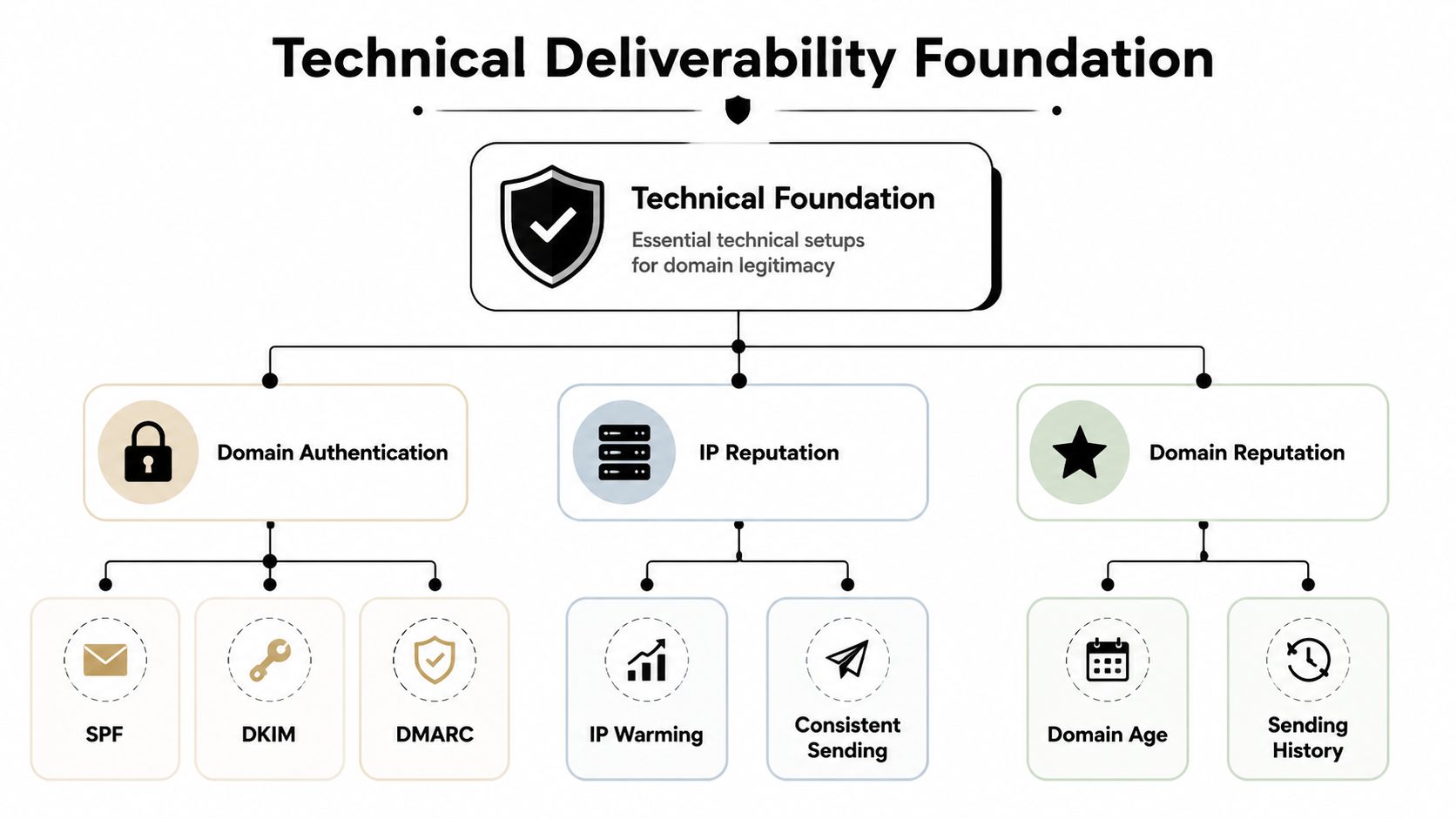
If your domain isn’t authenticated, nothing else matters. Gmail and Yahoo now explicitly require SPF, DKIM, and DMARC for compliant sending, and the practical rollout is simple: publish DNS records first, verify alignment, then scale only after authentication passes mailbox tests, as explained in Mailgun’s guide to avoiding emails going to spam.
What SPF, DKIM, and DMARC actually do
Think of SPF as your sender ID. It tells mailbox providers which services are allowed to send on behalf of your domain.
Think of DKIM as a tamper seal. It adds a signature that helps receiving servers verify the message wasn’t altered on the way.
Think of DMARC is your policy layer. It tells providers what to do if SPF or DKIM checks fail, and it gives you reporting visibility.
Practical rule: If SPF, DKIM, and DMARC aren’t all in place and aligned, don’t send cold outreach yet.
A lot of teams stop at “records added” and assume they’re done. That’s where mistakes happen. Records can exist and still fail alignment because the sending platform, return path, or signature domain isn’t configured correctly.
If you want a plain-English reference before touching your DNS settings, Robotomail’s guide to DNS for email is useful because it breaks the moving parts down without drowning you in jargon.
The setup order that works
Don’t treat authentication like a one-click checkbox in your email platform. Use a sequence.
-
Add your sending domain Connect the domain or subdomain you plan to use for outreach inside your sending tool.
-
Publish the required DNS records Add the SPF, DKIM, and DMARC records in your domain host.
-
Verify inside the sending platform Wait for propagation, then confirm the platform recognizes the records.
-
Run mailbox tests Send test messages to different providers and check whether authentication passes cleanly.
-
Only then increase volume If alignment is broken and you start sending anyway, you train providers to distrust the domain from day one.
For teams building this from scratch, Fypion’s walkthrough on how to set up cold email infrastructure for high deliverability is a practical checklist.
Do this, not that
| Do this | Not that |
|---|---|
| Authenticate before outreach starts | Launch first and “fix DNS later” |
| Use a dedicated sending domain or subdomain | Send cold campaigns from your main company inbox |
| Verify alignment with real mailbox tests | Assume platform verification alone is enough |
| Keep sending identity consistent | Rotate random from-addresses across campaigns |
One more trade-off matters here. Teams often obsess over copy early because it feels closer to revenue. Mailbox providers don’t care how clever the copy is if the domain fails trust checks at the gate. Technical legitimacy comes first. Always.
Master Sender Reputation with Strategic Warming
A new sending domain has no reputation. That’s not a penalty by itself, but it does mean you haven’t earned trust yet. Sending at full volume from a cold domain looks like a brand-new business applying for a large loan with no credit history. The lender doesn’t know you, so the answer is caution.
A better path is controlled warming.
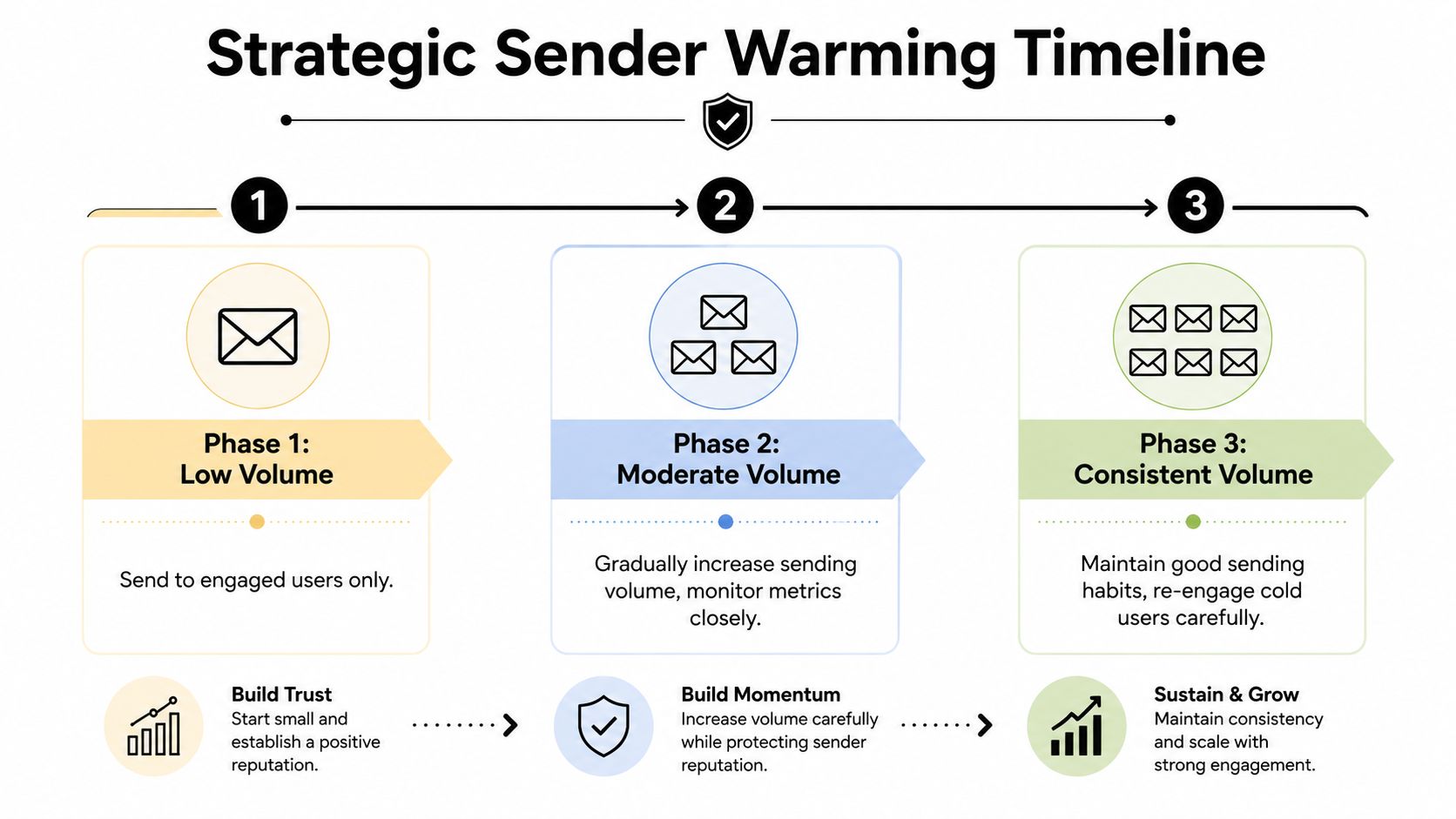
Mailwarm recommends starting from zero and increasing sends in stages such as 10, then 50, then 100 per day, while monitoring deliverability and reducing volume if spam placement appears. It also recommends keeping email content at least 60% text and no more than 40% images, as outlined in Mailwarm’s guide on how to avoid landing in spam.
What warming is really proving
Warming isn’t just about volume. It proves behavior.
Mailbox providers watch whether your early sends look normal. That means steady cadence, real replies, low friction, and no sudden spikes. If you jump from almost nothing to a large campaign, you create the exact pattern filters are designed to distrust.
Twilio’s guidance also pushes a sequence-first approach. It highlights progressive warm-up, real-time address validation, and bounce rates above a warning threshold as signs to slow down, which is why operational order matters more than random isolated fixes in Twilio’s deliverability advice.
A quick visual often helps teams understand the pacing:
The warming rhythm we trust
Start with your safest audience. That could be friendly contacts, warmer prospects, or tightly verified leads in a narrow segment. The point is to give the domain the best chance of earning positive early engagement.
Then keep the pattern boring. Boring is good in deliverability.
-
Start small: Use the low-volume stage to confirm messages reach inboxes and generate normal engagement.
-
Increase in steps: Move up only when placement remains stable for several days.
-
Hold steady when needed: If inbox placement slips, stop increasing volume. Let the domain settle before changing anything else.
-
Use representative email copy: Warm-up emails should resemble what you’ll send later, not empty tests or unnatural templates.
Early sender reputation is fragile. One reckless spike can undo careful technical setup.
Teams that want a broader framework for this can use Fypion’s post on email deliverability best practices as a working reference.
Mistakes that damage warm-up
The most common failure isn’t “bad luck.” It’s impatience.
-
Big day-one volume: New domains shouldn’t look like mature senders.
-
Constant sequence edits: If volume, audience, copy, and links all change at once, you can’t tell what caused the problem.
-
Testing one inbox repeatedly: Repetitive sends to the same address can create misleading signals.
-
Image-heavy warm-up emails: They don’t look like natural outreach and can create filtering issues early.
Warm-up is slow by design. That’s why it works.
Use List Hygiene as Your First Line of Defense
If you send to the wrong people, technical setup won’t save you.
Many cold outreach teams sabotage themselves. They spend time on domains, inboxes, and copy, then pour low-quality contacts into the machine. That’s backwards. List quality controls the quality of the signals you send to providers.
The biggest mistake is still the oldest one: bought lists. A landmark 2023 DMA study found that 78% of email recipients marked an email as spam or junk solely because the sender used a purchased email list, and 65% of those users immediately unsubscribed from the brand, according to the Data & Marketing Association.
Why purchased data breaks everything
Teams justify purchased lists by saying they need scale fast. But scale without consent or relevance doesn’t create pipeline. It creates complaints, distrust, and damaged sender reputation.
For cold outreach, the standard should be simple. You can reach out to people who fit your market, but the data itself still needs validation and the targeting needs to be tight. Random bulk volume is what kills campaigns.
A smaller verified list beats a larger questionable list every time.
The hygiene workflow that matters
List hygiene isn’t one task. It’s an operating habit.
-
Validate before first send: Remove invalid addresses, risky mailboxes, and malformed records before they touch your campaign.
-
Segment tightly: Don’t send the same pitch to every job title, company size, and use case.
-
Suppress fast: If an address shows signs of being unsafe or irrelevant, remove it from future sends.
-
Refresh older data: Even solid B2B data ages. Roles change, companies rebrand, and inboxes disappear.
-
Watch accept-all domains carefully: They can look valid while hiding risky behavior, which is why many teams use workflows like Fypion’s guide on how to verify accept-all emails.
Do this, not that
| Do this | Not that |
|---|---|
| Build targeted prospect segments | Blast one generic list |
| Verify addresses before launch | Trust raw exports blindly |
| Remove poor-fit contacts early | Keep mailing people who never should’ve been contacted |
| Prioritize relevance by role and pain point | Prioritize list size over quality |
A clean list doesn’t just reduce bounces. It increases the chance of opens, replies, and positive interaction. Those are the signals that keep future campaigns out of junk.
Craft Outreach Content That Earns Engagement
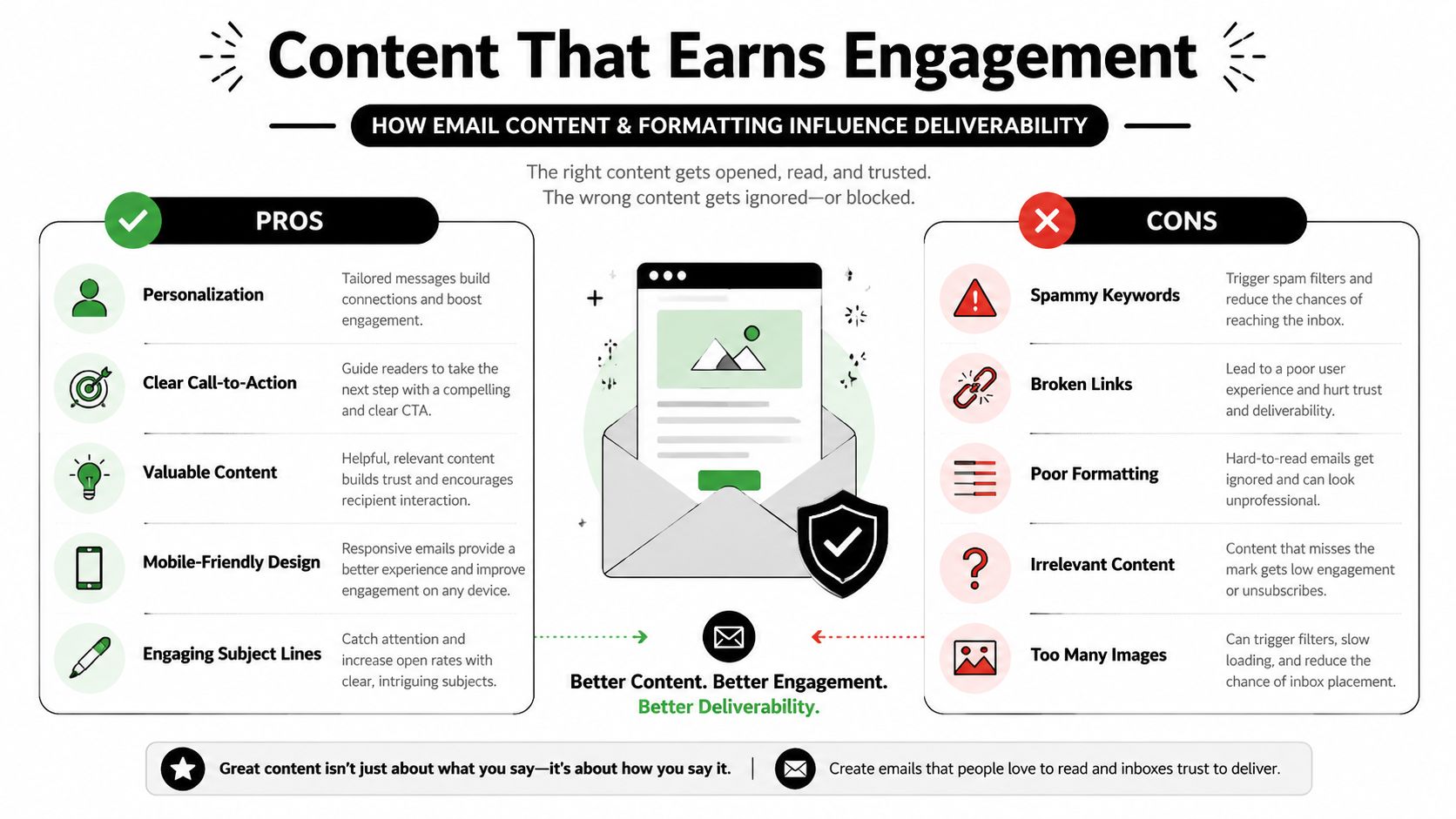
Once the infrastructure, warming, and list quality are under control, the email itself starts to matter a lot more. Not because filters are reading your mind, but because poor content creates the behaviors filters notice. Deletes, complaints, no replies, and fast disengagement all work against you.
The easiest content mistakes to spot are still subject-line mistakes. According to Verity’s 2024 report, subject lines containing words like “free” or “act now” had a 63% higher probability of being filtered into spam, and subject lines with all-capitalized words increased spam filtration by 81%, based on Verity’s report.
A bad version versus a workable version
Here’s the kind of email that gets filtered, ignored, or reported:
Subject: FREE OFFER ACT NOWHi there, We guarantee results for your business. Click these links to learn more and book now.Best, Sales Team
And here’s a version that behaves more like real B2B outreach:
Subject: quick question about your outbound processHi Sarah, Noticed your team is hiring for sales development. Are you testing cold email as a pipeline channel, or is most outbound still founder-led?If useful, I can share a simple angle we’ve seen work for teams that need more booked conversations without bloated tooling.Best, Alex
The second version works better because it feels like a real message. It’s specific, readable, light on friction, and gives the recipient a reason to reply without forcing a click.
Content rules that improve deliverability
Use a short checklist before every launch.
-
Keep subject lines plain: Natural language beats hype.
-
Write for a reply, not a click: Cold emails overloaded with links often create unnecessary friction.
-
Use personalization that means something: Role, context, recent trigger, or use case. Not just a first name token.
-
Keep formatting clean: Avoid image-heavy layouts, flashy HTML, and cluttered signatures.
-
Make the CTA small: Asking for a quick reaction is often safer than asking for a demo immediately.
If you need examples of cleaner structure and stronger messaging, Fypion’s guide on how to write a cold mail is a solid reference.
What doesn’t work anymore
A lot of senders still think avoiding spam folder placement is mostly about removing “bad words.” That’s too narrow. Spam words matter, but inbox placement improves when the full message earns normal human behavior.
That means the email should look like one person wrote it to another person for a clear reason. Overdesigned templates, stacked links, fake urgency, and exaggerated promises do the opposite.
Proactively Monitor and Remediate Deliverability Issues
Deliverability isn’t fixed when setup is complete. It’s healthy only when the feedback loop is healthy.
That’s the part many teams skip. They authenticate the domain, warm the inboxes, verify the list, launch the sequence, then assume no news is good news. Meanwhile, placement can slide unnoticed across Gmail or Outlook while campaign volume keeps going out.

What to monitor every week
You don’t need a huge dashboard. You need signals that tell you whether the system is stable.
-
Inbox placement by provider: Gmail and Outlook can behave differently. Check both.
-
Bounce patterns: A sudden rise usually points to list or infrastructure issues.
-
Spam placement in seed tests: Catch drift before a full sequence suffers.
-
Reply quality: Real responses usually indicate message-market fit and healthy delivery.
-
Complaint indicators: Any sign that recipients don’t want the mail should trigger a review.
Government guidance from the FTC makes an important point that most sender-focused articles ignore. Recipients can filter, block, mark as spam, unsubscribe, and are even told to check junk folders because legitimate email sometimes lands there. That’s why sender-side work isn’t enough. Your emails also need to be recognizable and manageable from the inbox side, as noted in the FTC’s advice on getting less spam in your email.
A remediation checklist when placement drops
When performance turns, don’t change everything at once. Diagnose in order.
-
Confirm authentication still passes A DNS or platform change can break alignment without anyone noticing.
-
Check recent volume behavior Spikes, rushed warm-up jumps, or uneven sending patterns often show up before placement issues.
-
Inspect the latest list segment New data sources, stale records, or weak targeting can poison an otherwise healthy setup.
-
Review recent copy changes Subject line changes, extra links, heavier HTML, or attachment use can shift filtering behavior.
-
Test mailbox placement again Don’t rely on campaign feel. Use actual seed and inbox tests.
For a practical troubleshooting walkthrough focused on recovery steps, Breaker’s guide to fixing spam is worth reviewing.
Build a closed-loop process
The strongest teams treat every campaign as diagnostic data. If deliverability improves, they ask what changed. If it slips, they isolate one variable at a time.
That’s also where managed support can help. Some companies use in-house ops, some use deliverability platforms, and some use providers such as email deliverability services from Fypion Marketing when they want someone handling testing, inbox monitoring, and remediation alongside outreach execution.
The inbox tells you the truth. Your job is to read the signals before a weak campaign becomes a reputation problem.
The Playbook for Consistent Inbox Placement
Many email senders still think about spam as a copy issue. It isn’t. It’s a trust issue.
If you want to know how to avoid spam folder problems consistently, stop hunting for one fix. Earn inbox placement in order. Authenticate the domain first. Warm gradually. Protect list quality aggressively. Write emails that feel like real communication. Then monitor the system like it can drift, because it can.
That shift matters. You’re not trying to outsmart filters. You’re trying to behave like the kind of sender filters want to trust.
When Gmail placement gets shaky, it also helps to compare your process against a focused troubleshooting resource like CleanMyList’s article on how to fix Gmail spam placement. Use that kind of checklist to validate your own process, not as a substitute for it.
The hard truth is simple. Most deliverability problems are self-inflicted. Rushed infrastructure, reckless volume, weak data, generic copy, and no monitoring will sink even a good offer. Teams that follow a sequence win because mailbox providers reward stable behavior over shortcuts.
If you want this entire system handled for you, Fypion Marketing manages cold email infrastructure, list building, outreach copy, deliverability monitoring, and campaign optimization for B2B companies that want qualified meetings without building the full machine in-house.