
Email Domain Reputation: A Complete Guide for 2026

You’ve written the sequence, checked the personalization, and selected prospects that match your ideal customer profile. The campaign dashboard reports that messages were delivered, yet replies have nearly disappeared. When you test a few recipient accounts, the explanation becomes obvious: your emails are being accepted by receiving servers but routed away from the primary inbox.
That gap between delivery and inbox placement is where email domain reputation determines the outcome. A relevant message can still become invisible when mailbox providers associate your domain with complaints, bounces, weak authentication, inconsistent volume, or poor recipient engagement.
The Silent Killer of Cold Email Campaigns
A B2B founder usually notices the problem through symptoms rather than a clear warning. The campaign appears to be running. The sending platform shows successful delivery. A few recipients respond, but the usual flow of conversations never develops. The team rewrites subject lines, changes the call to action, and debates whether the market has gone cold.
Often, the market isn’t the first problem. The domain is.
A receiving server can accept a message without placing it in the inbox. It may send the message to spam, filter it into another category, or suppress it before the recipient sees it. That’s why delivery rate alone gives an incomplete picture of campaign health. Inbox placement is the commercial result that matters, because an unread message can’t create a meeting.

The problem behind the dashboard
Mailbox providers maintain their own view of a sender’s historical behavior. They consider complaints, bounces, authentication, engagement, and sending consistency when deciding whether a new message deserves trust. That reputation isn’t static, and it isn’t identical across providers. A domain can perform well with Gmail recipients while generating weak results at Microsoft or another filtering system.
This creates a frustrating pattern for cold outreach teams. The copy can be accurate, the offer can be relevant, and the list can match the ICP, but the sender has already lost visibility before the prospect has a chance to evaluate the message.
Practical rule: Treat every sending domain as a long-term business asset, not as disposable campaign infrastructure.
List hygiene is part of that protection, but it isn’t a substitute for provider-specific diagnosis. A clean list can reduce avoidable bounces, while it can’t repair authentication drift or a history of unwanted mail. Teams reviewing their process can use this guide to email list cleaning services as a reference point, then assess the wider reputation system around the list.
The right question isn’t, “Did the email send?” Ask which provider received it, whether it reached the inbox, what signals influenced that decision, and whether the same pattern appears across recipient groups. That shift turns a vague response-rate problem into an operational investigation.
Understanding What Email Domain Reputation Actually Is
Email domain reputation is a composite trust signal that mailbox providers use to decide whether mail from a domain should reach the inbox, spam folder, or a block response. It isn’t a universal public score like a credit rating. Gmail, Microsoft, Yahoo, network filters, and blocklist services each maintain separate views based on the traffic and recipient behavior they observe.
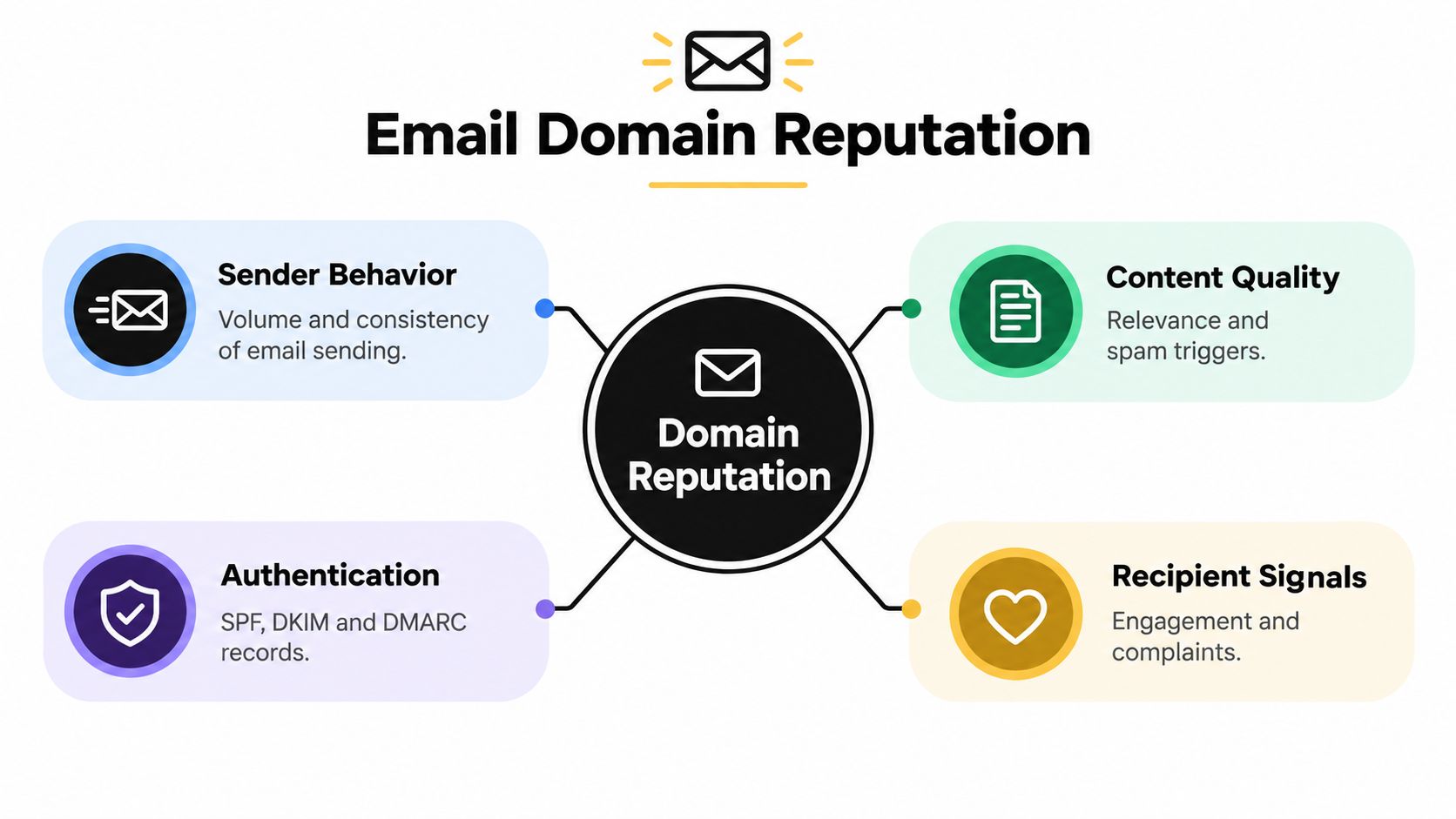
The signals commonly include authentication results, spam complaints, hard bounces, engagement, blocklist history, and the consistency of sending activity. Providers may weigh those signals differently, which means the same domain can receive different treatment at different destinations. A domain’s reputation therefore describes a relationship between a sender and a particular provider, not an objective grade that applies everywhere.
Reputation behaves like a running history
Every campaign adds new evidence. Consistent, wanted mail can support trust over time. A sudden volume increase, a poorly targeted list, or a cluster of complaints can create the opposite signal. Current guidance increasingly treats reputation as a rolling and engagement-driven assessment, so a domain can deteriorate quickly after a short period of poor sending behavior even when its technical records remain correct. Warmy’s explanation of domain reputation provides useful context on why recent sender behavior matters so much.
That dynamic nature creates two important distinctions:
- Domain reputation is not the same as IP reputation. Providers can use the domain as a stable identifier even when the sending infrastructure changes.
- Delivery acceptance is not inbox placement. A server may accept a message and still route it away from the primary inbox.
- A strong technical setup doesn’t guarantee trust. SPF, DKIM, and DMARC establish identity and policy, but recipients still determine whether the traffic appears wanted.
A useful explanation of the broader mechanism is available in reputation based filtering explained, particularly for teams that need to distinguish identity verification from filtering decisions. Authentication answers, “Is this sender authorized?” Reputation filtering asks, “Do we want more mail behaving like this?”
What the score means commercially
The commercial consequence is simple. If a domain has poor standing with a provider, fewer decision-makers see the message in the place where they normally work. The sales team may interpret the resulting silence as weak positioning or low demand, when the actual constraint is visibility.
That’s why reputation management belongs in campaign planning, not only in technical troubleshooting. Before increasing outreach volume, establish which domains send the mail, which providers matter to the target market, how complaints and bounces are monitored, and what evidence will trigger a pause.
The Five Core Signals That Determine Your Standing
Mailbox providers assess a domain through several operating signals, then interpret those signals according to their own systems. A domain can look healthy in one provider’s reporting and still perform poorly with another. The goal is therefore not to chase one universal score. It is to identify which signal is weak, where the weakness appears, and what operational change can address it.
Authentication establishes sender identity
SPF, DKIM, and DMARC establish who is authorized to send and how failures should be handled. SPF identifies approved sending services. DKIM gives the receiving provider a signature to verify. DMARC connects those results with the visible sending domain and defines a policy for failed authentication.
The practical test is alignment, not just the presence of records. If the authenticated identity differs from the domain shown to the recipient, a platform may report successful authentication while the provider sees a weaker trust signal. Audit every legitimate sender, including marketing platforms, sales tools, transactional systems, and support software. A forgotten service can create inconsistent traffic that is difficult to diagnose later.
Volume consistency reveals operational intent
Providers evaluate sending patterns over time. A controlled rhythm is easier to interpret than a sudden surge after a quiet period, particularly for a new domain or a newly introduced sending stream. Build activity gradually and separate new audiences or systems from established traffic so a problem can be isolated.
Consistency does not require every campaign to send at the same pace. A volume change should have a clear operational reason, a controlled rollout, and monitoring that can detect a deterioration before the next campaign expands. Teams planning regional outreach can review setting up cold email infrastructure for APAC before changing domains, sending systems, or audience segments.
Complaints are direct negative feedback
A spam complaint carries more negative weight than a passive non-open because the recipient has actively indicated that the message was unwanted. Review complaint rates by provider, campaign, audience source, and message angle. A spike in one segment usually points toward targeting, list quality, or expectation-setting. A rise across all segments calls for a broader review of sending behavior and authentication.
A widely cited healthy benchmark is below 0.1%, while rates above 0.3% are treated as critical in deliverability guidance from Validity’s sender reputation overview. Check complaints before a campaign report is complete. Waiting for a large sample can allow a provider-specific problem to spread through the rest of the program.
Bounces expose list quality
Hard bounces generally mean that an address cannot receive mail. They consume sending capacity and indicate that list maintenance or acquisition controls may be weak. Keep hard bounces low, investigate the source whenever they rise, and compare results across providers instead of treating the average as a complete diagnosis.
Remove invalid addresses promptly. A verification tool can identify obvious failures, but it cannot confirm that a valid address belongs to the right person or that the recipient expects the outreach. Review the process against CAN-SPAM compliance requirements. Compliance alone does not create positive reputation, while unclear identity, misleading presentation, and poor opt-out handling can generate negative signals.
Engagement provides positive context
Replies, clicks, and genuine conversations can indicate that recipients value the messages. Opens are less reliable alone because privacy features and technical handling can distort them. Compare engagement with complaints, bounces, provider, campaign, and audience source. A high click rate does not cancel a complaint spike.
Authentication gets you recognized, consistent behavior earns confidence, low complaints protect trust, clean lists prevent avoidable damage, and genuine engagement supports continued visibility. Review each signal by provider so a strong result in one system does not conceal a weak standing elsewhere.
How to Diagnose Your Current Domain Health
Diagnosis requires triangulation. No single dashboard reveals the complete reputation picture, so start by separating provider evidence from general infrastructure evidence.
Begin with the providers that matter most
Google Postmaster Tools can show Gmail-specific information such as reputation bands, spam rates, and traffic patterns when enough qualifying data is available. Gmail currently presents reputation in categories such as Good, Medium, Low, and Bad, rather than exposing one universal score. Use those categories as directional evidence, not as a certificate that all recipients will see your mail.
Microsoft’s Sender Network Data Services, commonly called Microsoft SNDS, provides a separate view of traffic quality and filtering conditions for Microsoft-operated systems. A healthy Gmail view doesn’t override a weak Microsoft result. Investigate each provider independently, especially if your prospect list contains a large concentration of Outlook or Microsoft 365 accounts.
Compare outcomes with operational metrics
Build a simple diagnostic view with one row for each provider and columns for:
- Inbox evidence: What do seed tests, recipient feedback, or provider tools show?
- Complaint signals: Are complaints rising, stable, or concentrated in one campaign?
- Bounce behavior: Are invalid addresses isolated, or does one data source generate most failures?
- Authentication: Are SPF, DKIM, and DMARC passing and aligned across all sending tools?
- Volume pattern: Did traffic change sharply before the decline appeared?
This comparison prevents a common mistake. A sender sees “delivered” in an outreach platform and assumes the provider accepted the message into the inbox. In reality, delivery reporting often confirms server acceptance, not the final folder.
Use benchmarks as context, not as a verdict
Industry data can help you understand the scale of the problem. Validity’s 2025 report, summarized by Mailgun’s State of Email Deliverability, reports average inbox placement of 83.5% globally, with 6.7% reaching spam and 9.8% missing. The same source reports 87.2% inbox placement at Gmail and 75.6% at Microsoft.
Those figures aren’t a target for every program. They show why provider segmentation matters and why “our average deliverability is fine” can hide a serious problem in one recipient ecosystem. Pair benchmarks with your own campaign-level evidence.
Finally, check blocklist status and authentication reports, then map the timing. If a decline follows a volume spike, suspect pacing or list quality. If it follows a DNS or platform change, investigate authentication and alignment. If only one provider worsens, focus first on that provider’s filtering behavior rather than rebuilding the entire program.
Why One Score Does Not Fit All Providers
A domain can look healthy in Google Postmaster Tools while struggling to reach Microsoft recipients. That isn’t necessarily a data error. Each provider has its own user base, historical observations, filtering priorities, and thresholds. The provider sees only the traffic and recipient behavior available inside its ecosystem.
Gmail may classify a domain as Good, Medium, Low, or Bad. Microsoft SNDS presents different operational evidence. Yahoo uses complaint feedback mechanisms and its own filtering logic. Cisco Talos and public blocklist services add another perspective, but they don’t represent the inbox decisions of every major provider.
Read disagreement as a diagnostic clue
Suppose Gmail looks stable but Microsoft performance falls. That pattern may indicate that Microsoft’s system has stronger negative evidence from its recipients, a different history for the domain, or a traffic pattern that Gmail hasn’t treated as problematic. The correct response isn’t to average the two views into one score. It’s to ask what changed in the affected ecosystem.
| Observation | More useful interpretation |
|---|---|
| Gmail looks healthy, Microsoft is weak | Investigate Microsoft-specific traffic, complaint behavior, and recipient mix |
| Provider dashboards look acceptable, replies fall | Test inbox placement and review targeting, content, and engagement |
| Authentication passes, filtering worsens | Look at complaints, bounces, volume changes, and blocklist history |
| One campaign underperforms | Segment the campaign before changing the entire domain |
The same principle applies to warmup. A sending pattern can improve gradually at one provider while another continues to treat the domain cautiously. That doesn’t mean the process is failing, but it does mean the team needs provider-level evidence before increasing volume.
Teams that don’t have internal deliverability expertise may use email deliverability services to audit the infrastructure and interpret provider-specific symptoms. The value of an audit isn’t a generic score. It’s a clear decision about which provider is affected, which signal changed first, and what action should happen next.
A disagreement between dashboards is not noise. It is often the most useful clue you have.
Actionable Steps to Fix and Protect Your Reputation
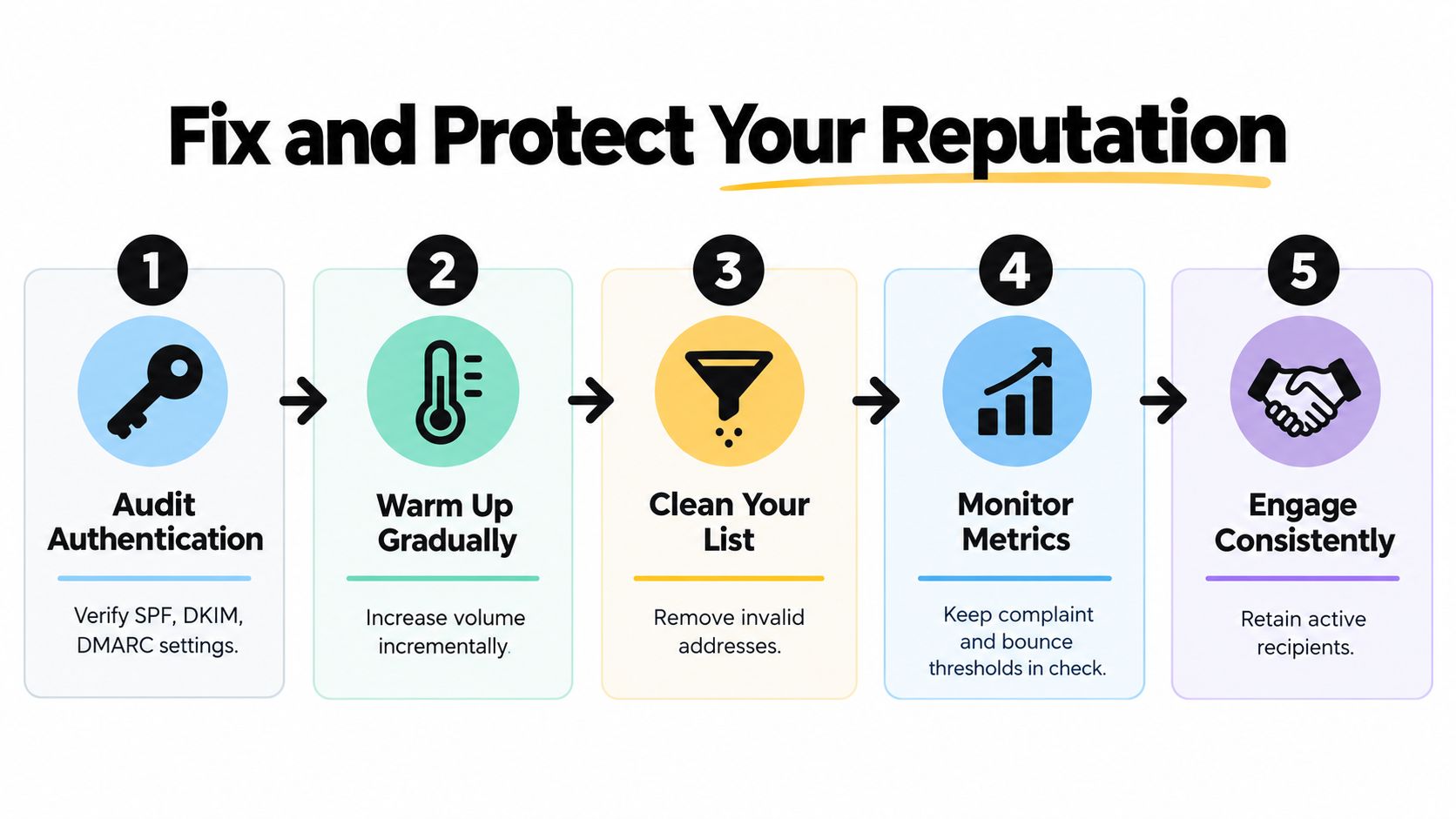
Recovery works best when you stop adding new volume and fix the highest-impact causes first. Don’t begin by rewriting every email. If the domain fails authentication or sends repeatedly to invalid addresses, better copy won’t solve the underlying problem.
Start with authentication and sender inventory
List every platform that sends mail for the domain. Include sales engagement software, marketing automation, customer support, billing, product notifications, and employee mail. Confirm that SPF, DKIM, and DMARC are configured for the legitimate senders and that the visible domain aligns with the authenticated identity.
A passing check from one platform doesn’t prove that every other platform is configured correctly. Review authentication reports for unexpected sources, duplicate authorization, and failed alignment. The technical foundation should be stable before you attempt any recovery campaign. This overview of email authentication protocols is useful when documenting responsibilities across tools and teams.
Stop avoidable list damage
Suppress hard bounces immediately. Remove addresses that repeatedly fail, investigate the source of questionable contacts, and separate old or unresponsive records from active prospects. Do not keep sending to an address just because it belongs to a valuable account. A valuable account that never wants the message can still produce negative signals.
List cleaning also requires judgment. Verification can identify invalid or risky addresses, but it won’t tell you whether your targeting is relevant, whether the contact has changed roles, or whether your outreach promise matches the way the address was collected. Combine technical validation with audience review.
Reduce pressure on a damaged domain
If complaints or bounces rise, pause the affected campaign instead of pushing through the problem. Review the provider breakdown, audience source, message promise, frequency, and opt-out experience. A pause gives you time to identify the first broken signal rather than adding more ambiguous data.
For a new sending stream, ramp activity gradually and keep the pattern predictable. Avoid sudden spikes after a quiet period. The right pace depends on your audience, infrastructure, and sending purpose, so treat volume changes as controlled experiments with explicit stop conditions rather than a race to a target.
Repair targeting and engagement
Personalization isn’t just inserting a first name. It means choosing a relevant business problem, addressing the correct role, and making the reason for contact clear. A short message that matches the recipient’s context is more likely to earn a reply than a heavily automated sequence that creates confusion.
Use replies as your strongest practical engagement signal. Track positive responses, negative responses, opt-outs, complaints, and silence by segment. If one industry, job function, or data source produces most of the negative feedback, suppress that group while you investigate instead of exposing the whole domain to the same pattern.
Monitor the recovery loop
Create a review routine that combines provider dashboards, authentication reports, bounce data, complaints, and campaign outcomes. Check the data often enough to catch a sudden deterioration, especially after changing providers, lists, message volume, or sending domains.
The most useful recovery dashboard doesn’t contain dozens of vanity metrics. It answers five questions:
- Which provider is underperforming?
- Which campaign or audience segment changed first?
- Are complaints or bounces approaching unsafe levels?
- Are authentication failures present in the affected traffic?
- What specific action will we take if the next send worsens the result?
Use the benchmark thresholds as guardrails rather than guarantees. Guidance commonly places spam complaints below 0.1% for healthy sending, with rates above 0.3% creating serious enforcement risk, while bounce rates above 5% are a warning sign in operational guidance from Prospeo’s domain reputation reference. These thresholds don’t replace provider-specific evidence, but they help teams decide when to pause rather than rationalize.
The recovery process is cyclical. Audit, reduce risk, send cautiously, observe provider outcomes, and adjust the audience or message. Protecting reputation means repeating that loop before a small warning becomes a domain-wide problem.
Building a Long-Term Strategy for Inbox Placement
Email domain reputation deserves the same operational attention as a core sales system. It determines whether your team can reach decision-makers, whether campaign results reflect the offer, and whether future outreach starts with trust or suspicion.
Treat the domain as an asset with a history. Keep an inventory of sending tools, review authentication after infrastructure changes, maintain suppression rules, and monitor provider-specific results instead of relying on one blended delivery figure. When engagement falls, investigate quickly. A neglected list, drifting configuration, or sudden volume change can affect visibility before the sales team recognizes the pattern.
A resilient program also separates diagnosis from reaction. Don’t abandon a domain because one campaign performs poorly, and don’t increase volume because one dashboard looks healthy. Identify the affected provider, compare the signals, and make the smallest change that tests your explanation.
Teams that need practical guidance on how to avoid the spam folder should focus on this operating principle: send wanted mail to appropriate recipients, authenticate it correctly, maintain a predictable pattern, and use provider evidence to guide every major decision. That approach turns deliverability from a last-minute emergency into a measurable part of pipeline planning.
Your domain isn’t just a technical container for email addresses. It carries the accumulated history of your outbound behavior. Protecting that history gives your sales team a more reliable chance to be seen, evaluated, and answered.
Fypion Marketing helps B2B teams manage cold email infrastructure, authentication, mailbox warmup, deliverability audits, personalized outreach, and ongoing campaign optimization. If you want to protect inbox placement while building qualified pipeline, visit Fypion Marketing to request a free consultation.