
How to Set Up Cold Email Infrastructure for High Deliverability
Getting your cold email setup right from the start is non-negotiable. It’s the difference between landing in the primary inbox and getting banished to the spam folder forever.
The whole process boils down to buying separate domains, authenticating them properly with SPF, DKIM, and DMARC, and then patiently warming up every single mailbox. This is how you signal to providers like Google and Microsoft that your emails are legit and wanted.
Your Blueprint for Inbox-Ready Cold Email
Hold on. Before you dive into the technical weeds of DNS records, you need a game plan. A rock-solid cold email infrastructure isn’t just a checklist of tasks; it’s a strategic system built to earn trust with internet service providers (ISPs).
Think of it like building a house. You wouldn’t dare put up the walls before pouring a solid foundation. This blueprint is that foundation.
It’s what separates the campaigns that pull in qualified leads from the ones that get your domains blacklisted in a matter of weeks. At Fypion Marketing, we’ve seen clients who stick to this process achieve incredible results, like a 220% month-over-month lead growth, because they established credibility from day one.
Before we dive into the specific actions, it’s helpful to see the big picture. These core components work together to ensure your outreach engine runs smoothly and effectively.
Core Components of Cold Email Infrastructure
| Component | Purpose | Impact on Deliverability |
|---|---|---|
| Separate Sending Domains | To protect your main company domain’s reputation from any potential issues with cold outreach. | High. Insulates your primary domain, preventing it from being blacklisted if a sending domain is flagged. |
| SPF, DKIM, & DMARC | To prove your emails are authentic and haven’t been forged or spoofed. | Critical. Without these, most major email providers will mark your emails as suspicious or block them outright. |
| Mailbox Warm-Up | To gradually build a positive sending reputation by mimicking natural human email activity. | Critical. Skipping this makes your new mailboxes look like spam bots, leading to immediate delivery issues. |
| List Hygiene | To remove invalid, unengaged, or risky email addresses from your sending lists. | High. Reduces bounce rates and spam complaints, which are major factors in determining your sender reputation. |
Each of these pieces is essential. Neglecting even one can undermine your entire outreach effort, wasting time and money.
The Pillars of Your Outreach Engine
A resilient infrastructure really comes down to three non-negotiable pillars. Each one has a specific job in protecting your brand and making sure your emails actually get seen.
-
Buying Separate Domains: First things first, you need to purchase domains specifically for outreach. These should be completely separate from your main corporate website. This strategy is all about insulation - if a sending domain’s reputation ever takes a hit, your core business email () is completely safe and unaffected.
-
Nailing the Technical Authentication: This is the digital handshake between your domain and the recipient’s inbox. Setting up SPF, DKIM, and DMARC records correctly is like showing a valid ID at a security checkpoint. It proves your emails are coming from you and haven’t been faked, which is an absolute must-have for deliverability.
-
Warming Up Your Mailboxes - Slowly: A brand-new domain has zero credibility. The warm-up process fixes that by gradually increasing the sending volume over several weeks, making it look like a real person is using the account. This activity signals to ISPs that you’re a legitimate user, not a spam bot launching an attack.
Skipping any of these is a one-way ticket to the spam folder. A robust setup gives your cold email campaigns the best possible chance to succeed, turning outreach into a predictable source of new business.
This structured approach is the backbone of any serious B2B outreach effort. For a deeper dive into turning these efforts into tangible results, you can explore our guide on B2B cold outreach for pipeline growth.
Getting these fundamentals right is what allows you to scale your campaigns without constantly putting out deliverability fires. It’s the difference between a sputtering engine and a high-performance one.
Building Your Technical Foundation for Deliverability
Alright, you’ve got your strategy mapped out. Now it’s time to get your hands dirty and build the engine that will drive your campaigns. A great cold email campaign is all about building trust with email providers like Google and Outlook, and that trust starts with the technical setup. This is where we lay the foundation for solid deliverability.
First things first: you have to protect your main company domain. This isn’t a suggestion; it’s a hard rule. Never, ever send cold emails from your primary domain (like ). You’ll want to buy a few new domains that are slight variations of your main brand.
Think of your primary domain as your corporate headquarters and your sending domains as temporary field offices. If one of those field offices runs into any trouble, it won’t take down the entire operation. Good variations could be something like or .
Getting Your Authentication in Order
Once you have your new domains, the next job is authentication. This is how you prove to the world that you are who you say you are and that your emails are legit. It sounds super technical, but it boils down to three key records: SPF, DKIM, and DMARC. Their whole purpose is to stop spammers from faking emails that look like they came from you.
-
SPF (Sender Policy Framework): Think of this as a bouncer’s guest list for your email. It’s a record that lists all the servers authorized to send emails on your domain’s behalf.
-
DKIM (DomainKeys Identified Mail): This adds a digital signature to your emails. The receiving server checks this signature to make sure the message wasn’t messed with on its way over.
-
DMARC (Domain-based Message Authentication, Reporting & Conformance): This is the enforcer. It tells receiving servers what to do if an email fails the SPF or DKIM checks - whether to reject it, send it to quarantine, or just let it through.
Properly setting up SPF, DKIM, and DMARC for cold email is what separates a low-performing campaign from a high-performing one. It’s all done in your DNS settings, and getting it right is non-negotiable.
Fine-Tuning Your Sending Infrastructure
With the main authentication handled, a few other tweaks will make your setup truly professional. These details create a smoother experience for you and your prospects, and they’re crucial for tracking and efficiency.
Custom Tracking Domains
When you track email opens and clicks, your sending tool uses a tiny tracking pixel. By default, this is hosted on the tool’s generic domain, which can look a bit amateur and sometimes trigger spam filters. To look more professional and improve deliverability, set up a custom tracking domain (like ) using a CNAME record.
Email Forwarding
What happens when a prospect finally replies to ? You don’t want to be logging into dozens of different inboxes to check for responses. That’s a nightmare. Instead, set up automatic forwarding from all your sending mailboxes to one central inbox. This keeps all your replies in one place, making it so much easier to manage conversations.
This entire process - buying the domain, authenticating it, and getting it ready for warm-up - is the backbone of any successful outreach system.
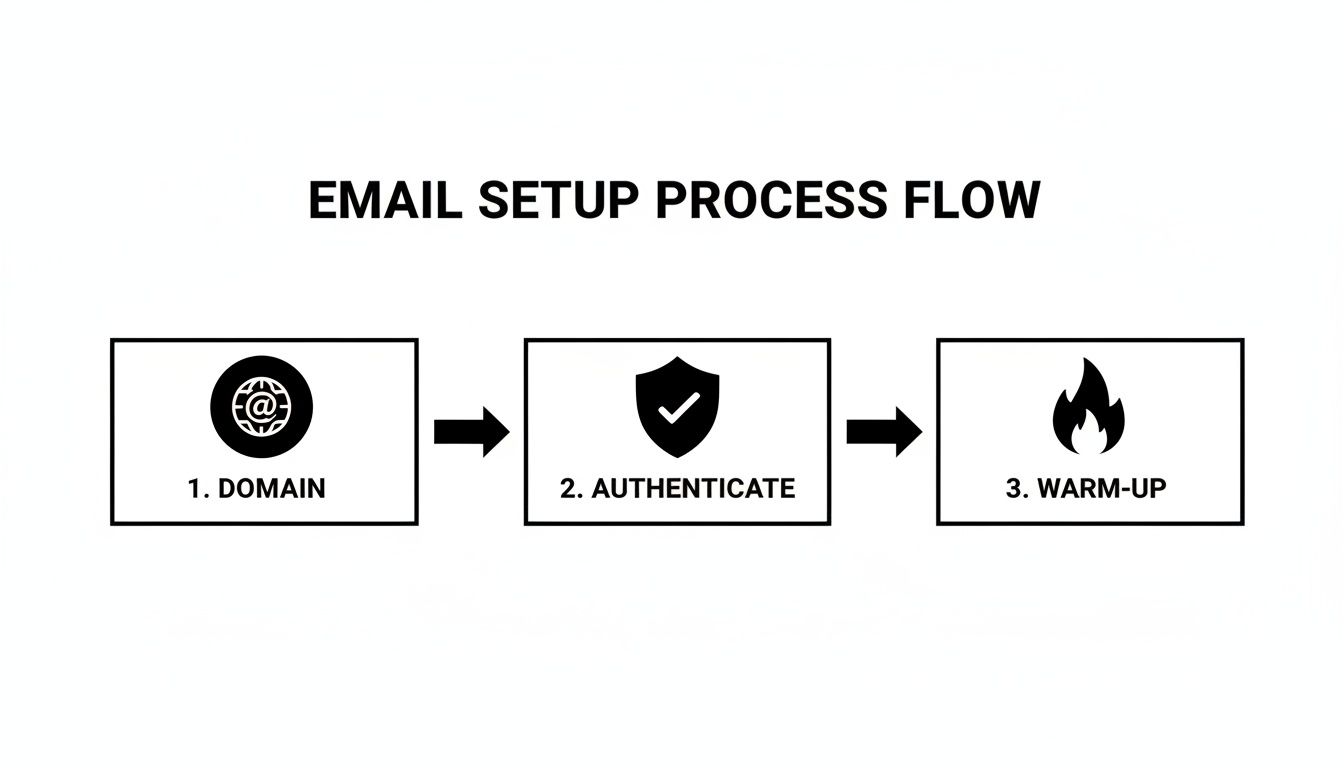
We’ve seen it firsthand: getting the tech right from the start is what enables everything else to work. Businesses that correctly set up these records see their response rates jump by as much as 30.5%. Without them, even the best B2B outreach from a promising tech startup will get lost in the junk folder, where open rates crater below 25%.
The goal here is to build a system that email providers trust and that you can actually manage without pulling your hair out. A solid technical foundation frees you up to focus on what really matters: writing great emails and building relationships. For a deeper dive into these topics, check out our guide on email deliverability best practices to master.
Alright, your domains are authenticated and the technical side is sorted. Now it’s time to actually create the mailboxes you’ll be sending from and, more importantly, get them ready for outreach.
Think of a new email account like a brand-new car. You wouldn’t drive it off the lot and immediately redline the engine, right? You have to break it in. Mailbox warm-up is that exact same break-in process, but for your cold email infrastructure.

The whole point is to build a positive sending reputation from day one. You start with a tiny sending volume and increase it slowly over a few weeks. This activity shows email providers like Google and Microsoft that your accounts belong to a real human having normal conversations, not some spam bot blasting out thousands of emails.
From my own experience, I can tell you that skipping the warm-up is the single fastest way to get your domains blacklisted. It’s a non-negotiable step if you want your setup to last.
Why You Should Automate the Warm-Up
Years ago, warming up mailboxes was a nightmare. We had to manually email friends and coworkers, beg for replies, and keep meticulous spreadsheets to track daily sending. Thankfully, automated warm-up tools have made this whole process a thousand times easier and more effective.
These platforms connect your new mailboxes to a huge network of other inboxes and handle everything for you:
-
Sends unique emails from your accounts to others in the network, mimicking human conversation.
-
Generates replies automatically, creating those crucial two-way interactions.
-
Fixes spam issues by automatically pulling any warm-up emails that land in spam back to the primary inbox, repairing your reputation in real-time.
-
Scales volume gradually based on a proven schedule, so you don’t have to think about it.
Honestly, using an automated tool is the only way to go for any serious outreach. It saves an incredible amount of time and does a better job than any manual process ever could.
A Warm-Up Schedule That Actually Works
The warm-up process usually takes about 3-4 weeks. Some people play it extra safe and go for as long as 12 weeks, but that’s often overkill. The goal is to slowly work your way up to a safe daily sending limit, which is typically around 30-50 emails per mailbox.
Don’t rush this. A patient warm-up builds a strong sender reputation that will pay dividends later. Trying to speed this up almost always ends in disaster.
Here’s a sample schedule you can follow, assuming you’re using an automated tool.
| Week | Daily Actions & Volume | Key Objective |
|---|---|---|
| Week 1 | 5-10 emails/day. Focus on getting positive engagement like opens and replies. | Establish your first bit of sending history and get some positive signals. |
| Week 2 | 10-20 emails/day. Continue to build on those initial conversation threads. | Build on that early reputation and show consistent, natural-looking activity. |
| Week 3 | 20-30 emails/day. Your tool should start varying send times slightly. | Reinforce your credibility by looking even more like a real person. |
| Week 4 | 30-40 emails/day. Keep a close eye on your deliverability metrics. | Reach a sustainable sending volume and get ready for your first real campaign. |
One crucial thing to remember: keep your prospect list clean, even during the warm-up. If you start sending to bad emails and get a high bounce rate, you’ll undo all your hard work. Bounces from catch-all servers can be particularly tricky, so make sure your verification process is solid. You can learn more about how to verify accept-all emails to keep your lists in top shape.
After this period, once your mailboxes are showing consistent high deliverability, they’re ready for the main event. You can now switch from sending warm-up emails to launching your actual campaigns, starting slow and carefully scaling up from there.
Scaling Your Outreach with a Multi-Inbox Strategy
Alright, you’ve patiently warmed up your mailboxes. Now you have a small fleet of sending accounts, primed and ready for action. But if you’re trying to achieve any real scale, you can’t just turn up the volume on a few of them and hope for the best.
Relying on a single mailbox - or even just one domain - for high-volume outreach is the fastest way to get yourself blacklisted. This is where a multi-inbox strategy isn’t just a “nice-to-have”; it’s the foundation of a resilient cold email machine.
The idea is pretty simple, really. You distribute your total sending volume across a larger pool of domains and inboxes. So, instead of blasting 200 emails from one account, you send 40 emails from five different accounts. This approach keeps each individual mailbox safely under the radar, typically within the 30-50 emails per day limit that spam filters are looking for.
It also creates critical redundancy. If one of your mailboxes or even an entire domain starts having deliverability issues, you can just bench it for a while without grinding your whole operation to a halt. For any serious B2B outreach, especially for tech startups and SaaS companies aiming for fast growth, this is a non-negotiable technique.
Calculating Your Inbox Needs
So, how many inboxes do you actually need? It’s not a random number you pull out of a hat. It’s a straightforward calculation based on your campaign goals.
First, figure out your total daily sending volume. Let’s say your goal is to contact 10,000 prospects a month. That works out to roughly 500 emails per business day (assuming about 20 sending days in a month).
Now, just divide that daily volume by your safe sending limit per inbox. We’ll use a conservative number, like 40 emails per day.
Formula: Total Daily Emails / Safe Emails Per Inbox = Number of Inboxes Needed Example: 500 emails per day / 40 emails per inbox = 12.5 (round up to 13 inboxes)
This means you’d need at least 13 mailboxes, probably spread across 4-5 different domains (with 3 mailboxes each), just to hit your target safely. Doing this all manually is a nightmare, but the right tools make it completely manageable. For more tips on scaling effectively, check out our guide on cold email best practices.
Real-World Scaling Scenarios
This math holds up even when you’re operating at a massive scale. Let’s say you’re running a huge campaign to 70,000 contacts with a 5-email sequence. That’s 350,000 emails total. Spread over a year, you’re looking at an average of about 1,400 daily emails. Even at just 30 emails per inbox, that would demand a setup of nearly 50 mailboxes to run without torching your domain reputation.
For the biggest operations, the numbers get even crazier. We’ve seen analyses showing that sending 1.4 million emails annually could require as many as 177 inboxes. And while the top performers with dedicated infrastructure can see a staggering 36-42x ROI, it’s obvious that managing this scale by hand is impossible. This is exactly where specialized bulk setup tools and automation become mission-critical.
Techniques for Managing Multiple Inboxes
Once you have your pool of inboxes, you need a system to manage them. Just having them isn’t enough; you have to use them smartly to protect your assets.
-
Inbox Rotation: Your cold email platform should automatically rotate which mailbox sends each email. This is key to ensuring your sending volume is spread evenly across your entire infrastructure, preventing any single account from getting flagged for overuse.
-
Campaign Spreading: A common mistake is assigning one campaign to one small set of inboxes. A better approach is to have all your active campaigns pull from your entire pool of available mailboxes. This diversifies your sending patterns and makes your activity look much more natural to Google and Microsoft.
To really get this right and manage multiple inboxes without losing your mind, a solid marketing automation workflow is a lifesaver. It helps you orchestrate complex sequences, handle replies, and maintain your whole setup with far less manual work.
This multi-inbox, multi-domain approach is the gold standard. It gives you the power to reach a huge audience while protecting your domains, keeping deliverability high, and ultimately, building a predictable lead generation engine for your business.
Maintaining and Monitoring Your Email Infrastructure
Getting your cold email infrastructure set up is a great first step. Think of it like building a high-performance race car - you’ve got the engine, the right chassis, and a slick paint job. But the race isn’t won in the garage. It’s won on the track, lap after lap. The same goes for your sending infrastructure.
Launching your campaigns is just the beginning. Without keeping a close eye on everything, deliverability can start to slip, your domains can get flagged, and a system that was once firing on all cylinders can grind to a halt. This is where consistent monitoring and maintenance make all the difference, ensuring you get predictable results for the long haul.
Your Dashboard of Essential Metrics
The first rule of maintenance is knowing what to look for. You can’t fix what you can’t see. Your cold email platform’s analytics dashboard is your mission control, giving you the real-time data you need to understand the health of your campaigns.
You’ll want to keep a close eye on a few key metrics:
-
Open Rate: This is your best initial indicator of inbox placement. If you see a sudden, sharp drop in open rates, it’s a huge red flag that your emails are probably landing in spam.
-
Bounce Rate: This tells you the percentage of emails that failed to deliver. A high bounce rate is a direct reflection of poor list quality and can absolutely tank your sender reputation.
-
Reply Rate: While your copy plays a big role here, a healthy reply rate is a good sign that your messages are not only being seen but are also hitting the mark with your audience.
-
Spam Complaint Rate: This is a metric you want as close to zero as possible. Even a tiny number of spam complaints can do serious damage to your domain’s health.
Your bounce rate must stay below 2%. If you see it creeping any higher, that’s an urgent signal to email providers that something is wrong. It’s time to double down on your list hygiene, and fast.
These numbers are your early warning system. Checking them daily, or at least weekly, helps you spot problems before they turn into full-blown crises.
Tools for Proactive Reputation Management
Your campaign dashboard is great, but it doesn’t tell the whole story. Relying only on open rates is like driving a car with just a speedometer - you’re moving, but you have no idea what’s going on under the hood.
This is where a solid monitoring toolkit becomes essential. These platforms give you a much deeper look into your sender reputation.
-
Blacklist Monitoring: These services constantly check your sending domains and IPs against hundreds of public blacklists. Getting on one of these lists can shut down your deliverability almost instantly.
-
Inbox Placement Analysis: Tools like GlockApps or Mail-Tester are game-changers. They send your email to a seed list of accounts across major providers like Gmail and Outlook and show you exactly where it landed: the primary inbox, promotions, or spam.
-
Sender Score Tracking: Just like a credit score, your sender score is a number that rates your domain’s reputation. Keeping an eye on this score shows you how email providers see you over time.
This level of monitoring isn’t optional if you’re serious about outreach. Email filters are getting smarter every day. We’ve seen it in the data - recent benchmarks showed B2B open rates drop from 36% to 27.7% in just one year because of these improvements.
The top performers who use these tools to keep their bounces under 2% and nail their inbox placement are the ones still crushing it with 50% open rates and seeing returns of $36-42 for every $1 spent.
A Routine Maintenance Checklist
Just like a pilot runs through a pre-flight checklist, you need a routine for maintaining your email setup. This simple process is what prevents small hiccups from becoming major disasters.
Here’s a practical checklist we use at Fypion Marketing to keep our clients’ campaigns running smoothly:
-
Weekly Health Check: * Review open, bounce, and reply rates across all active campaigns. * Run a blacklist check on all your sending domains. * Look into any sudden performance drops tied to specific mailboxes.
-
Monthly Review: * Run a full inbox placement test to make sure you’re still landing in the primary inbox. * Check your sender score and watch for any negative trends. * Prune unengaged contacts from your lists to keep engagement high.
-
Quarterly Audit: * Double-check that your SPF, DKIM, and DMARC records are still configured correctly. * Take a look at the health of your older domains. Decide if any need to be rested or retired.
Sticking to a consistent process like this is what turns cold email from a shot in the dark into a predictable, scalable channel for generating leads. For more on keeping your emails out of the spam folder, read also our complete agency success guide on how to improve email deliverability.
Common Questions About Cold Email Infrastructure
When you’re diving into the technical side of cold email, a few practical questions always come up. Getting these right from the start is the difference between a successful campaign and one that hits a wall before it even begins.
Here are the answers to the most common questions we get from businesses building out their outreach machine.
How Many Domains and Mailboxes Do I Really Need to Start?
It’s easy to overcomplicate this. You don’t need a huge fleet of domains and mailboxes right out of the gate. We’ve seen people go way too big, and others try to get by with just one. Both are mistakes.
For most businesses, the sweet spot to start is with 3-5 separate sending domains. On each of those domains, you’ll want to create 2-3 mailboxes.
This gives you a pool of 6-15 sending accounts. With that setup, you can send a few hundred emails a day without any single mailbox sending more than the 50-email daily limit we recommend. It’s the perfect balance. You have enough firepower to get results, plus enough redundancy to rest a domain if it starts showing any deliverability trouble, all without stopping your outreach.
What Is the Difference Between a Main Domain and a Sending Domain?
This one is absolutely critical. Confusing these two can put your entire business at risk.
Your main domain is your brand’s home base (like ). It’s what you use for your website and for internal employee emails. You should never, under any circumstances, send cold emails from this domain.
A sending domain is a completely separate domain you buy just for outreach. Think or . Using these variations creates a protective firewall. If a sending domain gets flagged or blacklisted (it happens!), your main corporate domain’s reputation stays clean. Your internal emails and website traffic are completely safe.
Can I Skip the Warm-Up Process if I Buy a Pre-Warmed Domain?
Everyone wants a shortcut, and buying an “aged” or “pre-warmed” domain seems like the perfect one. While an older domain with some history is definitely a head start, skipping the warm-up process entirely is a huge mistake.
Think of it this way: even an aged domain needs to get used to your sending infrastructure, your content, and your sending patterns. Suddenly blasting out emails from it, even if it’s old, will look suspicious to providers like Google and Microsoft.
I strongly recommend a shorter 1-2 week warm-up period even for these domains. This gives them time to acclimate to your system, ramps up sending volume gradually, and drastically reduces the risk of getting flagged right away.
Your campaign metrics and deliverability tests tell the full story. Consistently high open rates (over 40%), low bounce rates (under 2%), and a steady flow of replies are strong positive signals.
Before you go live, always use an inbox placement tool. These services send a test to a seed list of inboxes and show you exactly where you’re landing: the main inbox, promotions, or spam. It’s direct, actionable feedback on whether your setup is healthy or not.
At Fypion Marketing, we handle the entire technical setup and management of your cold email infrastructure, from domain acquisition to ongoing monitoring. You only pay for qualified meetings, so our success is tied directly to yours. If you’re ready to build a predictable lead pipeline without the guesswork, book a free consultation with Fypion Marketing today.