
Email Template Testing for B2B Cold Outreach: A Playbook
You exported a clean list of finance leads, loaded two subject lines into the sequencer, and told yourself you’d know the winner by Friday. By midweek one variant shows a higher open rate, so you pause the other and push the “winner” to the rest of the quarter. Two weeks later the meeting calendar is still empty, and you can’t tell whether the copy failed, the list was thin, or the open-rate gap was noise.
That’s the usual shape of email template testing on a normal B2B list. The dashboard moves, so the test feels decisive. The sample is too small to detect a realistic lift in replies, and the metric you optimized never promised a conversation.
Treat testing as a controlled loop. One variable. A sample you size before you send. A pre-send gate. A scorecard built on positive replies and booked meetings. Opens stay in the file as a diagnostic, not a verdict.
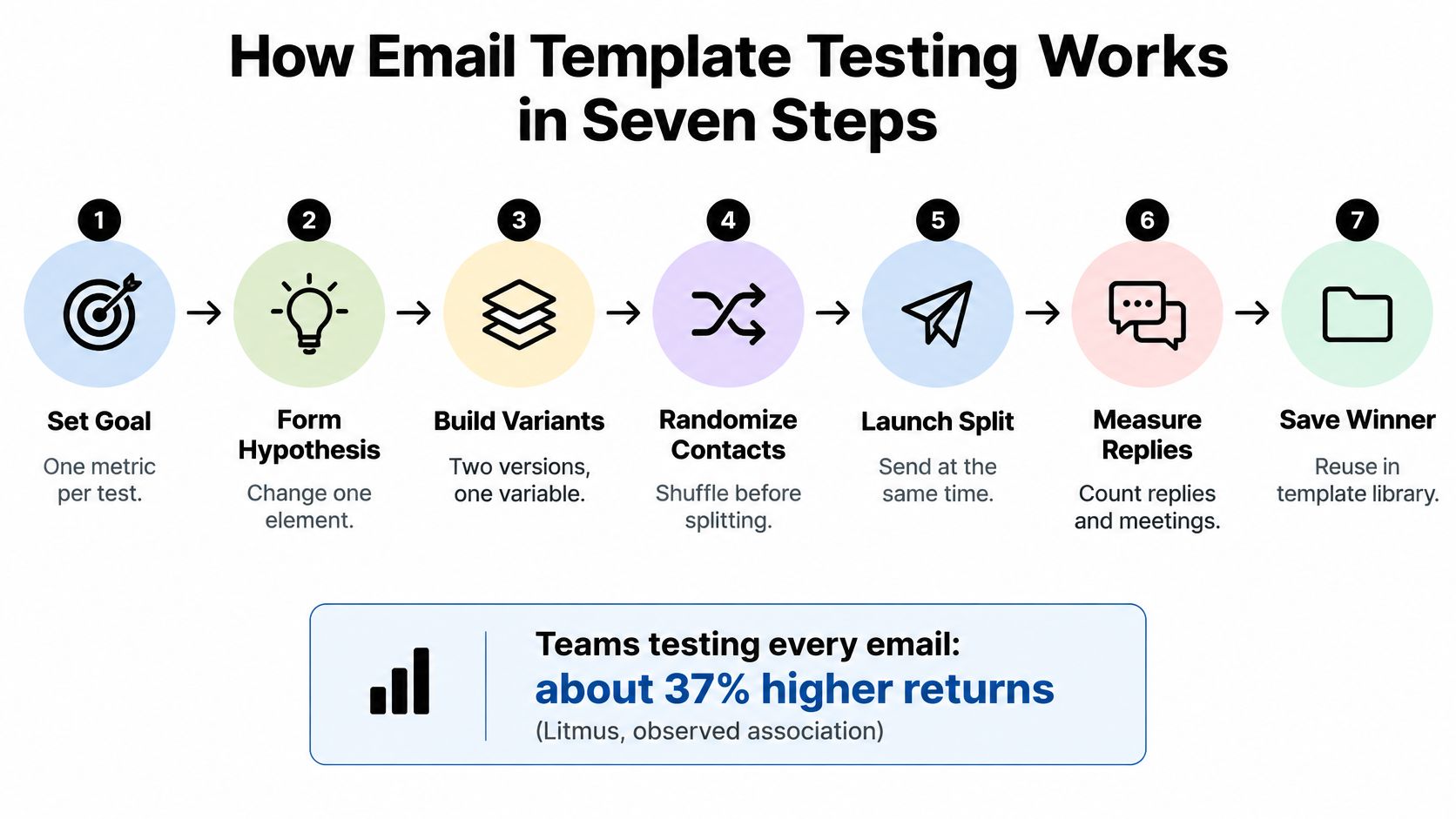
How Email Template Testing Works in Seven Steps
Companies that test every email see email marketing ROI about 37% higher than brands that never run A/B tests, according to industry research summarized by Litmus and reported by Mailmodo. Read that as an observed association, not proof that testing alone creates the gain. The same benchmark puts average email return at $36 for every $1 invested, so the cost of a repeatable test loop is small relative to what a well-performing template can return.
The seven-step loop
- Pick one variable and write a hypothesis. This stops you from changing the offer and the subject line in the same send. If both move, you can’t attribute the win.
- Calculate how many recipients each variant needs. This is the step that kills a “winner” called after 200 contacts. Detecting a small lift in reply rate takes far more names than one outbound segment usually holds, so a modest list often means testing a bigger difference or accepting an inconclusive result.
- Randomize the split at contact level. A CSV sorted by company size or lead source dumps similar accounts into one arm. Shuffle before you assign.
- Run the pre-send gate for rendering, authentication, and accessibility. A prettier template that lands in spam isn’t a copy win.
- Send a controlled sample before the full list. Seed inboxes and a small live slice catch broken links and dark-mode failures before they hit every prospect.
- Measure replies and booked meetings. Opens tell you someone may have seen the message. The endpoint that matters is a conversation sales would take.
- Promote the winner to the new control and schedule the next test. Log what each variant was, when it went out, and what it produced.
Running the send is rarely the hard part. Teams lose the learning because the only record is a Slack thread.
Practical rule: Write the hypothesis and freeze the control template before you open the sequencing tool.
Choose One Variable and Write a Testable Hypothesis
What to test first
| Variable | What It Controls | Where to Start | Isolation Difficulty |
|---|---|---|---|
| Opening line | Whether the prospect reads past line one | Lead with a trigger they can verify, such as a recent hire or funding round | Easy |
| Subject line | Whether the email is opened at all | Short lowercase version against a descriptive one | Easy |
| Call to action | What reply the prospect is asked for | Time-slot ask against an open question | Easy |
| Message length | How much the prospect must read | Shorter plain-text body against the current length | Easy |
| Personalization depth | How specific the research detail is | One role-level detail against one company-specific detail | Moderate |
| Sender identity | Who appears to be writing | Founder against account executive | Moderate |
| Proof point or offer | Why the prospect should care now | Customer result against industry benchmark | Hard, because it changes the meaning |
| Follow-up sequence | Timing and number of touches | Three touches against five | Hard, because it spans the whole sequence |
Opening lines and calls to action score well on both movement and isolation, so they are the default first tests. Proof points and follow-up timing change what the message means, or they span the whole sequence, so they need a larger plan and a cleaner log.
A usable hypothesis has a fixed shape. For a named segment, replacing variable A with variable B will raise positive-reply rate because of one specific reason.
A RevOps vendor selling to finance leads at mid-market logistics firms can compare an opener that cites a recent ERP migration with a generic capability line. The hypothesis says the trigger opener wins because it shows research, not because the product is “better.”
A 2025 compilation reported that 71% of marketers test email subject lines with A/B testing, with a claimed average improvement of 49%. Treat that compiled figure as a sign of how common subject-line tests are, not as the lift you should plan a list around. Subject-line craft sits in a separate pass, covered in this guide to sales email subjects.
Changing two variables at once is the classic attribution failure. If variant B has a new opener and a new ask, you won’t know which line earned the reply.
Pick one variable for the next campaign and write the hypothesis sentence into the test log before you draft either version.
Size Each Variant Before You Send
How small a lift you can actually see
I size the arms before writing a word of variant B. The counts below show what a two-proportion test needs at about 80% power and 95% two-sided confidence, the same design any free sample-size calculator produces.
| Baseline Reply Rate | Target Reply Rate | Relative Lift | Recipients per Arm |
|---|---|---|---|
| 2% | 2.5% | +25% | ~1,400 |
| 2% | 3% | +50% | ~3,800 |
| 2% | 4% | +100% | ~1,100 |
| 5% | 6% | +20% | ~8,100 |
Read these as approximate requirements. The baseline rate and the size of the gap both feed the calculation, and different methods can land a few hundred recipients either way. The pattern that matters is the order of magnitude. A typical outbound segment of a few hundred contacts reaches none of these rows. If you don’t have the contacts, you don’t have the test.
What a huge consumer test actually proves
Researchers assigned 1,409,963 bol.com customers to four subject lines. The control opened at 24.3%, the personalized version at 25.0%, the short version at 26.9%, and the emotion-inducing version at 26.1%. The personalized arm alone went to 376,966 people and produced 94,107 opens. The short version beat the control by 2.6 points, roughly a 10.7% relative increase, as the bol.com field experiment documents.
A swing that small would sit inside the margin of error on a normal B2B list. Subject lines still decide whether body copy is seen at all. The transferable lesson for outbound is how much sample a modest gap demands, plus the discipline of changing one variable, not those consumer open-rate levels.
A 1,500-contact reality check
Split 1,500 contacts in half and you have about 750 per arm. That falls short of every row above. The modest 2% to 3% move alone asks for roughly five times that sample. Three responses keep the work honest.
- Test a bigger swing. A new opener strategy or a different offer moves the rate more than a one-word subject tweak.
- Pool several sends into one window and keep the variable frozen while the arms fill. Bounces eat the sample you thought you had, which is why list cleaning belongs before the split, not after a disappointing week.
- Label a small-list result as directional and confirm it on the next send. Don’t rewrite the control on a coin flip.
Fix the sample size before launch. Don’t stop early because one variant looks ahead. A non-significant result is inconclusive. It does not prove the variants are equal.
Name the check in the log. A two-proportion z-test, or the same calculator that produced the table, is enough. Record both rates, the difference, and the confidence interval.
How to Split Recipients and Launch Variants Cleanly
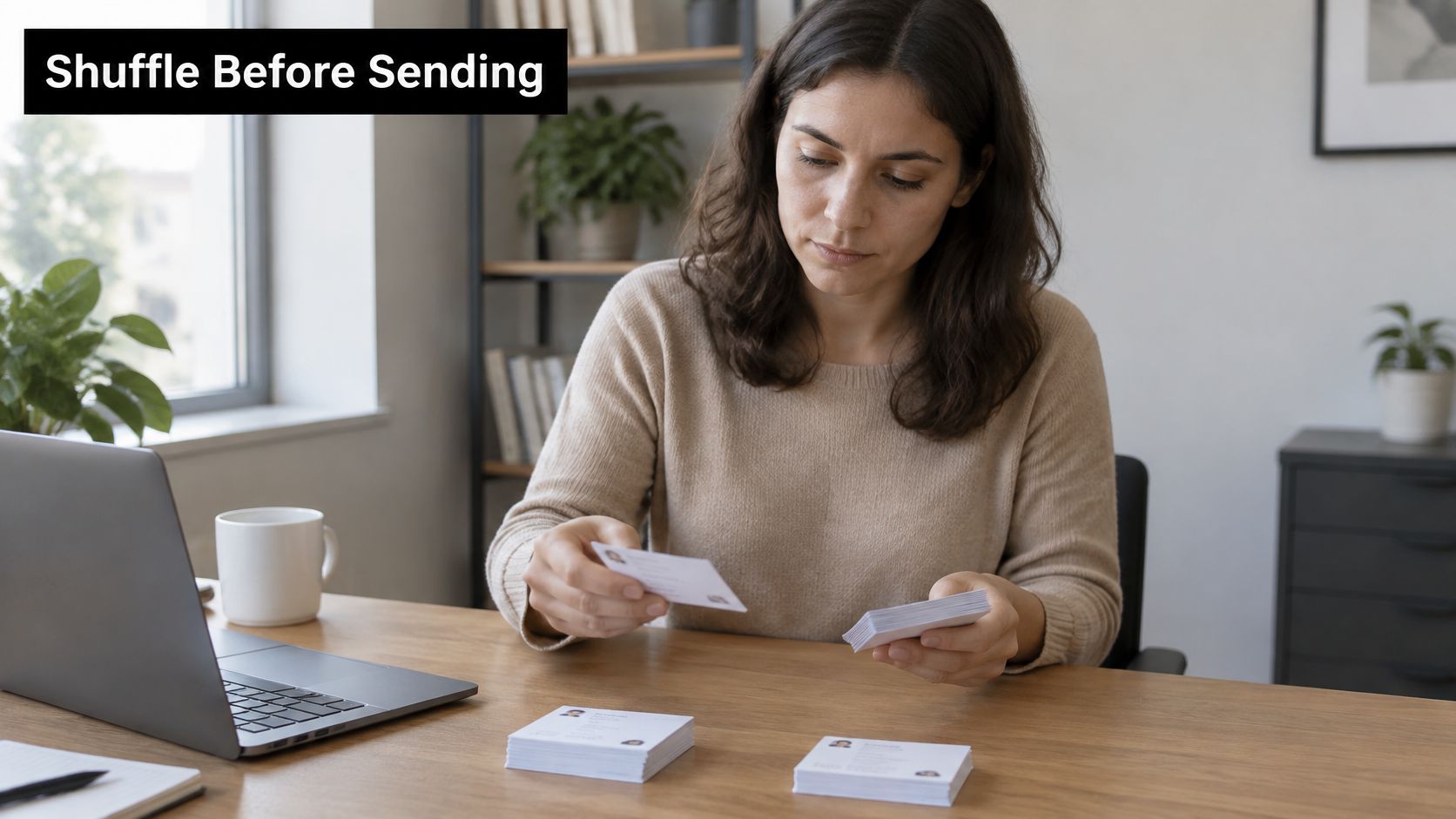
Sorting cards into two piles by hand is a useful picture of the job. If the piles aren’t random, the test is already biased.
Six setup steps
- Randomize at contact level before sending, not by spreadsheet order. Sorted lists cluster by company size, region, or source, so one variant inherits the easier accounts.
- Keep both variants on the same sending domain, mailbox pool, and daily volume. If infrastructure differs, a reply gap may be inbox placement.
- Split by company, not by person. Two colleagues comparing versions, or a forwarded note, contaminates the cell. Decide those company groups with list segmentation before the shuffle.
- Send both variants in the same window and on the same weekdays. A Monday blast against a Friday drip isn’t a copy test.
- Lock each contact to one variant for the whole sequence. Switching mid-sequence mixes the result you wanted to isolate.
- Log list ID, variant, send count, and start date. The common slip is a hand-edited variant B that picked up a new signature or an extra link without anyone noticing.
A short walkthrough of how a sequencer assigns variants is worth watching before you build the first split.
When a factorial test is the wrong tool
A 2x2 of opener against call to action needs four cells, about four times the contacts of a single A/B test. Use it only when every cell still clears the sample you sized earlier. Migma’s six-month Q3-Q4 2024 study tested more than 40 templates and formats across over 100,000 emails in B2B SaaS, e-commerce, media, and professional services. Most outbound teams don’t have that volume. Run one variable at a time, and save factorial designs for lists that can fill every cell.
Count each variant in the tool before the send. If the split isn’t even, fix the randomization. Don’t “even it out” by dragging names by hand.
The Pre-Send Gate for Rendering, Deliverability and Accessibility
Deliverability can fake a winner. If variant A lands in spam at a few receiving domains while variant B reaches the inbox, the reply gap you measured is a placement gap. On a list where every reply matters, a small placement difference is enough to crown the wrong template.
The gate with a pass condition
- Deliverability. SPF, DKIM, and DMARC align on the sending domain, and seed placement is checked in Gmail, Outlook, and Yahoo. Pass means both variants land in the inbox on the same seeds. If placement is already unstable, fix it through a deliverability review before you trust any reply gap.
- Rendering. Test the exact production HTML at mobile and desktop widths, in dark mode, and with images blocked. Read the plain-text version end to end. Pass means the ask is visible without images.
- Links and tracking. Every destination resolves, and tracking parameters or redirect domains are reviewed, because they can trigger filters. Pass means one working link and no surprise redirect.
- Accessibility. Check alt text, semantic headings, descriptive link labels, language metadata, and contrast, then do a screen-reader pass. The 2025 Email Markup Consortium analysis found 99.89% of tested emails had serious or critical issues, and only 21 of 443,585 passed every automated check. Linting isn’t the pass. A human screen-reader pass on the final HTML is.
- Controlled release. Seed representative clients, then send a small live sample before the full list. Pass means bounces and complaints on that sample look normal before you scale.
Run this gate on every variant, not just the one you expect to win.
Pitfalls that void the test
- One mailbox preview. Gmail on your laptop isn’t Outlook on a prospect’s desktop.
- CSS older clients ignore. Layout that depends on it hides the message.
- The offer inside an image. Image blocking deletes the point of the email.
- Structure and offer changed together. You can’t attribute the result.
A template that renders cleanly can still fail for someone using a keyboard, zoom, or a screen reader. In my experience those failures rarely generate complaints. The prospect just never responds, and on a small list that silence reads as weak copy.
Measure Replies and Meetings Instead of Opens
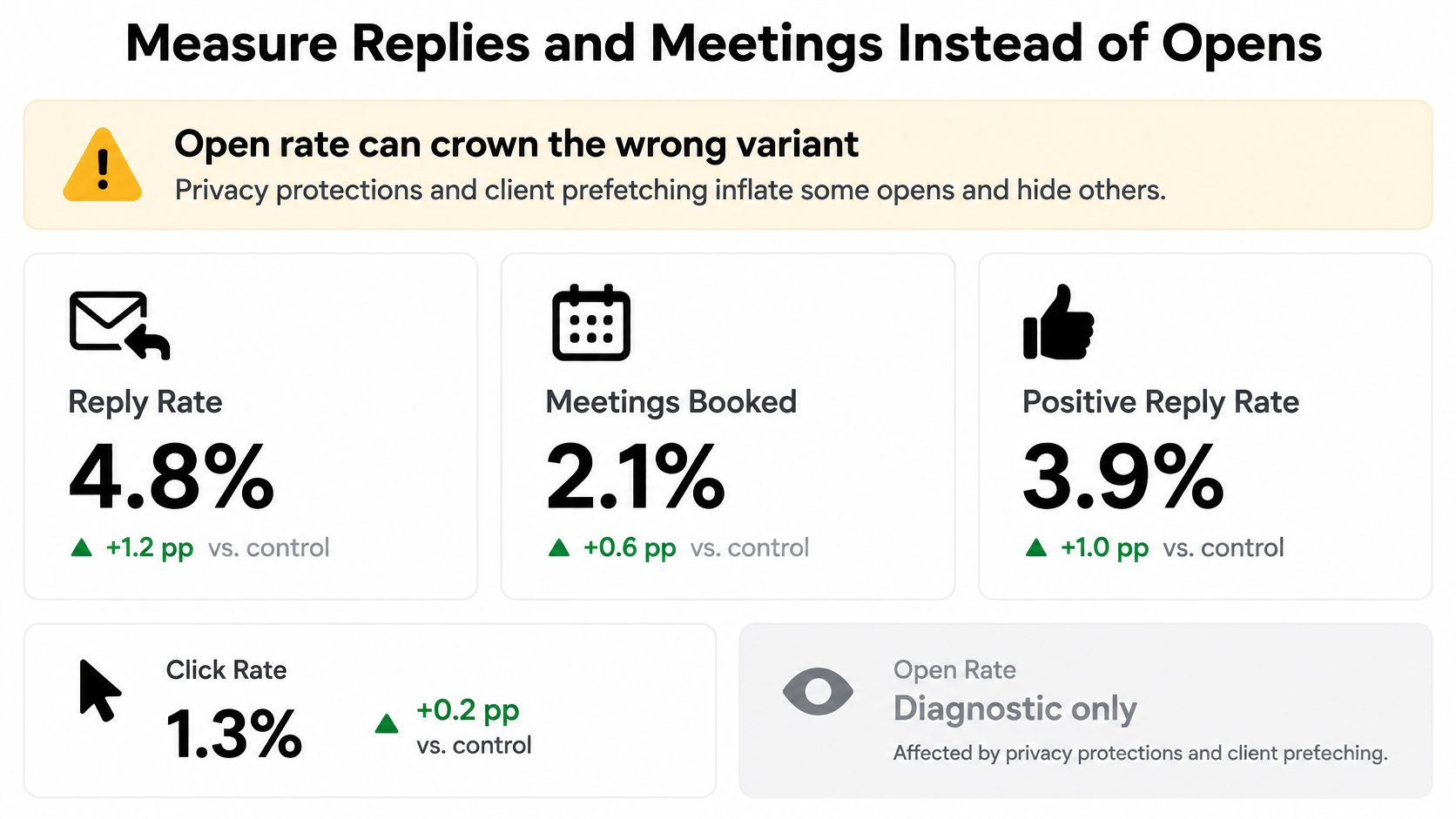
Open rate can crown the wrong variant. Privacy protections and client prefetching inflate some opens and hide others, so a higher open rate doesn’t mean more humans read the note. Preview and client behavior make the practical case. Use opens as a diagnostic, then judge human replies, positive-reply rate, booked meetings, qualification, complaints, and later opportunity quality. A flashier layout can win tracked clicks while a plainer, text-forward note wins the conversations.
The scorecard
Primary metrics
- Positive-reply rate. Interested replies divided by delivered emails.
- Booked meetings per 100 delivered.
- Qualified-meeting rate. Meetings that pass criteria you agreed with sales before the send.
Guardrails. Unsubscribes and spam complaints, counted per variant. A variant that wins on replies and loses on complaints is disqualified.
Diagnostic only. Opens and clicks, used to check whether the message was seen at all.
Declare a winner only when the primary metric clears significance at the planned sample and no guardrail gets worse.
A short plain-text variant can produce fewer clicks and more qualified replies from finance leads. An open-rate dashboard would have shipped the designed version and missed those conversations. The last lines still have to make a reply easy, which is the point of a deliberate email close.
Two steps after the send
Tag every reply in the CRM as interested, not now, wrong person, or unsubscribe. Check opportunity creation 30 to 60 days later, because B2B meetings lag the send. Hold the scorecard for 14 to 21 days after the last touch before you call the test.
Plan Your First Four-Week Test Roadmap
One variable per week
On a list of a few thousand contacts, one week of sends rarely produces enough replies to separate a real lift from noise. The schedule below is built around replies and booked meetings for that reason, not opens.
| Week | Variable Tested | Variant Against Control | Primary Metric | Sample per Arm |
|---|---|---|---|---|
| Week 1 | None, baseline only | Current template as control | Reply rate and bounce rate | Full list, after a seed-inbox check |
| Week 2 | Opening line | Trigger-based opener against generic opener | Positive-reply rate | Size from your baseline using the sample table |
| Week 3 | Call to action | Time-slot ask against open question | Positive-reply rate | Size from your baseline using the sample table |
| Week 4 | Message length | Shorter plain-text body against current length | Booked meetings per 100 delivered | Size from your baseline using the sample table |
The four-week schedule assumes a list over 5,000 contacts, where each test row can reach its planned sample inside one week. Below 5,000, each test row needs two weeks, so the same roadmap runs seven weeks in total. The baseline stays in week one, the opener runs weeks two and three, the ask runs weeks four and five, and length runs weeks six and seven.
Test order matters because each winner becomes the control for the next row. Don’t start the call-to-action test with a new offer hiding inside it. A changed offer and a changed ask at once leave you guessing which one moved replies.
End a test only when it hits the planned sample or the significance bar you set, not because week two looks promising.
Keep one active test per segment. Once a quarter, read the full log for patterns, such as an opener that works in logistics and fails in healthcare.
Retire a segment from testing when the same contacts keep getting sends and reply rates fall. Fatigue contaminates the next comparison, and you’ll blame the copy.
Before the first send, write the hypothesis, freeze the control, set the sample size, and name the primary metric.
Fypion Marketing runs cold email outreach for B2B teams and tests campaign copy and sequences, including subject lines, hooks, and calls to action, with fees tied to booked meetings that meet criteria you agree up front. If you want that loop run against a real list, instead of a dashboard that only tracks opens, start with a consultation at Fypion Marketing.