
Enterprise vs SMB: How Buyers, Cycles and Tactics Differ
SMEs represented approximately 99.7% of enterprises in OECD member economies in 2013, while employing about 60% of workers and generating between 50% and 60% of total value added in the non-financial business sector, according to the OECD report on SME performance and business conditions. That single split reframes Enterprise vs SMB for B2B sellers. SMBs dominate by count, but enterprises concentrate far more purchasing power per account.
Counting firms therefore tells you almost nothing about where revenue will come from, how long a deal will take, or why a customer will churn. A seller who targets by headcount alone will misprice, misstaff implementation, and forecast badly. A better classification asks who owns the problem, who can implement the product, and what support the buyer expects after signing.
Enterprise vs SMB at a Glance
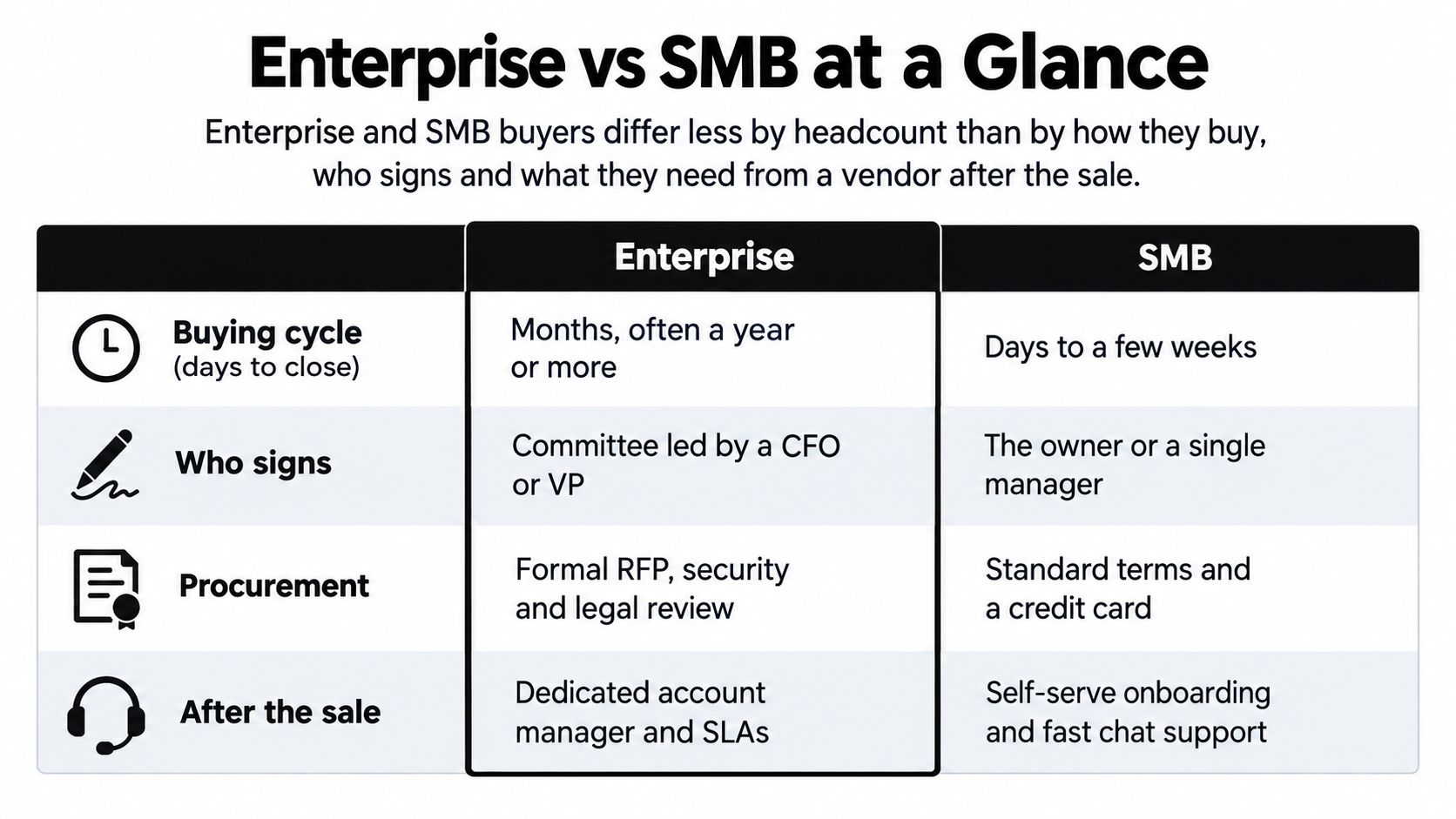
The operational difference is clearest side by side, before definitions get in the way.
Enterprise vs SMB buyers on core dimensions
| Dimension | SMB | Enterprise |
|---|---|---|
| Typical buying cycle | Days to a few weeks | Six to eighteen months |
| Buying committee | One to three people, often the owner | Six to ten or more people across functions |
| Budget authority | Owner or department head | Budget holder plus finance and procurement approval |
| Typical annual contract value | Hundreds to tens of thousands of dollars | Tens of thousands to millions of dollars |
| Procurement path | Card payment or simple order form | Formal RFP or information request, vendor onboarding, legal redlines |
| Implementation owner | Vendor or a single generalist administrator | Internal IT, security and a project team |
| Support expectation | Email, chat and self-serve documentation | Named account manager, service levels and dedicated onboarding |
| Main sales motion | Inbound interest, free trial, short demo | Multi-threaded outbound, executive sponsorship and paid pilot |
Size Bands Are a Starting Filter, Not a Segment
Go-to-market teams often use working bands as a first sort. One common scheme labels firms under 10 employees as micro, 10 to 49 as small, 50 to 249 as medium, and 250 and above as enterprise. Useful for routing a list, useless for predicting a deal. Two firms in the same band can run completely different procurement processes, and the band says nothing about who will implement your product after signing.
The U.S. figures make the same point at scale. Small Business Administration size standards vary by industry and can be based on employee count or revenue, so headcount alone is a rough filter. The Census Bureau’s direct counts are clearer: the U.S. had 5.58 million firms with at least one employee and fewer than 500 employees in 2023, up from 5.53 million in 2022, plus 30.43 million nonemployer establishments generating nearly $1.8 trillion in revenue, equivalent to 6.4% of U.S. GDP, according to the U.S. Census Bureau Small Business Week story.
A solo operator, a growing services firm, and a company just below the enterprise threshold can all sit outside the enterprise class while having nothing in common as buyers.
That spread is why account volume misleads. An SMB list looks enormous until you remove firms with no employees, no growth signal, no budget owner, and no one who’d administer your product. What’s left is smaller, but it’s the only part that can close and renew.
The Mid-Market Gap Between the Two Motions
Mid-market is the band where neither motion fits cleanly. These buyers often have a real IT function and formal approval for larger purchases, but they lack the procurement staff or patience for a full enterprise cycle. They’ll ask for SSO, audit logs, and annual terms, then still expect onboarding that feels like a self-serve product.
Treat mid-market as its own motion when you price and staff it. Force these buyers into an SMB trial and you lose on controls. Force them into an enterprise process and you lose on speed.
A Qualification Test That Separates Volume From Value
Don’t qualify on headcount first. Qualify on whether the account can buy, implement, and keep using what you sell.
- Growth signal: The firm is hiring, expanding locations, or adding a function your product supports.
- Named problem owner: One person owns the pain and can describe the current workaround in detail.
- Implementation capacity: Someone can connect systems, migrate data, or manage user rollout, even if that person isn’t in IT.
- Existing tooling: The firm already pays for adjacent software, which proves budget exists for this category.
- Trigger event: A renewal, audit finding, new leader, or funding event creates a reason to act now rather than next quarter.
An account that passes four of those tests at a smaller size is usually worth more than a larger account that passes one. A signature without implementation capacity turns into purchase regret: onboarding stalls, the internal champion loses credibility, and renewal never arrives. That’s the core distinction in Enterprise vs SMB targeting. You choose a buying system you’ll have to support after the deal closes, and company size is only a clue to which system that is.
Buying Cycles, Procurement and Decision Makers
Say a 35-person logistics firm needs better invoicing and a national retailer needs the same capability. The product category is identical. The deals won’t resemble each other.
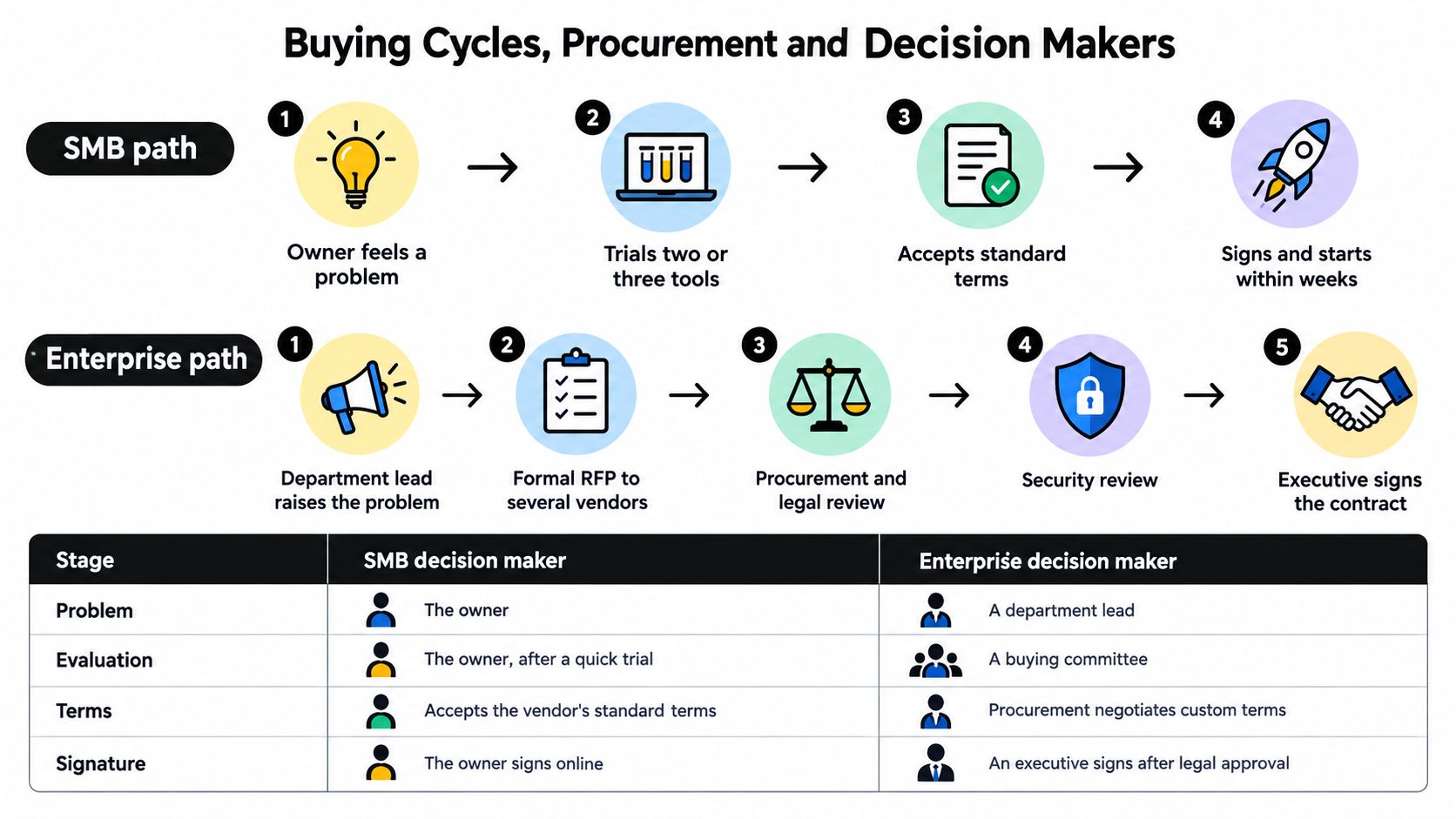
The timeline below shows where the two paths split, especially once procurement and security enter the process.
How an SMB Deal Usually Moves
The owner feels the problem directly, often because invoices are late or staff are rekeying data. She trials two or three tools, asks one operations manager to sanity-check the workflow, and accepts standard terms if pricing is transparent. A pilot is optional and often skipped because the trial already proved fit.
That speed cuts both ways. You can close quickly, but you get very little time to uncover integration gaps or data quality problems. Your demo has to surface implementation work early, or you’ll win a signature and inherit a failed rollout.
How an Enterprise Deal Actually Advances
The enterprise path starts with a budget cycle, an audit finding, or a named initiative, not a spontaneous trial. A department lead builds a case, procurement issues an information request, and three to six vendors make a shortlist. Then the deal slows down where sellers least expect it.
Security sends a questionnaire covering access control, data handling, subprocessors, and recovery. Legal redlines liability, indemnity, termination, and data processing terms, and that exchange can run four to twelve weeks as a planning scenario in a complex deal. A paid pilot follows only after success criteria, data access, and evaluation owners are agreed in writing.
The roles matter because each one can stop the deal for a different reason.
- Economic buyer: Owns budget and judges business return.
- Champion: Sells internally when you’re not in the room.
- Technical evaluator: Tests integration, security, and administration.
- Procurement and legal: Control vendor onboarding, terms, and risk approval.
- End users: Decide whether adoption is real or forced.
Forecasting rule: An enterprise deal hasn’t advanced because the demo went well. It’s advanced when security has your answers, legal has a redline path, and the pilot has named success criteria.
That’s why sellers need different pipeline stages for each segment, and why disciplined sales pipeline management matters more as committee size grows. An SMB opportunity in trial may be close. An enterprise opportunity after a great demo may still be months from procurement.
The short video below is useful for visualizing how stage discipline changes when more decision makers enter a deal.
If you use the same close date logic for both segments, your forecast will always be optimistic on enterprise deals and late on SMB expansion. Separate the stages, the exit criteria, and the expected stall points.
Security and Product Requirements by Buyer Size
Disaster recovery is the requirement that most often exposes a mismatch, because it’s where product claims meet operational evidence. An independent Cisco and Cyentia Institute study tested 25 practices spanning governance, strategy, spending, architecture, and operations, and found that prompt disaster-recovery capability was the strongest differentiator of security success between SMBs and larger organizations, according to the Cisco 2021 Security Outcomes Study for SMB. Cisco also reports that the need for sufficient security technology and integration increases as organizations grow, in that same study.
That finding changes the buying question. Don’t ask whether a product is labeled SMB or enterprise. Ask whether backup is automated, restoration is tested, recovery objectives are documented, and administration is centralized enough that one person can run it in practice.
Formal Ownership Is Where Smaller Firms Fall Behind
ENISA’s survey of 194 organizations across 31 countries found that medium-sized companies scored about one point higher than microcompanies across five product-security domains, and more than one-third of microcompanies had no incident-response plan, according to the ENISA SME CRA survey report. The share reporting no prior compliance activity was 25% among microcompanies and 22% among small companies, compared with only 6% among medium-sized companies, in that same ENISA survey. ISO 27001 compliance was cited by 52% of respondents, GDPR-related measures by 48%, and internal security audits by 44%, in that same ENISA survey.
For a seller, those figures explain why a cheap tier without documentation creates work later. The buyer may not have an incident workflow, an audit trail, or anyone who can answer a customer’s security questionnaire. If your product doesn’t supply those scaffolds, the customer has to invent them.
This is also where consent and data handling stop being back-office detail. A clear approach to consent management helps smaller buyers show customers how personal data is collected and used, without building the process from scratch.
Baseline Controls for Each Segment
| Requirement | SMB baseline | Enterprise expectation |
|---|---|---|
| Backup and recovery | Automated backup with tested restore | Documented recovery objectives per system |
| Access control | Role-based access and MFA | SSO with the corporate identity provider and segregation of duties |
| Auditability | Exportable audit logs | Evidence generation for customer and regulatory audits |
| Incident handling | Built-in incident workflow and clear owner | Formal response plan integrated with security operations |
| Data location | Clear data-processing commitments | Regional data residency options |
For teams preparing that evidence, Vigil Security’s guide to audit evidence is a useful resource on how compliance standards translate into documentation buyers can present during review. Use it to check whether your security packet answers questions before procurement asks them.
Advanced configurability can satisfy enterprise governance and overwhelm an SMB with no administrator at the same time.
Don’t overbuild for the wrong buyer. An SMB needs secure defaults, guided setup, and integrations that reduce fragmented tooling. An enterprise needs policy enforcement, interoperable controls, and proof. If you sell the enterprise version to a firm with no owner for it, you haven’t reduced risk, you’ve transferred it to implementation.
Budgets, Pricing and Where Purchases Go Wrong
The common assumption is that bigger buyers need more features and smaller buyers need a cheaper version. Purchase regret data points somewhere else.
Start with where money already goes. In 2024, small businesses with fewer than 100 employees planned to allocate 24% of their IT budgets to hardware, compared with 16% among enterprises with 1,000 or more employees, according to Spiceworks Research on the state of IT budgets. That split suggests smaller firms still direct more spend toward tangible equipment, while larger organizations spread more across software, services, and integration.
For SaaS sellers, that means an SMB pitch built only on feature depth competes against laptops, phones, and infrastructure the owner can see. Your pricing has to make time-to-value obvious before the buyer compares you with hardware.
Pricing Models and Their Fit by Segment
| Pricing model | Typical segment | Works because | Main risk |
|---|---|---|---|
| Free tier with monthly self-serve plan | SMB | Low friction and fast trial | Upgrades stall and support costs rise |
| Per-seat tiered subscription | SMB and mid-market | Predictable and scales with users | Seat creep and features gated behind higher tiers |
| Annual platform licence | Enterprise | Volume discounts and custom terms | Long lock-in and large upfront commitment |
| Usage-based billing | Both segments | Customers pay for consumption | Budget unpredictability for finance teams |
| Per-meeting or outcome fee | Services and lead generation | Buyers pay only for agreed results | Requires agreed qualification criteria to avoid disputes |
Outcome pricing needs especially clear definitions. If you’re comparing that model with other acquisition costs, a grounded view of price per lead helps you judge whether you’re paying for activity or for a qualified result.
Regret Comes From Different Failure Points
Capterra’s 2025 survey of 3,500 global software buyers found that SMBs were more likely to attribute purchase regret to poor implementation, while enterprises were more likely to cite products being difficult to use or inadequate technical support, according to Capterra’s analysis of SMB and enterprise software purchase tips.
That distinction should change what you sell. An SMB often doesn’t need your enterprise feature set. It needs onboarding, integrations configured correctly, data migrated cleanly, and someone who’ll train the two people who’ll use the product daily. Bundle implementation into the first contract if that’s where failure happens.
An enterprise can tolerate a complex deployment if usability and support hold up afterward. It can’t tolerate a platform that thousands of employees resist or a support model that disappears after rollout. A large contract with weak support doesn’t fail loudly at signing, it fails slowly through low adoption and a non-renewal you saw coming too late.
Price therefore isn’t just a number. It’s a signal about who carries implementation risk. If the buyer carries all of it and has no capacity, a low price is expensive. If the vendor carries it through onboarding and support, a higher price can be the safer purchase.
Cold Email and GTM Tactics for Each Segment
Outreach fails when you use one sequence for two buying systems. SMB outreach has to earn a fast yes from a busy owner. Enterprise outreach has to create alignment across people who don’t share the same priority.
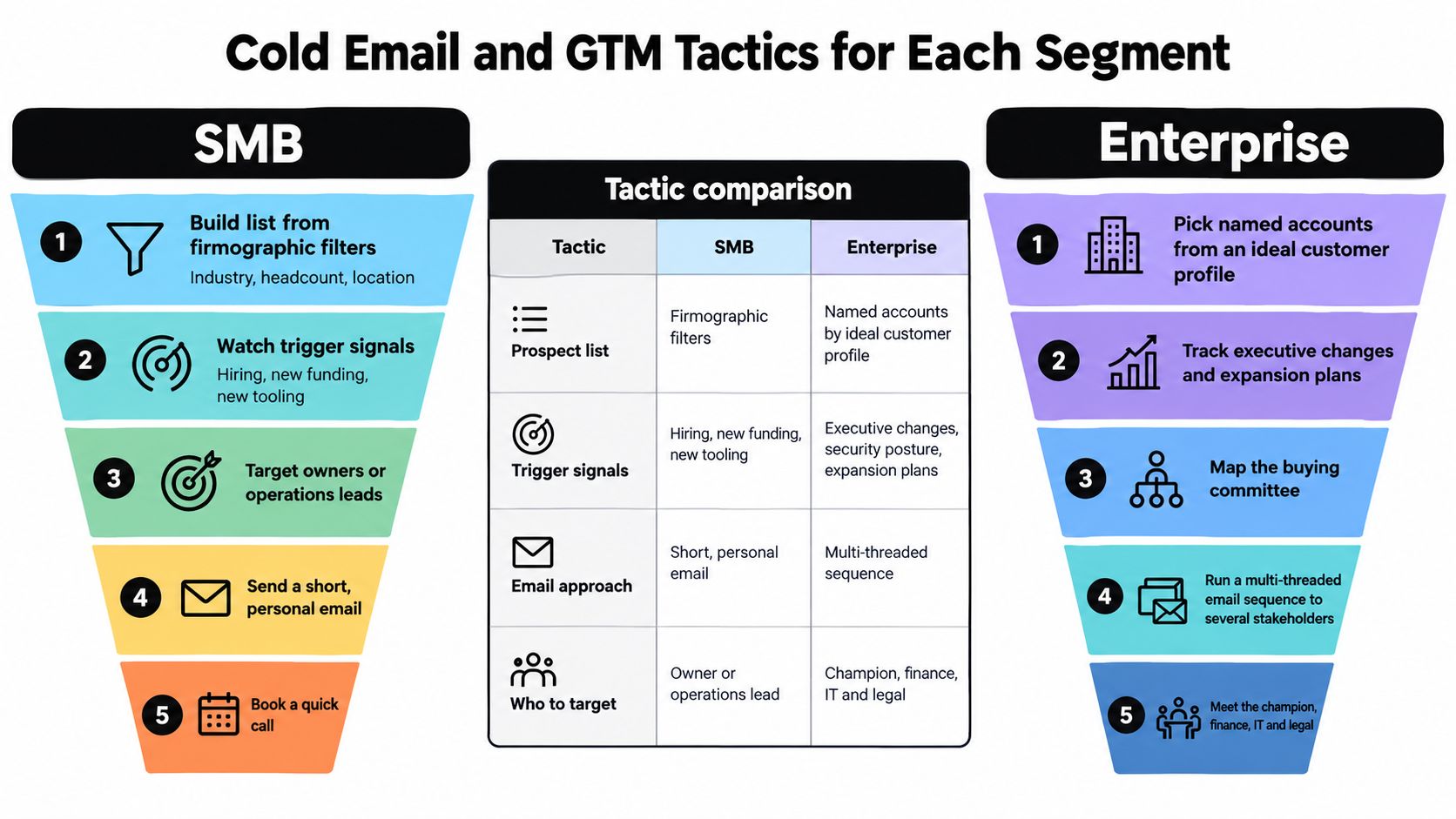
The funnel view below shows how list building, triggers, and targeting narrow differently in each segment.
SMB Outreach Sequence
- Build the list from firmographic filters: Start with industry, headcount band, location, and current tooling, then remove firms with no visible growth or hiring.
- Add a trigger signal: Prioritize hiring for a relevant role, a new location, new funding, or adoption of an adjacent tool your product integrates with.
- Target the owner or operations lead: Send to the person who feels the problem, not a generic inbox, and reference the specific workflow you’d replace.
- Run three or four messages over about two weeks: Keep each email short, lead with the operational pain, and change the angle rather than repeating the pitch.
- Offer a free trial or a 15-minute call: Make the next step smaller than a demo, with a clear outcome such as importing their data or testing one workflow.
For the mechanics of deliverability, sequencing, and copy structure, a detailed cold email guide from MailAdept can help you tighten the basics before you scale volume. Pair that with disciplined email list segmentation so owners in different industries don’t receive the same generic claim.
Enterprise Outreach Sequence
- Pick named accounts: Start from your ideal customer profile and current customer lookalikes, not from a broad database pull.
- Research a named initiative: Find an expansion, leadership change, compliance deadline, or technology consolidation you can reference specifically.
- Map three to five roles per account: Include the economic buyer, technical evaluator, and an end-user leader who can become your champion.
- Run six to eight touches over six to eight weeks: Coordinate messages by role, so finance hears about cost control while IT hears about integration and security.
- Ask for a scoped pilot or briefing: Propose success criteria, data needs, and a short evaluation window tied to their initiative, not a generic demo.
Lead With Readiness When the Topic Is Risk
ConnectWise’s 2025 SMB cybersecurity research reports that 83% of respondents believe AI and GenAI increases their organization’s cybersecurity threat level, yet only 51% have implemented policies or practices specifically addressing those AI-related risks, according to ConnectWise’s State of SMB Cybersecurity in 2025.
That gap is a messaging opportunity, but not for fear-based copy. SMB buyers already know the risk is rising. They need governance-ready onboarding, approved use cases, access controls, and vendor review they can run without a security team. Your email should promise a workable operating model, not just speed.
Measure the segments differently or you’ll kill the slower one too early. Judge SMB outreach on trial starts and closes within a short window. Judge enterprise outreach on qualified opportunities created, multi-threaded engagement, and pilot conversion. The same reply rate can mean success in one segment and noise in the other.
Choose the Segment to Target First
Don’t choose Enterprise vs SMB by ambition. Choose it by what your team can sell, implement, and support without breaking the model.
Which segment fits your situation
| Situation | Lean toward | Why |
|---|---|---|
| Sales team of one to three reps and a product live within days | SMB | Short cycles return pipeline quickly |
| Product must pass SSO, audit log and data-residency checks | Enterprise | Controls are gating criteria, not optional extras |
| Annual price under a few thousand dollars | SMB | Self-serve motions avoid costly committee sales |
| Same features sold to both segments | Split by operational maturity | Implementation capacity decides fit more than headcount |
One planned situation needs extra care. Say your annual contract is above $50,000 and it’s tied to a funded initiative. That hypothetical price point can justify enterprise pilots and multi-threading, because the deal value covers security review, legal time, and a named account manager. Below that level, committee selling usually destroys your margin.
Run a 90-Day Test Instead of Debating the Segment
Pick one segment and test it for 90 days as a controlled pilot. Track time-to-value, win rate, implementation hours per customer, and support load in the first month. If customers close but never reach first value, you’ve chosen buyers without implementation capacity, no matter how good the fit looked on headcount.
Segmentation frameworks help when you move beyond size. Bazzly’s guide to SaaS segmentation offers a useful way to think about grouping customers by behavior and needs, which pairs well with concrete ideal customer profile examples when you’re turning that logic into a target list.
If you don’t have in-house outbound capacity, compare building sequences yourself with an outsourced pay-per-meeting service such as Fypion Marketing, weighing qualification criteria and cost per booked meeting against rep time. The right choice is the one that produces qualified conversations with buyers who can implement, not just the most meetings.
Your next step this week is specific. Choose one segment, build its first target list using the qualification test, write the first sequence for that buying system, and set the metric you’ll judge after the pilot. Don’t run both motions half-heartedly, because you’ll learn neither well enough to scale.
If you’ve picked your first segment but don’t have the outbound capacity to reach it consistently, Fypion Marketing builds cold email campaigns on a pay-per-qualified-meeting model, handling list building, copy, and campaign management so your team can focus on pilots and closing. Visit Fypion Marketing to discuss your target accounts, qualification criteria, and the meetings you need booked.