
10 Best Cold Email Tools for B2B Teams in 2026

On Monday, a team connects its first mailbox to a cold email platform and feels ready to scale. By Friday, the sending domain is drifting into spam folders, two prospects have landed in the wrong sequence, and nobody can explain whether the problem was the list, the copy, or the infrastructure. That gap is usually the core issue, not the tool itself. The best cold email tools are the ones that match your mailbox count, data stack, and deliverability habits at B2B volume, then stay sane when a second teammate or client shows up. I’ve kept this roundup focused on what it costs to run, how it handles inbox rotation, credit burn, and deliverability controls, and what breaks once usage stops being tidy. If you’re also comparing warmup options, this email warmup software overview is a useful companion.
1. Apollo
Apollo makes sense when the main bottleneck is lead supply, not sending. It combines contact data, enrichment, sequences, dialer workflows, and deal management, so it can sit near the center of a B2B go-to-market stack rather than act like a standalone sender. That breadth helps if you want prospecting and outreach in one place. It also makes budgeting harder once credits, seats, and add-ons start stacking up. Start at the Apollo pricing page and treat the sending plan as only one part of the cost.
Where Apollo wins
Apollo works well for teams that want a deep dataset and CRM-adjacent workflows without turning prospecting into spreadsheet work. The credit system covers email, phone, and API usage, so it gives you flexibility. It also means you need clear rules before several teammates start drawing from the same pool. The upside is simple. You can cut tool sprawl and keep data, sequencing, and handoff in one environment.
For teams comparing Apollo with narrower senders, Apollo alternatives compared is a useful reference. If you want a broader breakdown of substitutes and trade-offs, the Apollo alternatives guide helps frame the decision.
Practical rule: Apollo is strongest when your team wants one system for finding, enriching, and sequencing leads, not when you already have a separate data stack.
Where Apollo gets expensive in practice
Apollo’s value depends on how tightly you control usage. Once several reps or clients share the account, you need clear rules for credit allocation, list ownership, and who can burn enrichment on what. Without that discipline, waste hides fast. For teams buying mainly for sending, Apollo can feel like a prospecting database with outreach attached, which fits some operating models and clashes with others.
That trade-off is why pricing should be checked through the actual workflow, not just the plan page. If your goal is outbound execution rather than database depth, Apollo is often more tool than you need. If your goal is to unify prospecting, enrichment, and outreach, it belongs near the top of the shortlist. Price the credits, seats, and add-ons before the team treats it like a flat-rate sender.
2. Instantly
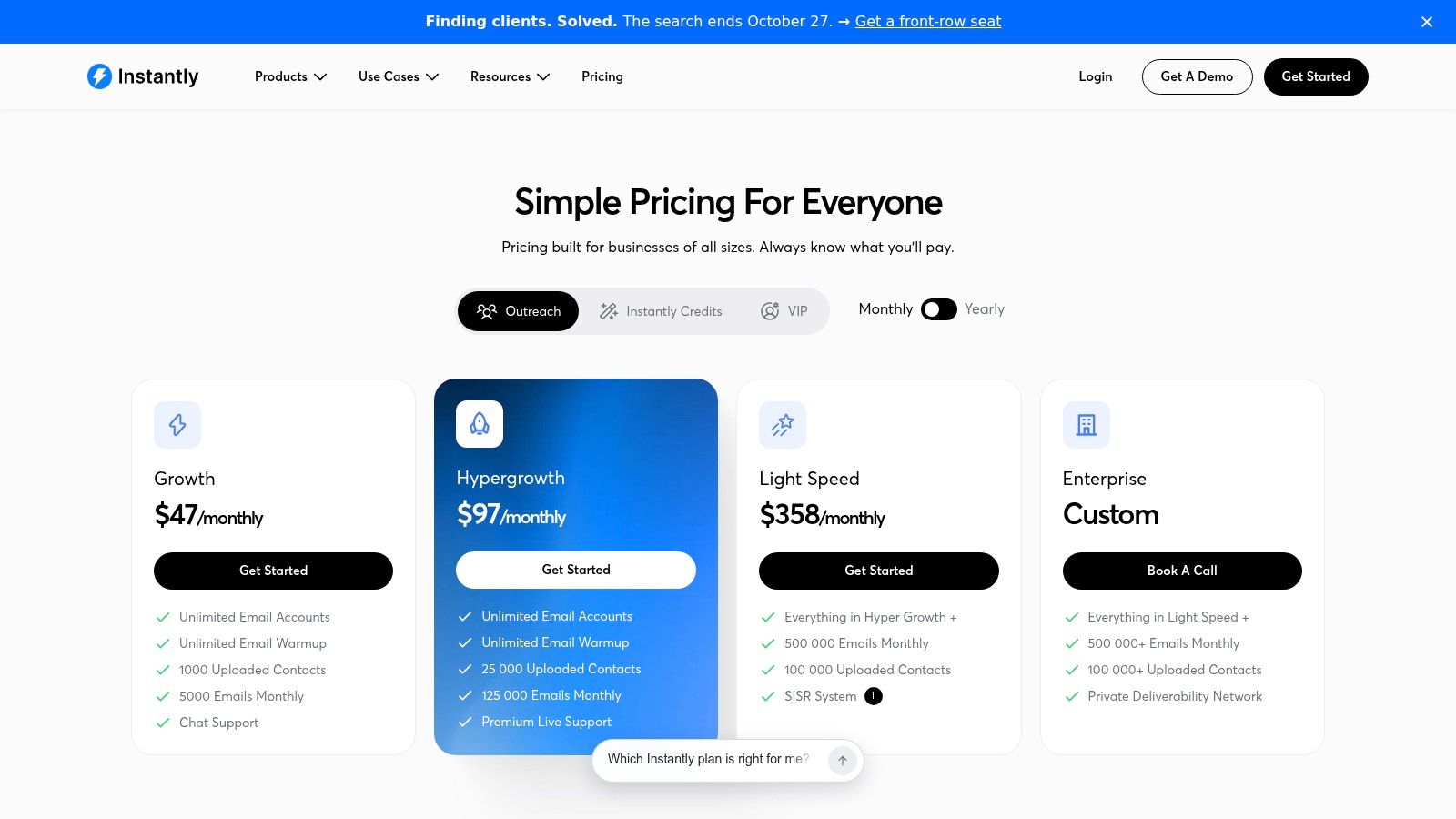
A team that needs to launch cold email fast usually hits the same cost question first, how many inboxes can it run before the tool starts charging like a seat-based CRM? Instantly keeps that problem simple with unlimited email accounts on paid tiers, built-in warmup, AI drafting, and reply handling in one place. That helps when speed matters more than a perfect stack. The full cost only becomes clear once you add data, CRM, or stricter deliverability controls, so check the Instantly pricing page against the way your team works.
What stays cheap, what doesn’t
The main draw is mailbox scale without a per-inbox tax. That makes volume planning easier, especially when you are adding sender after sender for different clients or campaigns. Unibox keeps replies in one place, which matters once several sending addresses are live. Instantly also offers a lead database and CRM products, but those are separate subscriptions, so the bill grows as the workflow grows.
That is the trade-off. A sender-only setup is easy to justify. Once the team wants data, CRM, and deeper automation, the price can move far beyond the headline number.
What changes when a second teammate joins
Solo use is straightforward. Shared use adds rules.
Someone has to decide how inboxes rotate, who can upload lists, and whether every teammate should touch the same campaign set. Without that structure, duplicate sends, messy reporting, and weak list hygiene show up quickly. A proper email deliverability audit also becomes more useful once multiple people are sending from the same account family, because warmup settings and sender reputation need a tighter check.
For agencies, that is still a workable trade if the operating model stays simple and the economics matter more than polished presentation. For in-house teams that depend on a deeper CRM, the platform can start to feel split across too many add-ons. Instantly is a sending engine first, and that is the right way to judge it.
3. Smartlead
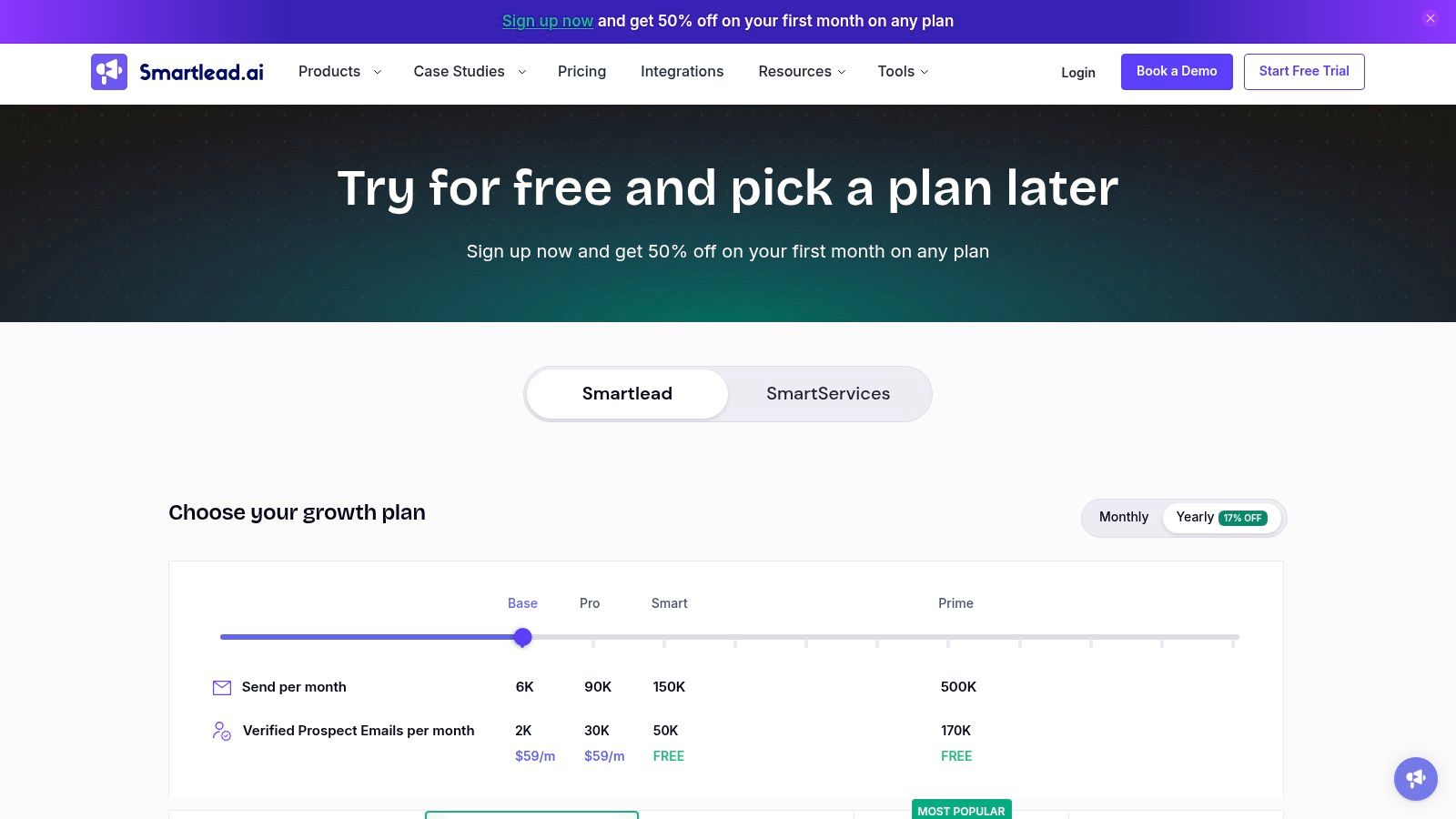
Smartlead fits agencies that need mailbox scale without paying for each inbox separately. It centers on inbox rotation, warmup pools, and client-specific workspaces, so it holds up better when several senders run across several accounts. The pricing model is easier to forecast than many alternatives, but the add-ons still matter. Verification, white-labeling, and private infrastructure can raise the actual cost quickly. Check the Smartlead pricing page before you assume the base plan covers the full setup.
Why agencies keep choosing it
The main draw is predictable mailbox scaling. If volume shifts by client or campaign, the unlimited mailbox model is easier to manage than tools that charge by seat or sender. Rotation keeps one inbox from carrying too much load, and the agency structure gives better separation between clients. That is operational value, not just a feature list.
Smartlead works as sending infrastructure first, so it pairs well with a broader stack. If you are choosing the rest of that stack, the guide to campaign tools for B2B is useful context for how sending fits into the wider workflow.
Smartlead is built for teams that manage many sending identities. It is less useful for teams that want a polished all-in-one CRM.
What you still have to buy around it
Smartlead is strongest when your own process is already defined. It does not replace your data source, and it does not try to act like a full sales engagement suite. In practice, that means buying mailboxes, verification, or dedicated infrastructure elsewhere, then connecting the pieces yourself. Experienced operators can run that setup cleanly. A team that wants one subscription and one login for everything may find it assembled rather than unified.
That trade-off matters at B2B volume. When a second teammate joins, the platform still works, but you need rules for inbox ownership, list handling, and campaign access. Without that discipline, reporting gets messy and it is harder to see what you are paying for. Smartlead is strong on sending infrastructure. It is less convincing as a broad platform.
4. QuickMail
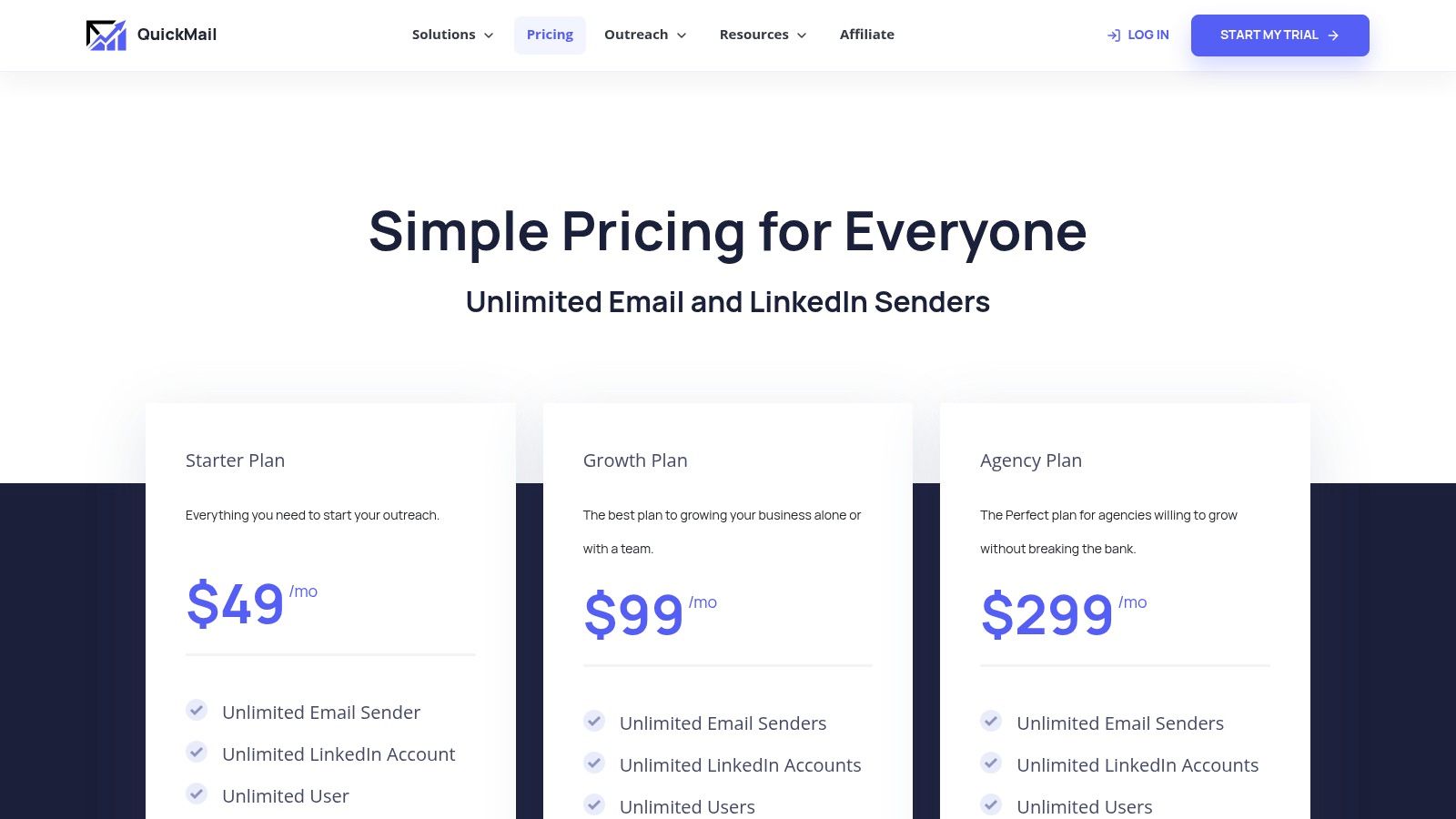
QuickMail is the tool for teams that care more about sending control than shiny product layers. It offers unlimited senders and users on plans, warmup through MailFlow, and enough rotation and throttling control to make high-volume sending feel manageable. The billing is also more predictable than many people expect, especially if they’re used to seat-based tools. Check the QuickMail pricing page if you want a straightforward sender with fewer surprises.
Why operators like it
QuickMail does not try to hide its deliverability obsession. The platform is built around mailbox rotation, per-inbox visibility, and controls that help you spot an account going bad before it drags down a campaign. That matters once a team starts running several inboxes at once. When one mailbox gets damaged, you need to know quickly which one it is and what campaign touched it.
The lack of per-seat pressure also helps when a second teammate joins. You’re not immediately paying more just because someone else needs access. That makes it easier to bring in an operator, a manager, or an agency partner without rewriting the budget.
Where it falls short
QuickMail is not a full stack. You’ll bring your own data, and that’s fine if your sourcing process is already stable. If not, the workflow becomes more manual than some rivals. The interface also feels older than some newer platforms, which is a real trade-off if your team values ease over control.
I’d choose QuickMail when deliverability reporting and inbox rotation matter more than integrated prospecting. I wouldn’t choose it if you want your sender to double as your contact database. It’s a good operating tool, but only if you’re comfortable bringing the rest of the stack yourself.
5. Woodpecker
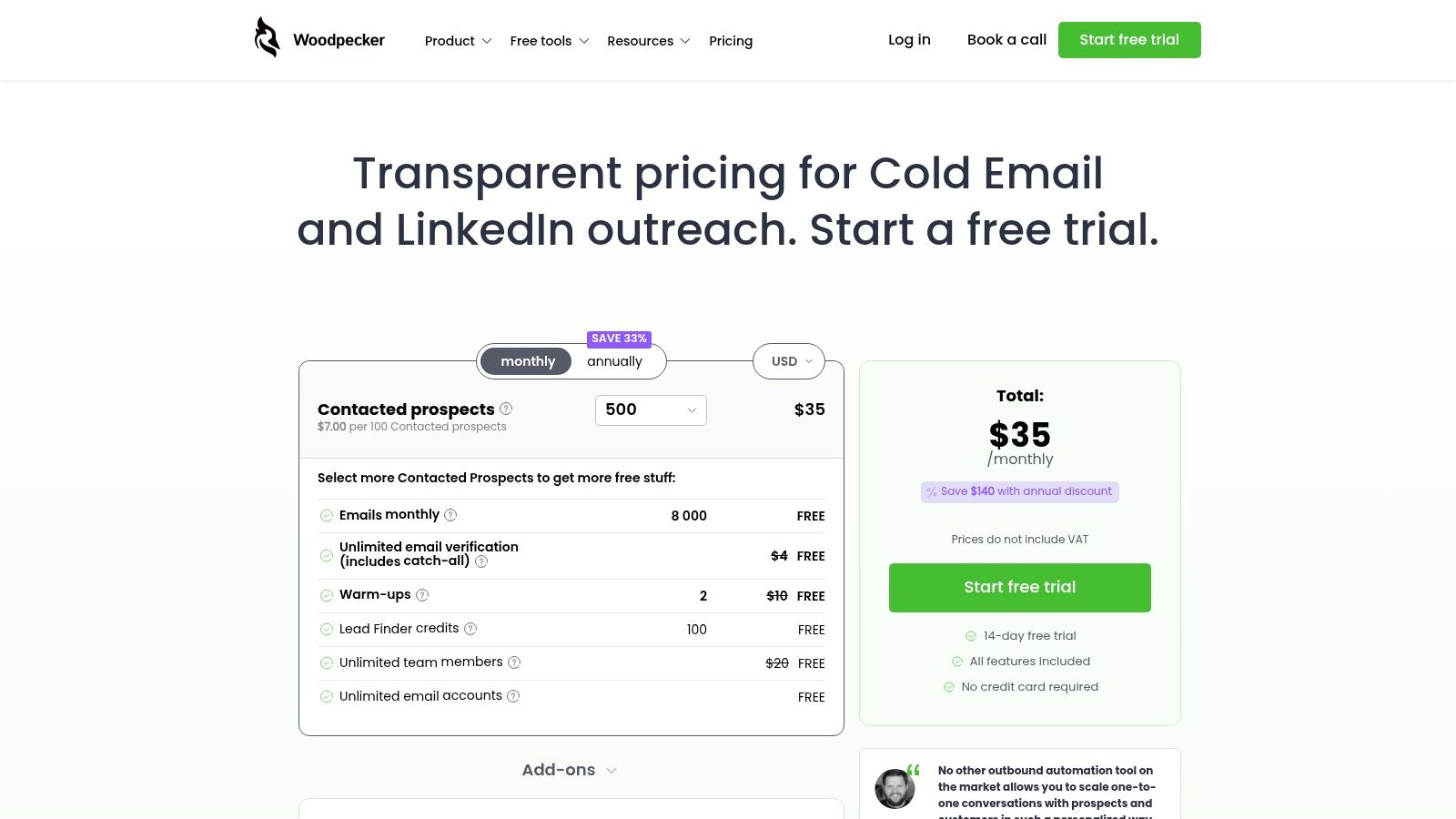
Woodpecker is for teams that want a deliverability-first platform with predictable logic around billing. Its contacted-prospects model is easier to reason about than seat counts when your volume changes from month to month. That matters for agencies, consultants, and lean teams that don’t want a quiet month to cost the same as an aggressive one. The Woodpecker pricing page is worth reading slowly, because the metering model changes how you think about send volume.
Where the value shows up
Woodpecker’s strongest case is operational calm. Unlimited email accounts and team members reduce some of the friction that appears as soon as more people touch outreach. Built-in warmup and deliverability safeguards make it feel like a tool made by people who have watched inbox placement fail in real campaigns, not just in demos. That’s useful when you care about consistency more than fancy UX.
I also like that the platform keeps its cold email identity. It doesn’t pretend to be every channel for every team. That focus can be a strength when you want fewer surprises and less product sprawl.
Where the bill can creep
The billing model is the key trade-off. Contacted-prospects pricing is fair when volume is uneven, but it can be less attractive in heavy-send months. Add-ons can also accumulate if you need extra warmup slots, additional domains, or other extensions around the core sending motion. That’s manageable if you plan ahead, but it punishes casual budgeting.
Practical rule: Woodpecker works best when you value inbox safety and predictable billing more than broad platform breadth.
For teams that want a tool they can set up and mostly trust, Woodpecker is still one of the stronger choices. For teams that want deep multichannel orchestration, it can feel narrow. That’s not a flaw if the job is outbound email first.
6. Saleshandy
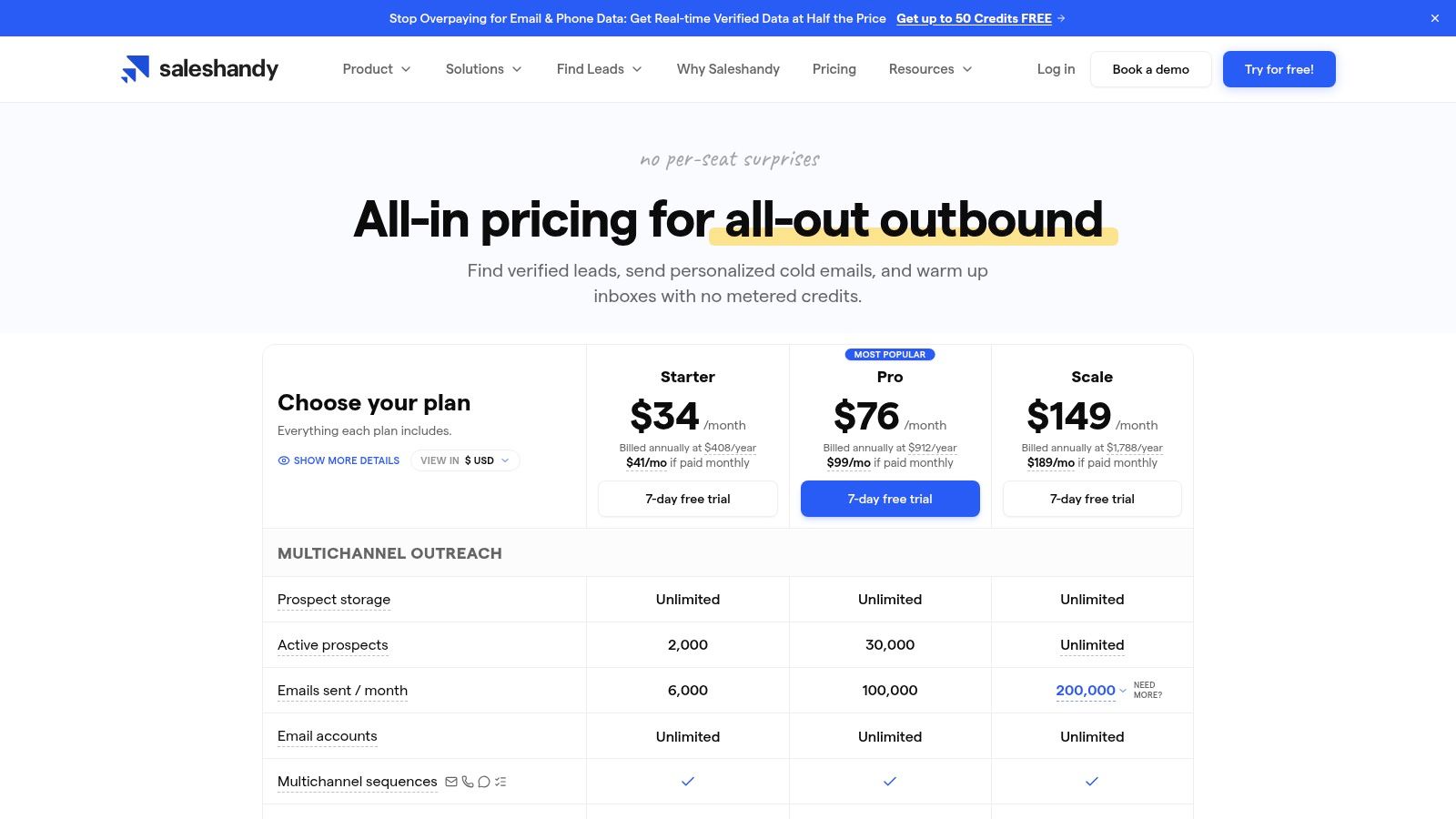
Saleshandy is a practical middle ground for teams that want outreach, dialer support, and data in a single subscription model. The platform bundles verified data, sequences, warmup, and multichannel steps, which is helpful if you dislike buying five separate tools to build one workflow. It also scales well for agencies because upper tiers can remove seat friction. The Saleshandy pricing page is the place to check what’s bundled and what still costs extra.
Why it feels operationally sane
Saleshandy is one of the better options if your team wants a broader outbound setup without the seat math getting ugly too quickly. The upper tiers support unlimited team members, and that can make client work or internal handoff less painful. It also includes warmup and waterfall-style verification in the motion, which matters if your list quality varies by source.
The main advantage is packaging. Teams that want email, calling, and some enrichment in one place can move faster here than in a more fragmented stack. That speed often matters more than having the longest feature checklist.
Where caution still helps
The bundle is not as flat as it first looks. Verification, AI usage, and dialer costs can vary with activity, so the actual monthly bill depends on how your team uses the product. That’s fine if you plan for it, but dangerous if you compare only the headline plan. Agencies should also pay attention to workspace and support structure, because shared operations tend to expose weak spots in onboarding fast.
Saleshandy is best when you want an all-in-one motion and you’re willing to accept some usage-based complexity inside the bundle. It is not the cheapest option for every scenario, but it can be one of the easier tools to operationalize across a small team. For many B2B groups, that matters more than shaving a few dollars from the sticker price.
7. Snov.io
Snov.io is a sensible pick when one person, or a very small team, wants prospecting, verification, and outreach in one place. The shared credit model keeps the workflow compact, and the inclusion of warmup means you don’t have to stitch together a separate deliverability stack on day one. That simplicity is the main reason it earns a place on a serious shortlist. The Snov.io pricing page is best read as a credit system, not just a sender menu.
The upside of one shared credit pool
A shared pool keeps planning simple. If you’re sourcing leads, verifying them, and sending from the same platform, you can see the trade-offs more clearly than you can in a split-stack setup. That’s useful for founders and solo operators who need to learn the motion without buying a separate database, verifier, and sender.
Team seats are also included earlier than many competitors, which helps if a founder wants a helper to jump in without restructuring the plan. That’s a small thing until you’ve tried adding collaborators to a tool that charges like every login is a new department.
Where it gets awkward at scale
Credit accounting becomes more annoying once more people or more campaigns share the account. Finding, verifying, and sending all compete for the same budget, so heavy prospecting weeks can eat into sending capacity. That isn’t a problem if you use the platform in a disciplined way. It is a problem if your team likes to explore first and budget later.
Snov.io works best when you want a compact, affordable system and you’re not trying to manage a sprawling operation. It’s less attractive once mailbox count rises and the shared-credit logic starts to feel tight. For a solo operator, though, the simplicity is hard to ignore.
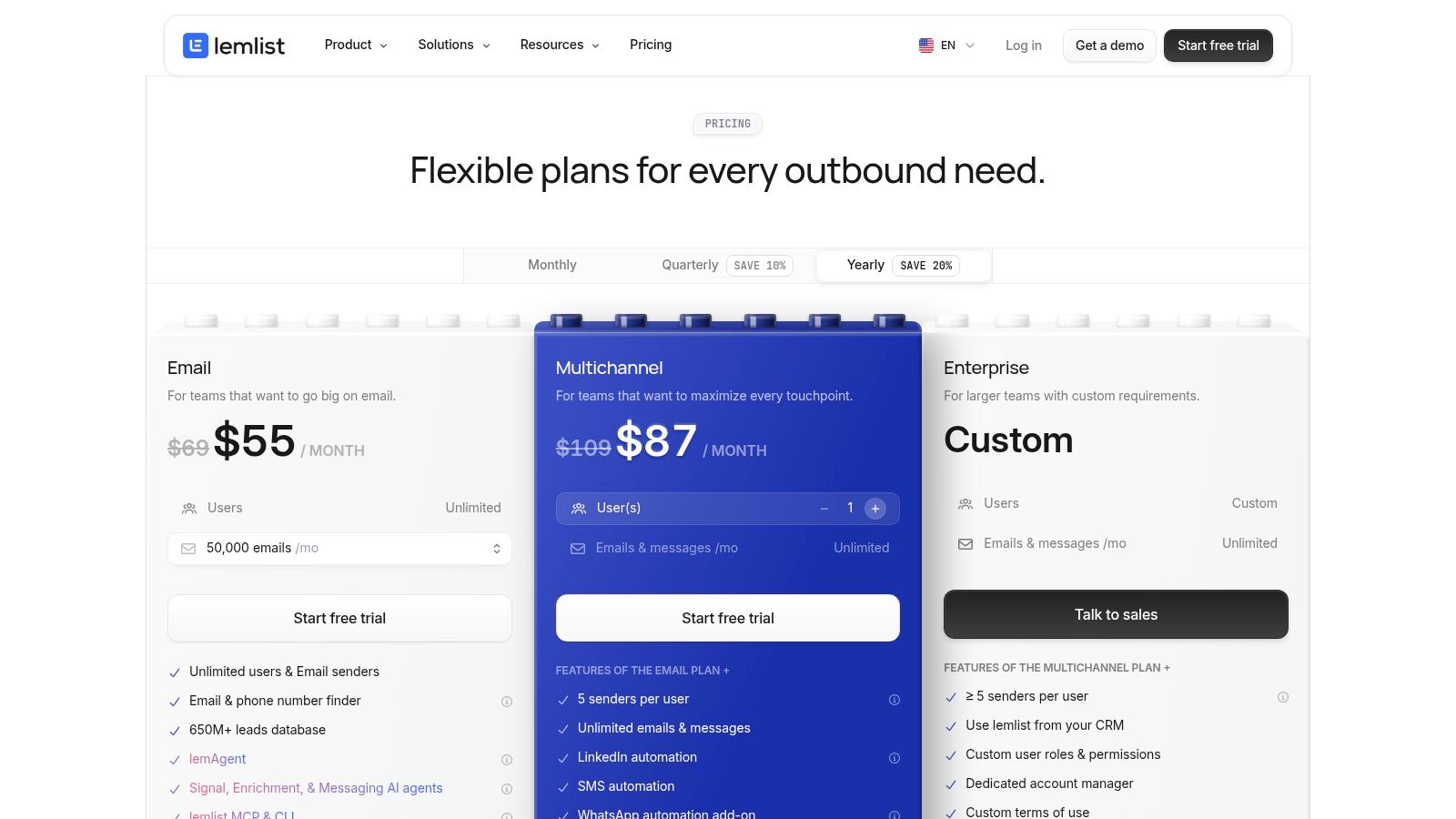
8. lemlist
lemlist is still the tool I’d choose when personalization is the actual strategy, not just a line in the pitch deck. Images, videos, and custom landing pages make outreach feel hand-built in a way most tools don’t attempt. That is why teams pay more for it. See the lemlist pricing page if your workflow depends on that level of customization.
When lemlist earns its keep
lemlist is strongest when your offer benefits from visible effort. If you sell into crowded markets and a generic template gets buried, the platform’s personalization layer can make your outbound feel materially different. It also supports LinkedIn steps on higher tiers, which helps if your motion is multichannel but still focused on carefully crafted outreach.
The trade-off is obvious. Per-user pricing and add-ons can get expensive quickly once the team grows or the campaign design gets more ambitious. That means lemlist rewards teams that use the personalized assets, not teams that just like the idea of them.
Why some teams outgrow it
The platform can be a little heavy for beginners. That’s partly because it does a lot, and partly because its strongest features ask you to think carefully about content and structure. If you just want a simple sender, you’ll likely overpay. If you want emails that look made for one person, the premium can make sense.
For small teams, lemlist works best when the message itself is the differentiator. For larger teams, the cost per sender becomes more noticeable. It remains one of the sharper tools in the category, but you should buy it for a real personalization motion, not because it sounds advanced.
9. Reply.io
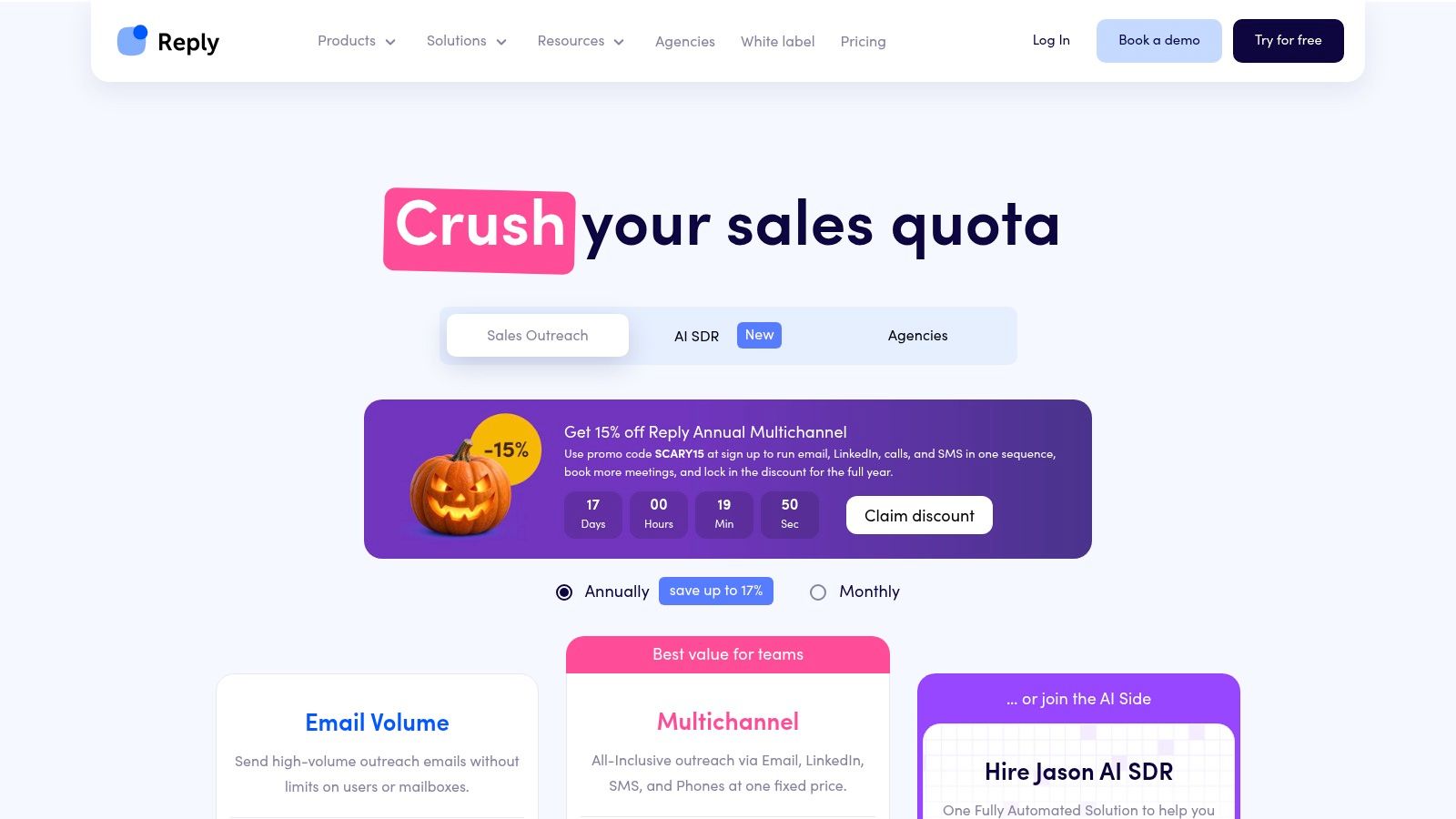
Reply.io makes sense when cold email sits inside a wider outbound motion. It combines email, calls, SMS, LinkedIn, and WhatsApp in one sequencing system, along with stronger CRM integrations than most tools in this category. That gives sales teams a single place to manage follow-up, but it also means the stack is built for coordination, not low-cost email sending. Review the Reply.io pricing page carefully, because package complexity can push the actual cost higher than it first appears.
Where Reply.io fits best
Reply.io fits in-house teams that run multichannel outreach and need solid sync with Salesforce, HubSpot, Pipedrive, or similar CRMs. It gives managers visibility across email steps, call tasks, and reply handling without forcing reps to work in separate tools. Agencies can use it too, especially when they need account-level reporting and shared oversight across multiple clients.
The trade-off is cost. Reply.io is rarely the cheapest choice for email-only outreach, and the bill can climb once more channels enter the workflow. That is a fair trade if your team uses those channels every day. If the motion is mostly email, the extra spend is hard to justify.
What makes it a different kind of tool
Reply.io is built for coordination more than raw sending volume. Unlimited users on the email plan help, but most of the value comes from keeping sequences, CRM data, and rep activity in one system. That matters when a second teammate joins and the process needs to stay clean.
A multichannel setup also changes the decision. If you are comparing cold email with LinkedIn outreach, the two channels usually serve different jobs, and this cold email vs LinkedIn outreach guide is useful context. Reply.io works when your team wants both in one operating rhythm.
I would skip it for a lean sender-only setup. I would choose it for teams that already dial, sequence, and track across channels every day. It is not lightweight, and that is the point.
10. Mailshake
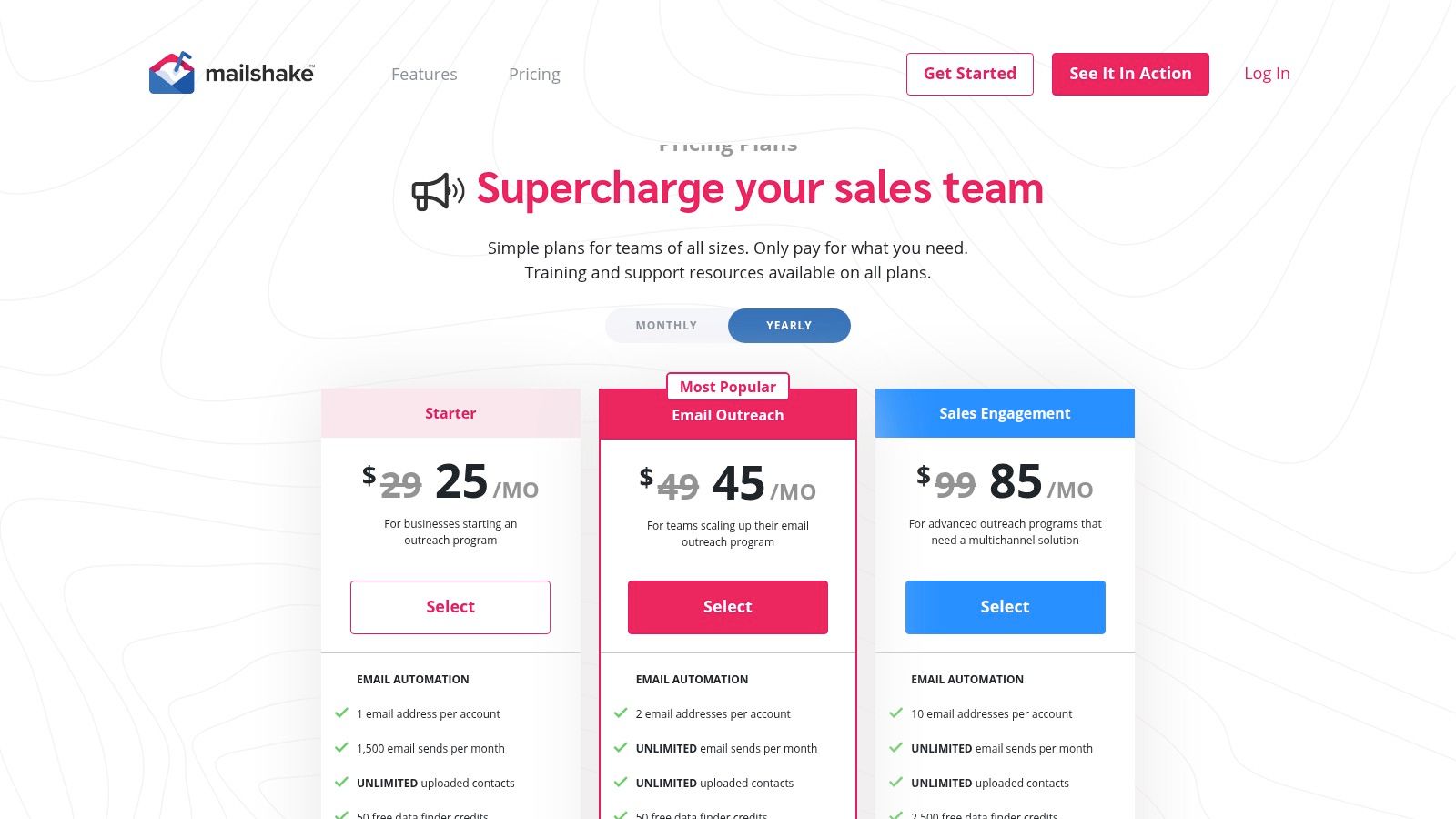
Mailshake is the straightforward option for teams that want a clean UI, a reliable outbound motion, and the ability to add calling when they’re ready. It’s not the newest platform, but it’s still one of the easiest to understand operationally. That matters more than people admit, especially when a second teammate needs to inherit a setup without a training project. The Mailshake pricing page makes the seat structure clear, which is helpful because this is one of the more explicit per-user models on the list.
Why it still gets recommended
Mailshake is easy to launch, and that has real value. Teams that don’t want a complicated onboarding process can get campaigns moving without building a full RevOps project around the tool. The built-in dialer on higher plans adds usefulness for teams that want one place for outreach steps and follow-up handling.
The trade-off is the seat-based model. Once more people need access or more inboxes need to run, costs climb in a way that flat-rate tools avoid. There’s also no free trial, so you’re committing earlier than you might with other options.
The practical downside
Mailshake is best when simplicity is worth the premium. If you want one dependable outbound platform and your team size is stable, it can be a very reasonable choice. If you expect mailbox counts to grow quickly, the economics become less friendly. That’s the core decision.
For a smaller team that values clarity over maximum flexibility, Mailshake still holds up. For volume-heavy agencies, it’s less attractive than tools that let inbox count scale more cheaply. It’s a solid tool, just not the cheapest way to expand.
Top 10 Cold Email Tools, Features & Pricing
| Tool | Core features | Deliverability & scale | Pricing & value | Target audience | Unique / USP |
|---|---|---|---|---|---|
| Apollo | Large B2B DB, enrichment, sequences, dialer, CRM/API | ★★★★, warmup & deliverability suite; credits-based | 💰 Credits model; plan complexity requires budgeting | 👥 Sales teams & ops needing all‑in‑one | ✨ Deep dataset + API enrichment; 🏆 broad feature set |
| Instantly | High‑volume sending, unlimited inboxes, AI writer/reply, lead DB | ★★★★, inbox rotation, throttling, advanced deliverability controls | 💰 Low cost at scale (unlimited inboxes); some features gated | 👥 Agencies & high‑volume teams | ✨ Unlimited inbox rotation + AI Reply Agent; 🏆 scale-focused |
| Smartlead | Unlimited mailboxes, auto rotation, warmup pools, workspaces | ★★★★, rotation & warmup pools reduce manual ops | 💰 Predictable at scale; add‑ons for verification/white‑label | 👥 Performance agencies & multi‑client ops | ✨ SmartSenders rotation; private infra options |
| QuickMail | Unlimited senders/users, high send caps, MailFlow warmup, API | ★★★★, included warmup; predictable deliverability | 💰 Flat, predictable pricing; scalable caps by tier | 👥 Teams wanting simple scaling & API access | ✨ MailFlow warmup + unlimited senders; straightforward pricing |
| Woodpecker | Contacted‑prospects billing, unlimited accounts, warmup, A/B testing | ★★★★, strong deliverability toolkit & warmups | 💰 Metered by contacted prospects; predictable billing; add‑ons extra | 👥 Teams focused on deliverability & predictable costs | ✨ Prospect‑metering billing; agency rotation add‑ons |
| Saleshandy | Multichannel (email/dialer/LinkedIn), waterfall enrichment, warmup | ★★★, verification & warmup included; multichannel support | 💰 Transparent bundles; generous active prospect limits | 👥 Agencies & teams wanting bundled outreach + dialer | ✨ Built‑in dialer + multichannel suite |
| Snov.io | Prospect finder, verification, enrichment tokens, outreach sequences | ★★★, multiple warmups; recipient‑based metering | 💰 Credit‑based (finder/verify/enrich); competitive entry price | 👥 Startups & SMBs needing data + outreach in one plan | ✨ All‑in‑one prospecting + outreach; recipient metering |
| lemlist | Multichannel sequences, AI research/writing, verification/enrichment credits | ★★★★, robust multichannel workflows; deliverability tools | 💰 Credits model; flexible but can be complex to budget | 👥 Teams wanting multichannel + template playbooks | ✨ AI tools + marketplace of templates; 🏆 strong playbooks |
| Reply.io | Multichannel sequencing, agency dashboard, integrations, compliance | ★★★★, advanced reporting & orchestration for scale | 💰 Tiered packages; pricier for high‑volume/AI options | 👥 Growing teams & agencies needing centralized orchestration | ✨ Agency/client views + SOC II compliance; strong analytics |
| Mailshake | Automated sequences, A/B testing, throttling, optional dialer & mailboxes | ★★★, rotation & throttling; quick campaign setup | 💰 Simple UI; up‑front billing; add‑ons to scale mailboxes | 👥 Teams wanting quick setup with optional dialer | ✨ Ready‑to‑use mailboxes add‑on; clean, fast workflow |
From Shortlist to Pipeline, Choosing Your Cold Email Stack
Start with two or three tools that fit your current send volume, mailbox count, and data sources, then run a short pilot on one segment. Judge the platforms by cost per booked meeting, not cost per seat, and watch bounce rates and reply quality from the first week. That matters more than a feature checklist because cold email fails when deliverability slips or the wrong people get into the wrong sequence. If you are operating in the U.S., remember that compliance is not optional, the FTC’s CAN-SPAM compliance guide is still the baseline for commercial email, including opt-out handling and sender identification.
Deliverability is also more technical now than many teams expect. Google and Yahoo’s bulk sender requirements pushed authentication, one-click unsubscribe, and complaint control into the center of the workflow, especially once a domain starts sending at volume. On top of that, inbox placement is a better yardstick than raw delivery, because a message can be accepted and still never land where the recipient sees it. That’s why the right tool is usually the one that lets you see mailbox-level health, not just campaign totals.
If you’re comparing by operating cost, the decision usually comes down to this. Flat mailbox economics favor tools like Instantly, Smartlead, and QuickMail. Data-first stacks favor Apollo or Snov.io. Deliverability-first teams often end up with Woodpecker or QuickMail. Multichannel teams should look harder at Reply.io, while personalization-heavy teams usually get more out of lemlist. None of those choices is wrong if the operating model fits.
For B2B teams that don’t want to build, monitor, and repair the whole cold email system in-house, Fypion Marketing is a relevant option. It runs cold email outreach as a service, with no upfront fees or retainer, and the model is tied to booked, qualified meetings that meet agreed criteria. A free consultation is the cleanest starting point if you want to compare that route against buying software and managing the stack yourself.
Fypion Marketing runs managed cold email outreach for B2B teams that want the technical setup, list building, copy, testing, and reply handling taken off their plate. If you’d rather pay for booked, qualified meetings than manage inbox rotation and deliverability yourself, visit Fypion Marketing and start with a free consultation.