
Best Cold Email Outreach Platform: How to Choose in 2026

Only 1% of recipients booked a meeting in the average cold B2B email campaign in 2025, according to figures attributed to Digital Bloom’s deliverability report by SalesHive. That’s a more useful starting point for choosing a cold email outreach platform than the number of messages a vendor lets you send. You’re buying a system for creating qualified conversations without accumulating hidden costs in damaged domains, manual reply handling, and disconnected customer records.
Why Reply Rates Should Drive Your Platform Choice
Most cold outreach gets no reply. Cirrus Insight’s benchmark synthesis reports that about 8.5% of cold outreach emails receive a response, while other benchmarks it summarizes put typical B2B reply rates at 3% to 5% and stronger campaigns at approximately 5% to 8%.
The arithmetic matters more than a vendor’s sending allowance. In the synthesis’s campaign example, sending 10,000 messages produces about 300 replies at 3%, compared with approximately 850 at 8.5%. Those are replies, not necessarily interested buyers or qualified meetings.

Buy improvements in relevance, not just capacity
Audience selection, account coverage, personalized copy, and consistent follow-up are better evaluation criteria than bulk delivery alone. Contacting several relevant stakeholders should mean adapting the reason for contact to each role, not sending identical messages throughout an organization.
For practical copy and follow-up ideas, MakeAutomation’s guide can help you improve cold email response rates. Establish your measurement definitions alongside those experiments, using our guide to B2B cold email response rates to distinguish overall responses from useful sales conversations.
Buying rule: A platform should help you reach the right people, reach their inbox, and follow up consistently. Sending more messages doesn’t compensate for failing those tests.
Treat benchmarks as directional averages, not promised outcomes. Industry, offer, list quality, and the vendor’s definition of a reply can change the comparison substantially. Before accepting a performance claim, ask whether the calculation includes automated responses, negative replies, and unsubscribe requests.
Platform Types and Team Fit at a Glance
Cold email outreach platform types at a glance
| Platform type | Best fit | Typical strength | Typical gap | Deliverability owner |
|---|---|---|---|---|
| All-in-one sequencer with mailboxes | Small SaaS teams running first campaigns | Fast setup and built-in warmup | Limited control of domain configuration at scale | Vendor, check settings yourself |
| Sequencer on your own domains | Teams with an in-house operations owner | Full control of domains, DNS and copy | Every DNS, warmup and rotation task is yours | Client team |
| Data-led prospecting suite | Teams needing contacts, enrichment and sending in one place | Contact data and buying signals in one tool | Sending and reply handling often shallower than sequencers | Mixed, verify in trial |
| Managed cold email service | Companies without a dedicated outbound team | Infrastructure, copy and reporting handled for you | Less direct control and an additional service fee | Provider-managed |
Use these categories as buying models, not universal descriptions of every vendor. A platform can combine managed mailboxes with a prospect database, while a service provider may give clients direct access to the underlying sequencer.
The strength and gap often come from the same design choice. Vendor-managed sending removes setup work, but you need to establish whether you can inspect authentication, export records, and pause individual domains yourself. Running your own infrastructure gives you those controls, but somebody must maintain them.
Match the model to the operator
A small SaaS founding team testing outbound can start with an all-in-one sequencer, provided it can inspect settings rather than relying on a ready-to-send label. The priority is learning whether the audience and offer generate useful conversations without creating a large administration burden.
A growing sales team with a named operations owner is better positioned to use its own domains and mailboxes. That owner can coordinate campaign changes, infrastructure maintenance, and incident response instead of leaving responsibility split between sales representatives.
For a team struggling to assemble usable contact records, a data-led suite deserves a trial. Test a sample from your actual market, inspect missing fields, and verify that enrichment improves targeting rather than merely adding more attributes.
A company without outbound staff should consider a managed service. Delegating execution still leaves the client responsible for defining suitable buyers, approving claims, and deciding what counts as a qualified opportunity.
Conditions that change the choice
- Bulk sending: Require stronger authentication visibility and provider-level monitoring before expanding beyond a small test.
- Regulated markets: Have counsel review the intended workflow and require documented unsubscribe handling.
- High-value accounts: Favor research review, account-level coordination, and careful follow-up over maximum throughput.
- Shared sales ownership: Require explicit reply assignments so interested prospects don’t sit unattended.
The deciding questions are operational: who owns deliverability, how many domains will you operate, and where must a person approve the next action? A category label won’t answer those for you.
Deliverability Controls to Verify Before Launch
Deliverability is an authentication-and-reputation problem, not a sending-volume feature. A successful connection between a mailbox and a sequencer proves that the application can send mail. It says nothing about whether recipient providers will trust it.
Google’s sender guidance requires bulk senders, approximately 5,000 or more messages to Gmail accounts within 24 hours, to configure SPF, DKIM, and DMARC with the visible From domain aligned to either the SPF or DKIM organizational domain. The same guidance recommends keeping user-reported spam rates below 0.1% and avoiding 0.3% or higher. Those thresholds matter even for smaller senders: complaint rates accumulate per domain, and a domain damaged during a low-volume pilot carries that history into every later campaign.
Use this launch checklist to organize the technical review.
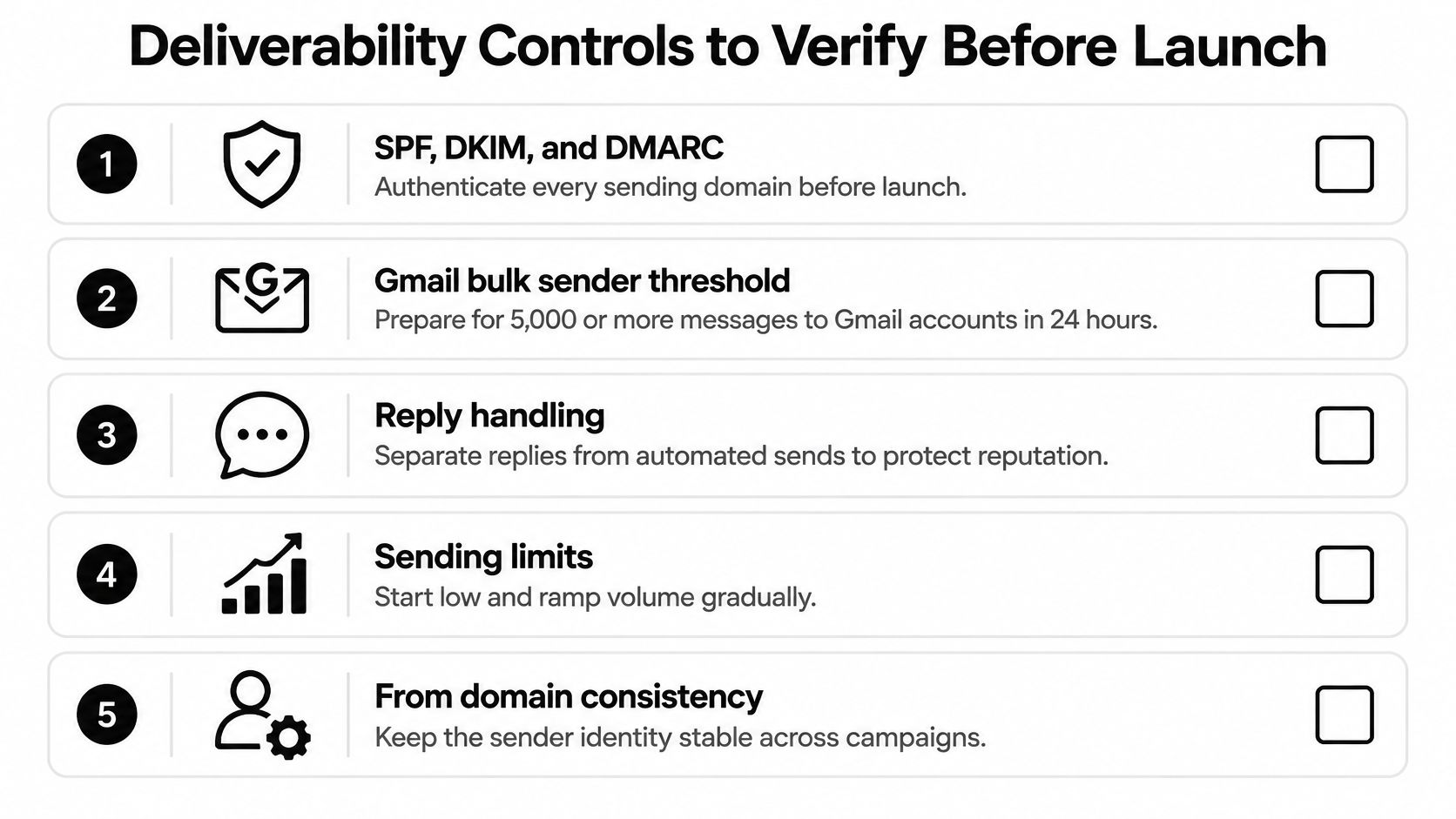
Inspect authentication on actual messages
A green setup indicator is a configuration check, not evidence of correct signing. Send test campaigns to controlled accounts, inspect the received message headers, and confirm that the domain recipients see matches the authenticated identity.
Check that the platform supports per-domain DKIM keys, an SPF-safe vendor configuration, and reporting that exposes DMARC alignment failures. Before sending a live message, use mailX to verify your DKIM record. A published record is a prerequisite; it does not prove every outgoing message is signed correctly.
Our guide to email authentication protocols explains what each check establishes, which helps the sales owner and technical owner agree on a shared standard. Keep authentication results visible in ongoing reporting rather than filing them away after launch.
Verify controls that limit exposure
The platform should classify bounces so your operator can distinguish invalid addresses from temporary deferrals or provider restrictions. Those events call for different responses, and automatically retrying everything makes diagnosis harder.
Require domain-level throttling, not just mailbox caps. If several mailboxes share a domain, separate inbox limits leave total domain volume uncontrolled, and mailbox providers judge reputation at the domain level.
At Fypion Marketing, all outreach runs on dedicated sending infrastructure with full SPF/DKIM/DMARC authentication, and the client’s primary domain and inbox are never touched. Dedicated infrastructure separates cold sending from ordinary business correspondence, but it does not remove the obligation to watch recipient reactions.
Take these acceptance checks into the demo:
- Authentication evidence: Show received-message results for each sending domain.
- Complaint suppression: Demonstrate how an identified complainer is excluded from future campaigns.
- Bounce diagnosis: Open examples of permanent failures, temporary failures, and provider blocks.
- Domain controls: Pause a domain without stopping unrelated domains.
- External monitoring: Reconcile available platform signals with Google Postmaster Tools.
Treat this checklist as a launch gate, not a one-time audit. Any check that passes today can fail after a sequence change, a new domain, or a list refresh, so each item needs an owner and a review cadence before the first send.
Monitoring Domain Reputation and Recovering From Complaint Spikes
A campaign can generate replies while an operator misses rising complaints on a particular domain. The danger isn’t limited to a missing authentication record. It includes a gradual deterioration that a launch checklist cannot detect.
EmailValidation.io’s deliverability guide describes cross-provider requirements including aligned authentication, one-click unsubscribe, valid reverse DNS, TLS, and correctly formatted messages. For buyers, the implication is practical: a single deliverability score isn’t enough to judge performance across recipient providers.
The monitoring workflow should make diagnosis possible before an operator decides to increase volume.
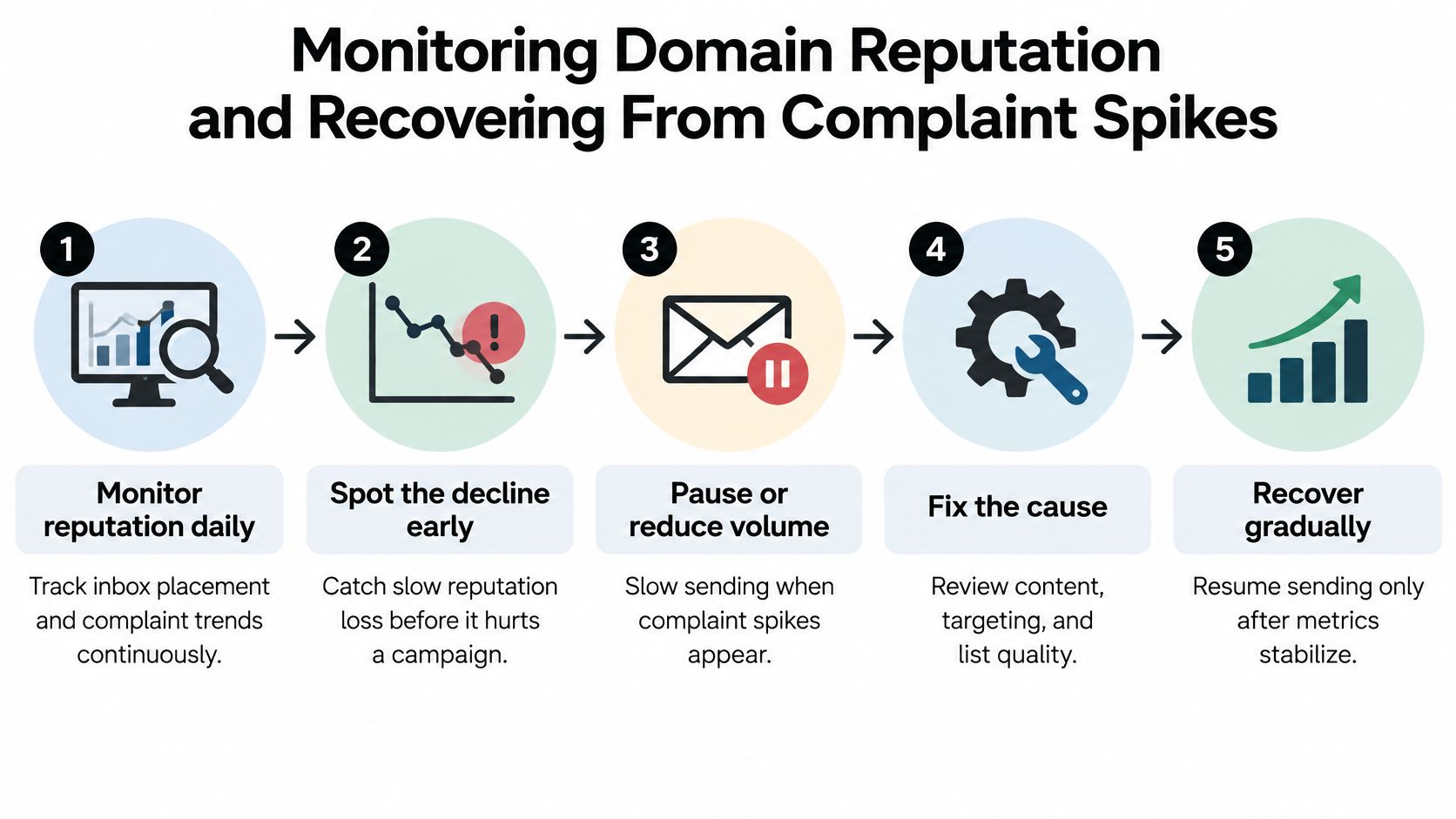
Recognize the sequence of warning signs
Consider a campaign that begins with a tightly matched segment, then expands into less relevant accounts. Replies may continue from the original audience while complaints emerge from the new segment. If the operator reviews only campaign totals, those reactions can disappear inside an acceptable-looking average.
Require reporting by sending domain and recipient provider, with the underlying event counts and measurement definitions. The system should disclose unavailable signals rather than treating missing complaint data as evidence of no complaints.
A platform’s incident response is part of its value. The useful question isn’t only whether it can spot a problem, but whether an operator can contain it without disrupting every campaign.
Inspect provider-specific alerts, automatic suppression, and the time between an unsubscribe request and its application across campaigns. Our email deliverability audit guide provides a practical basis for reviewing the evidence an operator should retain.
Recover by fixing the cause
Use a controlled recovery sequence rather than moving the same list to another domain:
- Pause the affected domain. Preserve its settings and logs so you can investigate what changed.
- Identify the segment that caused complaints. Compare audience source, copy version, sender identity, and recipient provider.
- Clean the list. Remove invalid, suppressed, and unsuitable contacts, then reassess the business reason for outreach.
- Reduce volume. Establish a conservative restart plan with an accountable owner.
- Restart with a warmup. Resume gradually only after correcting the cause and reviewing authentication and provider feedback. Warmup isn’t a repair guarantee.
Use the following video as supplementary context alongside the operational checks.
Recovery creates work beyond the paused campaign: list review, investigation, copy changes, and delayed prospecting. Include that work when comparing platforms, even when the subscription price looks attractive.
Personalization and Automation Features That Earn Replies
Personalization has evidence behind it, but not an unlimited performance promise. OutreachBloom’s evidence summary cites a Cochrane review covering 12 randomized trials and 48,910 participants, where personalization increased the odds of response by approximately 24%, and a separate field experiment where sales leads rose from 0.39% to 0.51%.
An improvement in odds isn’t the same as an equal percentage-point improvement in response rate. Neither finding establishes that an AI-generated opening line will improve your campaign.
Test relevance instead of counting tokens
A first name, company name, or job title makes a message individualized in form. Account-specific relevance explains why the recipient has a plausible reason to care about the offer.
Say you sell software for managing implementation handoffs. A useful message connects the product to an identifiable operational problem at an appropriate company. An opening line praising an unrelated company announcement adds personalization without establishing that connection.
Use email list segmentation to separate business situations before generating copy. If you need starting structures, you can find examples of sales outreach emails in CapyScout’s guide, then adapt the premise rather than copying the wording.
During a trial, require these experiments:
- Randomized holdouts: Compare personalized and control messages within the same eligible audience.
- Version-controlled copy: Preserve the message each recipient received.
- Field validation: Block broken substitutions and unsupported account claims.
- Sequence-level testing: Compare complete follow-up approaches, not just subject lines.
- Timing controls: Keep scheduling consistent enough that copy comparisons remain interpretable.
- Reply classification: Separate interest, objections, referrals, automated responses, and opt-outs.
Keep human judgment where factual errors matter
Ask the platform to show the evidence behind generated account statements. A plausible sentence isn’t sufficient if nobody can verify its premise.
Reserve human review for strategic accounts, product claims, and qualification decisions. Automation can assemble research and draft alternatives, but the operator should approve assertions that could misrepresent either company.
Maintain a measurement sheet with explicit denominators:
| Measure | What to record |
|---|---|
| Delivery | Accepted messages relative to attempted sends |
| Positive reply | Interested responses relative to delivered messages |
| Qualified meeting | Meetings meeting agreed criteria relative to contacted prospects |
| Opportunity | Sales-accepted opportunities relative to contacted prospects |
Keep these definitions stable throughout an experiment. A higher reply rate is not a win if additional responses are objections, opt-outs, or conversations your sales team cannot qualify.
Usability and Automation in Daily Use
Test usability with the person who will operate the platform, not only the person approving the purchase. A polished demonstration won’t reveal how much work it takes to correct a bad import, assign a reply, or stop a running sequence.
Run a realistic acceptance test
- Record setup effort. Track the hours spent connecting domains, verifying authentication, and setting up mailboxes. Note every point where vendor support becomes necessary.
- Build a sample sequence. Include an initial message and follow-ups with a stop-on-reply rule. Edit a draft step, then verify that the change doesn’t unexpectedly alter an active campaign.
- Break a personalization field. Leave a test contact’s field empty. Confirm that the system blocks the message or substitutes an approved fallback.
- Process a reply. Check that it appears in a shared view, can be labeled and assigned, and pauses further automated messages to that contact.
- Test permissions. Give a representative and an administrator different roles. Confirm that ordinary reply access doesn’t also grant permission to change sending infrastructure.
- Reconcile reporting. Filter delivery, replies, and meetings by campaign, domain, and mailbox. Export the results and check that the totals match.
Check the exceptions, not just the happy path
Test recipient-time-zone scheduling, bounce-triggered pauses, and branching after a reply. Include an out-of-office message and an unsubscribe request so you can see whether the platform distinguishes them from genuine interest.
Trial acceptance: Your operator should be able to explain what the system will send next, why it will send it, and how to stop it.
Require a person to review positive replies before booking a meeting. They should confirm fit, interpret ambiguous language, and avoid promising capabilities or terms that automated drafting introduced. Automation is most useful when it handles timing and tracking without obscuring those decisions.
Hidden Costs and Integrations Most Comparisons Skip
Hidden cost drivers in cold email platforms
| Cost item | What drives it | How to estimate |
|---|---|---|
| Sending domains | Campaign structure and domain rotation | Annual registration per domain, plus DNS setup time |
| Mailboxes | Daily send volume per inbox | Monthly fee per mailbox, plus warmup period |
| Contact data credits | Verified or enriched contacts per month | Credits per email verified or enriched, multiplied by list size |
| User seats | People who need reply or campaign access | Per-seat monthly fee, multiplied by team size |
| Integration tier | CRM and calendar connections | Check which plan unlocks two-way sync |
Don’t assume the advertised subscription represents your operating cost. Build a quote from the configuration you intend to use, including infrastructure, data, operator access, and the integrations required for handoff.
Estimate the working system
Start with your intended daily volume and a conservative mailbox-level sending plan agreed with the infrastructure owner. Calculate the required mailbox total, then allocate those mailboxes across domains. Don’t multiply by the domain count again if your mailbox estimate already covers the whole operation.
Add domain registration, mailbox fees, and time before productive sending. Price verification and enrichment separately if the vendor consumes different credits for each action, and determine whether failed lookups still use credits.
Include people who need to read or assign replies, not just campaign builders. Also budget staff time for research review, suppression management, troubleshooting, and reporting.
Domain replacement should be a contingency, not a growth strategy. If your estimate assumes regularly discarding domains after poor results, reassess the targeting and sending practices before scaling.
Prove the integration under real conditions
A CRM logo on a pricing page doesn’t establish the direction or completeness of synchronization. Use our guide to CRM integration to define the records and events your workflow needs.
- Two-way synchronization: Change a contact status in the CRM and confirm the outreach platform respects it. Then send a test reply and verify that it appears on the CRM record.
- Duplicate suppression: Import an existing customer and an active opportunity. Confirm neither enters an inappropriate prospecting sequence.
- Calendar handoff: Test booking ownership, availability, cancellations, and status updates.
- Exit options: Export contacts, activity history, suppression records, and copy versions in usable formats.
Evaluate the recovery path when synchronization fails. Your operator needs a visible error, a retry mechanism, and a way to reconcile missed updates.
The hidden integration cost isn’t merely another subscription. It’s the manual work required when sales representatives cannot trust that campaign activity and customer records agree.
Confirm Your Shortlist Before You Commit
Email deserves a place in the channel mix: Forbes Advisor’s compilation reports that 77% of B2B buyers prefer email as a contact method. That describes broad buyer preference, not permission to send irrelevant cold outreach or a guarantee of meetings.
Shortlist platform types that match your staffing, deliverability owner, and intended domain count. Run a controlled trial on a dedicated domain before committing to a broader rollout.
Require evidence before signing
- Operational control: Demonstrate domain isolation and show complaint and bounce reporting.
- Recipient handling: Test unsubscribe processing and suppression across campaigns.
- Workflow integrity: Synchronize real test records with the CRM.
- Full economics: Price domains, mailboxes, data, seats, and operator time.
- Qualification: Put the definition of a suitable meeting in writing.
A managed service is an alternative to operating software yourself, not an exemption from these checks. Compare its responsibilities and total cost against the work your team would otherwise perform.
Our cold email service is paid only for meetings the client confirms were a good fit. Keep that performance-based service distinct from our Managed Cold Email Infrastructure service, which costs $1,500 per month and covers domains, warmup, deliverability, and copy while the client keeps control of outreach.
Write down your daily volume, domain count, and reply owner, then request a trial built around that operating plan.
Fypion Marketing offers managed cold email outreach covering targeting, verified prospect lists, infrastructure, copy, testing, and reply handling. Visit Fypion Marketing to discuss whether a managed campaign or infrastructure support fits your team, and bring your sending plan and qualification criteria so the conversation starts with operational requirements.