
What Is Email Deliverability in B2B Outreach

Email deliverability is the ability of a message to reach the recipient’s intended mailbox, especially the primary inbox, yet the worldwide inbox-placement benchmark was only 83.5% in 2024. SMTP acceptance isn’t inbox placement: a receiving server can accept your email without putting it where a prospect will see it.
That distinction changes how you investigate a quiet campaign. A healthy delivery percentage doesn’t tell you whether buyers received the pitch in their inbox, recognized a relevant problem, or thought your offer deserved a reply.
For a sales lead, the useful question isn’t whether an email was delivered. It’s where the message landed and what happened next.
What Email Deliverability Actually Measures
When someone asks, “What is email deliverability?”, the practical answer is your ability to get legitimate messages into the intended inbox, not just through the receiving server’s front door.
A sending platform usually reports delivery when the recipient’s server accepts a message. That server can still route it to junk, apply an internal quarantine rule, or withhold it from the recipient. Your dashboard records acceptance, while your prospect sees nothing.
Validity’s worldwide benchmark for 2024, summarized in Sales.co’s email deliverability statistics, measured 83.5% inbox placement, meaning approximately 16.5% of legitimate marketing messages missed the primary inbox, with 9.8% missing because they were blocked or deferred before reaching inbox or spam. The same benchmark recorded 87.2% inbox placement at Gmail and 75.6% at Microsoft.
Those are marketing-email benchmarks, not a forecast for your cold outreach. They demonstrate why you can’t substitute server acceptance for visibility.
What each deliverability outcome means
| Outcome | What happened | Why it misleads | 2024 benchmark |
|---|---|---|---|
| Delivery | Receiving server accepted the message | Acceptance can still mean spam or subsequent loss | Not the inbox-placement figure |
| Inbox placement | Landed in the intended inbox | Visibility still doesn’t prove interest | 83.5% worldwide |
| Spam or bulk | Accepted, then filtered out of the intended inbox | The campaign looks delivered but stays hidden | Inside the 16.5% that missed the inbox |
| Missing mail | Blocked, deferred, or lost before inbox or spam | That volume didn’t reach either measured destination | 9.8% |
| Gmail inbox | Placement at Gmail only | A blended rate hides this provider’s results | 87.2% |
| Microsoft inbox | Placement at Microsoft mailboxes | Results elsewhere don’t establish visibility here | 75.6% |
Sender reputation isn’t another destination. It’s the domain and sending-IP history that helps receivers decide which destination your messages deserve.
The terminology confuses experienced teams, too. In Mailjet’s 2025 survey of more than 1,100 senders across five countries, 88% said they didn’t know what their email delivery rate was measuring.
Before reviewing campaign performance, ask your platform what its delivered label means. Does it show acceptance, an inferred outcome, or measured placement?
Reporting rule: Separate inbox, spam, and missing-message results by mailbox provider. Treat a high delivery rate as incomplete evidence, not a clean bill of health.
How a Mailbox Chooses Inbox or Spam
After you press Send, your email passes through systems your sales team doesn’t control. You control the sending setup, the recipient selection, and your behavior over time. The receiving provider controls acceptance and placement.
The route below shows the main checkpoints, rather than every technical exchange.
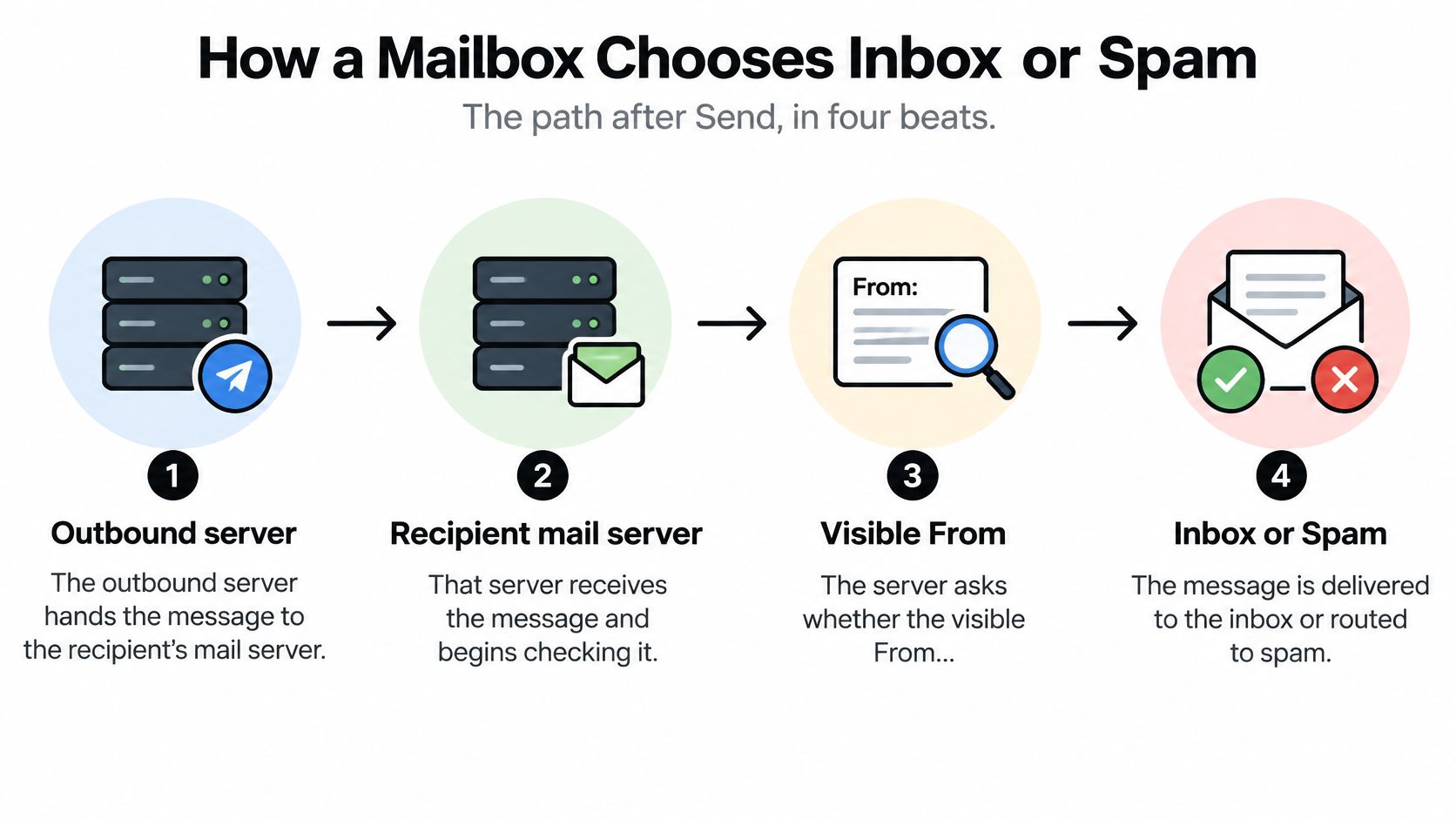
The checks after Send
- Your outbound server hands over the message. It attempts to transfer the email to the recipient’s mail server. An unavailable destination or a receiver’s refusal can interrupt that handoff.
- The receiver checks authorization. It looks for evidence connecting the sender to an authorized domain. Passing this check doesn’t establish whether the recipient wants the email.
- The provider evaluates sending history. Complaints, address failures, changing volume, and recipient behavior contribute to its assessment. Providers don’t publish a complete formula, so avoid treating any single signal as the entire decision.
- The receiver chooses an outcome. It can place the message in the inbox, filter it, defer it for another attempt, or reject it.
Think of a commercial building. Authentication is your visitor badge. Reputation is the security team’s experience with you and the organization you represent. Inbox placement is getting directed to the right office instead of remaining outside or in a waiting area.
A valid badge doesn’t make an unwelcome visitor welcome. Likewise, a correctly authorized pitch can still be unwanted.
Why cold outreach needs extra care
With a subscribed newsletter, recipients have already expressed interest. In cold outreach, that expectation may be absent, so you shouldn’t assume the same tolerance for frequency or broad messaging. Relevance matters before the first follow-up, not after someone complains.
Your infrastructure also matters. A shared sending IP can carry history created by other senders, while your domain develops its own record. Understanding email domain reputation helps you distinguish a problem attached to your identity from one connected to the sending environment.
For a visual companion to the receiving process, watch this explanation.
The operational takeaway is straightforward: authorization establishes who may send, while recipient selection and sending behavior influence whether receivers continue trusting that sender.
SPF DKIM and DMARC in Plain Terms
You don’t need to memorize protocol specifications to manage outreach. You do need to know what each authentication control proves and which failures should stop a campaign.
Google’s email sender guidelines require all senders to use at least SPF or DKIM, while bulk senders must use SPF, DKIM, and DMARC. For an outreach operation, implementing the complete framework also makes troubleshooting more useful than checking a single record.
Give each control one job
- SPF authorizes sending infrastructure. It tells receivers which servers may send using the domain’s SPF identity. Publishing it isn’t proof that every tool you use is covered.
- DKIM signs the message. The receiver can verify the signature against the signing domain’s public key and check message integrity.
- DMARC connects authentication to the visible From domain. It evaluates alignment and lets the domain owner publish handling instructions and receive reports.
Alignment is the decision-changing detail. Under relaxed alignment, the authenticated domain and visible From domain can share an organizational domain. Strict alignment requires an exact match.
Say your sales sequencer sends a message that appears to come from your company, but authenticates it using the sequencer’s unrelated domain. SPF might pass for that service, yet the message can still fail DMARC if neither the SPF identity nor a passing DKIM identity aligns with your visible From domain.
A green authentication label in a tool isn’t enough. Inspect an actual message sent through the production workflow.
Set up, inspect, then enforce
Use this order when configuring email authentication protocols:
- Publish SPF for legitimate sending services. Have the administrator check the DNS lookup limit instead of adding services indefinitely.
- Enable DKIM for the sending domain. Verify that outbound messages are signed, not merely that the platform shows configuration complete.
- Begin DMARC in monitoring mode. Collect reports before applying a policy that could block legitimate business mail.
- Review aggregate reports and align authorized sources. Include the sales sequencer, marketing platform, support system, and any other legitimate sender.
- Tighten the policy after resolving legitimate failures. Don’t enforce a restrictive policy while known business systems remain misconfigured.
Authentication proves authorization. It doesn’t prove that a prospect needs your product or wants another follow-up.
Treat changes to sending tools as configuration changes requiring verification. A newly connected platform can introduce a different signing identity even when nobody intentionally changes the address prospects see.
List Hygiene Warming and Engagement
Complaint prevention starts before copywriting. Google recommends keeping user-reported spam rates below 0.1%, fewer than 1 complaint per 1,000 messages, and avoiding 0.3% or higher, where delivery support can be reduced or mitigations applied.
Those aren’t targets to approach. A small number of unhappy recipients can become operationally significant, particularly when a team sends to poorly selected contacts.
Remove avoidable reasons for rejection
Validate addresses before launch, then use a central suppression list across your campaigns. Suppress hard bounces, unsubscribes, and complainants immediately, and check that another sequence won’t reintroduce them.
Address validation and audience qualification solve different problems. A validator can help identify an invalid mailbox, but it can’t establish whether its owner buys your product.
If list checks are becoming manual and inconsistent, compare email list cleaning services by their verification process, treatment of uncertain addresses, and ability to synchronize suppressions. Don’t evaluate them only by how many contacts they approve.
- Confirm the person’s role. A valid address for someone who can’t influence the purchase isn’t a useful prospect.
- Check account relevance. Document why the company might need the offer rather than relying only on industry labels.
- Respect a clear refusal. An opt-out belongs in the suppression system, not in a later re-engagement campaign.
Increase volume only with evidence
Warming means building a consistent sending history gradually. Start conservatively, inspect placement and complaint signals, and increase only while results remain healthy. A new mailbox doesn’t become ready for unrestricted volume because a calendar reminder says its warmup is complete.
If you’re evaluating supporting software, Flowkon’s email warm up tool guide provides options to compare. Judge any tool alongside actual placement tests and legitimate recipient feedback, not a warmup score alone.
For example, a small batch of verified contacts sharing a specific business problem is a more controlled test than a large purchased list receiving an interchangeable pitch. You can investigate individual replies and adjust the audience without exposing the entire list to an untested approach.
Make the message recognizable and easy to decline. Use a real sender name, a specific reason for writing, a plain layout, and a working opt-out. Where supported, configure a one-click unsubscribe header and a visible unsubscribe link rather than forcing recipients to negotiate their removal.
The objective is authentic conversation with relevant prospects, not the largest send your software permits. Track positive replies and qualified conversations alongside complaints, rather than treating activity as progress.
How to Tell Rejection From a Weak Offer
Your campaign has a healthy delivery percentage and almost no replies. Before rewriting the subject line, separate technical rejection, spam placement, poor targeting, and an offer recipients don’t value.
These require different interventions. Changing adjectives won’t repair rejection, and changing domains won’t make an irrelevant offer useful.
Investigate in the right order
- Read rejection and deferral responses. Use SMTP bounce logs to identify what the receiver reported. Distinguish permanent failures from temporary conditions with a hard bounce versus soft bounce diagnosis, and suppress confirmed hard bounces.
- Test placement at both Gmail and Microsoft. Send the production message through the production workflow to seed accounts. Record inbox, spam, and missing outcomes separately.
- If seeds reach the inbox, inspect targeting and the ask. Review whether recipients own the problem, whether the account has a reason to act, and whether your proposed next step is proportionate.
- If seeds land in spam, investigate sending conditions. Check complaint trends, recent volume changes, authentication alignment, and message content before replacing domains.
Provider-specific testing matters. Validity’s benchmark report recorded Gmail inbox placement declining from 89.8% early in 2024 to 84.2% in the fourth quarter.
Seed tests are diagnostic samples, not a complete view of every prospect’s mailbox. Combine them with receiver feedback and campaign outcomes.
Where a weak cold email result actually comes from
| Signal | Likely layer | First check |
|---|---|---|
| Hard bounces or deferrals rising | Technical rejection | Read SMTP responses, validate addresses, suppress hard bounces |
| Seeds accepted but sitting in spam | Spam placement | Check complaints, a recent volume jump, alignment, and content |
| Inbox seeds and almost no replies | Targeting or offer | Review role, company fit, and the ask before buying domains |
| Gmail seeds inbox while Microsoft seeds spam | Provider difference | Judge Microsoft separately rather than averaging the results |
| Opens look strong and positive replies don’t | Misleading engagement | Stop writing subjects for curiosity and judge replies |
| DMARC shows failure or passes without alignment | Authentication | Align the visible From domain before rewriting copy |
Opens deserve particular caution. Privacy features and image-proxy systems can make them unreliable indicators of human attention. A curiosity-driven subject can also attract attention without creating buying intent.
Use Google Postmaster Tools for available Gmail spam-rate and domain-reputation signals. For supported Microsoft consumer-mail infrastructure, use SNDS and JMRP, recognizing that access and visibility depend on your sending setup and don’t represent every corporate Microsoft mailbox. Read DMARC aggregate reports in a parser to inspect authentication patterns.
Diagnostic discipline: Change one layer, retest both providers, and only then decide whether the copy deserves another revision.
When placement looks healthy, distinguish targeting from offer quality by reading responses. Wrong-person replies suggest audience problems; relevant buyers who understand the pitch but see no reason to act suggest a weak offer or poor timing.
A Fix Order for B2B Cold Email
Repairs should follow the evidence, not whichever fix is easiest to buy. Registering another domain may feel productive, but it won’t resolve a stale list or an unwanted proposition.
Use this sequence to protect recipients and restore a measurable outreach process.
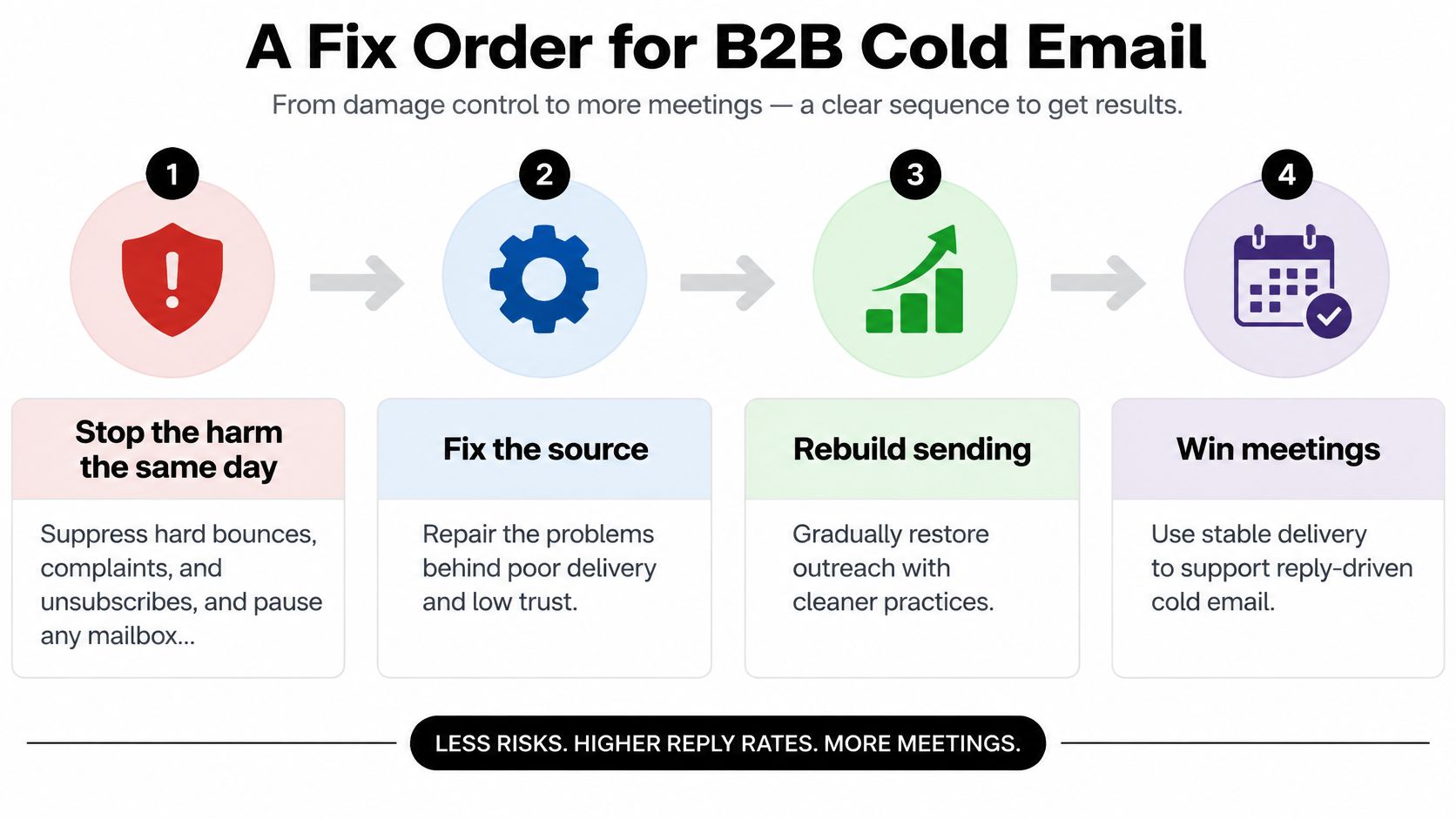
Prioritize repairs before expanding
-
Stop the harm the same day. Remove hard bounces, complaints, and unsubscribes from active queues. Pause the affected campaign or mailbox when repeated seed tests show spam placement, rather than continuing while someone investigates.
-
Repair the sending identity. Verify alignment using actual messages from the live workflow. Check every connected sender so that a repair in the sequencer doesn’t leave another authorized service broken.
-
Return to a demonstrated healthy volume. Use your own sending history, not a universal daily allowance. Restore volume in measured steps, inspecting placement and recipient feedback before each increase. If shared infrastructure appears involved, evaluate shared IP versus dedicated IP with your provider rather than assuming a dedicated IP automatically fixes reputation.
-
Rebuild around a defined buyer. Specify the industry, role, business condition, and reason the account should care. Remove guessed address patterns and generic role mailboxes when they don’t identify an accountable buyer. Require a relevance note before contacts enter the campaign.
-
Rewrite the first touch around an observation and an ask. Explain the account-specific reason for writing, connect it to a credible outcome, and ask for a manageable next step. Reduce repetitive follow-ups and leave room for an actual decision.
A SaaS campaign repair scenario
Say a SaaS team launches outreach from a fresh domain, sees Microsoft seed messages in spam, and receives almost no replies. The team can’t reasonably conclude that prospects dislike the product because it hasn’t established visibility.
The operator pauses the affected sends, validates the list, repairs any alignment failures, and checks whether existing, healthy mailboxes can support a controlled relaunch. Moving mailboxes is appropriate only after addressing the underlying problem, not as a way to evade filtering.
Next, the team replaces a vague introduction with a concrete account trigger, such as a newly announced integration relevant to the product. It tests placement again and evaluates positive replies and qualified meetings, not merely acceptance.
Avoid purchased lists and misleading subject lines. Keep cold outreach operationally separate from invoice and support mail, while recognizing that separation isn’t immunity from reputation problems.
A repaired campaign still needs an owner. Without recurring checks, the next list import or tool change can reintroduce the same failure.
Weekly Deliverability Operations
Deliverability needs a recurring operating routine, not a completed setup ticket. Assign someone responsibility for reviewing signals, pausing affected sends, and confirming that fixes work.
The bulk-sender requirements summarized by Broadcom include authentication, DMARC, one-click unsubscribe, and low complaints for Google and Yahoo; Microsoft began actively rejecting noncompliant bulk mail to Outlook.com, Hotmail, and Live.com on May 5, 2025. Smaller senders shouldn’t interpret the absence of bulk enforcement as proof that their practices are safe.
Weekly deliverability checks and when to escalate
| Check | Cadence | Escalate when |
|---|---|---|
| DMARC aggregate reports | Weekly | A new source fails or alignment breaks |
| Seed tests on Gmail and Microsoft | After every copy or volume change | One provider is in spam while the other inboxes |
| Complaint trend | Weekly, reviewing daily movement | Any spike appears, even if a single day looks acceptable |
| Hard bounces and unsubscribes | Same day | A suppressed address is still queued |
| Volume versus the last healthy week | Before each increase | The plan jumps instead of stepping up |
| Cold domains versus customer domains | When adding mailboxes | Invoices or support share a domain with cold mail |
Make stopping rules explicit in your automation. Cyndra’s guidance on when to stop automated email sequences is a useful resource when documenting reply handling and sequence exits.
Give the owner authority to pause sends without waiting for a pipeline meeting. If nobody can own DNS checks, placement tests, and list quality, assign an internal specialist or outside operator before increasing volume.
Fypion Marketing offers managed B2B cold email outreach, including sending infrastructure, authentication, list building, and ongoing campaign optimization. Visit Fypion Marketing to discuss your target accounts and current inbox performance, and explore a qualified-meeting campaign built around agreed sales criteria rather than delivery percentages alone.