
How to Create Email Templates for B2B Outreach
Most advice on how to create email templates is built for newsletters, not cold outreach. It assumes the reader already knows you, already wants your updates, and will tolerate branded layouts, banner images, and multiple calls to action. That advice breaks fast in B2B outbound.
Cold email has a different job. It has to earn attention from a skeptical buyer, survive spam filtering, render cleanly on mobile, and get to a reply without looking automated or overproduced. A template that looks polished in a drag-and-drop editor can still fail where it matters most: inbox placement, readability, and response quality.
The best cold email templates are usually simpler than marketers expect. They aren’t empty. They’re disciplined. They use structure on purpose, keep code light, and leave enough room for real personalization without turning the message into a mail merge accident.
The Anatomy of a High-Performing B2B Template
Cold email templates fail when they try to look like marketing assets.
In B2B outbound, the template has a narrower job. It has to make the message easy to scan, easy to trust, and easy to reply to. That means structure matters, but flashy structure usually hurts more than it helps. Buyers are not evaluating your brand system. They are deciding whether to spend another ten seconds on the email.
Start with a constrained template
A reusable cold email template should remove decisions, not create them. The best-performing structures we build for outbound teams are narrow by design: one column, minimal styling, no competing visual elements, and enough whitespace to make the message readable on a phone.
If you’re sending plain text, this is straightforward. If you’re sending HTML, keep it restrained. Complex layouts, stacked content blocks, and design-heavy modules create more places for rendering issues, broken spacing, and spam-filter friction. They also signal “campaign” instead of “personal email,” which is the wrong cue for cold outreach.
A simple rule works well here.
Practical rule: If the prospect cannot understand the point from the first screen on mobile, the template needs to be cut down.
The five parts that matter
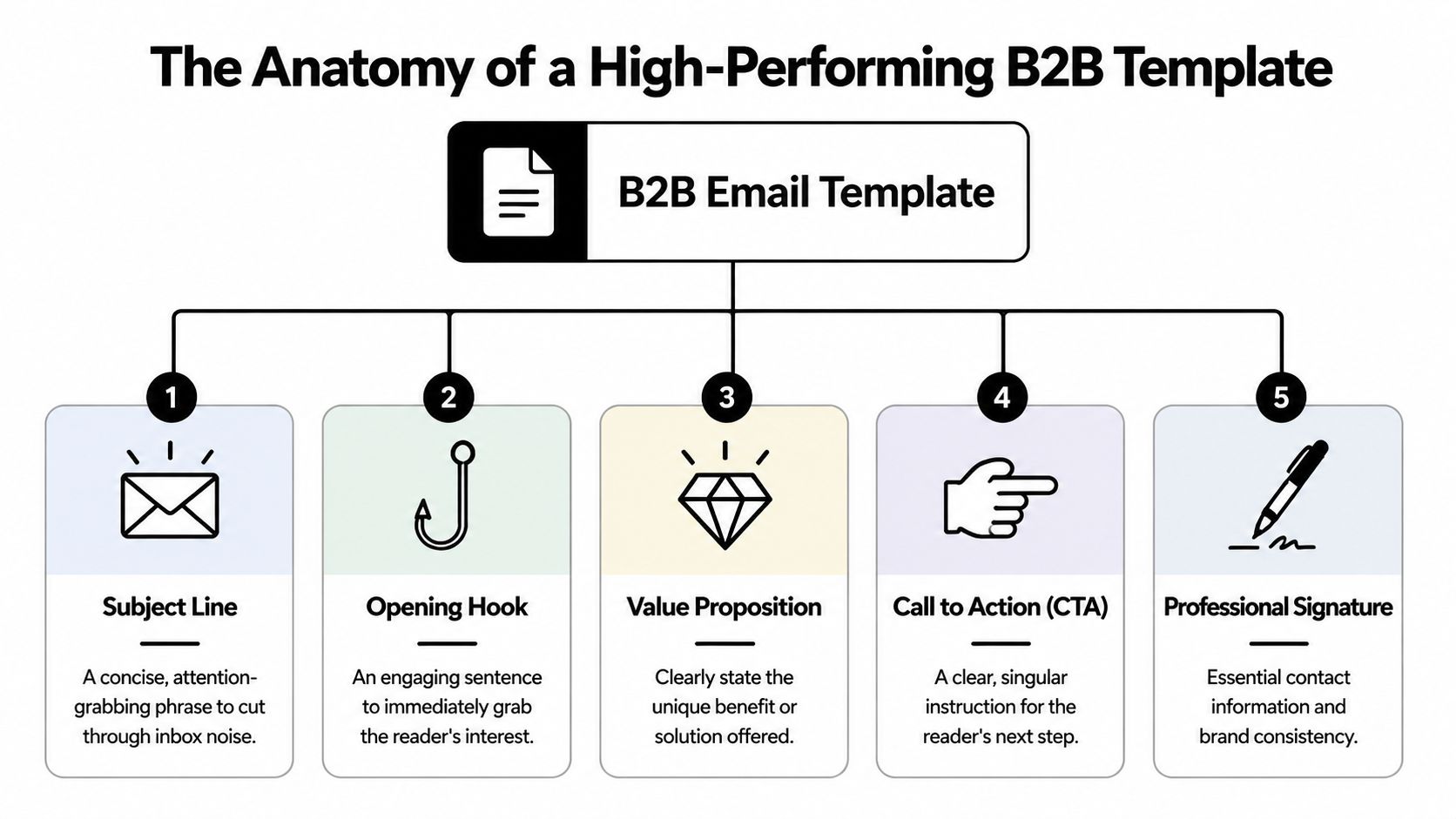
High-performing cold templates typically follow this anatomy:
-
Subject line The subject line sets context. It should signal relevance fast and avoid sounding like a promotion. Short, specific subjects usually hold up better than clever wording.
-
Opening hook The first line earns the next line. Use a real reason for the outreach: a hiring signal, a market shift, a role-based problem, or a credible observation about the account.
-
Value proposition Weak templates often lose the buyer at the value proposition stage. A good template connects one problem to one outcome. It does not list services, stack claims, or paste in a company overview.
-
Call to action Ask for one next step. One. Cold emails underperform when the sender asks for a meeting, offers to send more info, links to a case study, and drops a calendar link in the same message.
-
Professional signature Keep the signature clean. Name, title, company, and contact details are enough. Heavy banners, badges, and promotional footer elements add weight without adding trust.
Standardize the structure, not the wording
The mistake B2B marketing teams make is building one polished template and forcing every segment into it. That creates generic messaging fast. The better approach is to lock the frame and swap the inputs.
Use the same structural sequence each time:
-
Context: why this account, why now
-
Problem: the issue worth their attention
-
Outcome: the business result you help create
-
Proof: one credibility cue, if it helps
-
Ask: one low-friction next step
That structure gives reps room to personalize without improvising the whole email from scratch. If the team needs help tightening the offer before writing, this messaging framework for outbound campaigns is a useful starting point.
The reusable template we recommend for B2B campaigns
We recommend this reusable template for B2B campaigns:
-
Short subject line
-
One-line opener
-
Two short body paragraphs
-
Single CTA
-
Plain signature
That format works because it respects how buyers read cold email. They skim first, judge relevance second, and only then decide whether to reply. Long intros, dense blocks of copy, and branded formatting get in the way of that sequence.
One operational detail matters here too. Reps often write better first drafts by speaking them out loud, especially when they need natural phrasing instead of stiff sales copy. Tools that let you dictate in Gmail on any device can speed that process up, as long as the final message still gets edited for clarity and brevity.
A template is the delivery frame, not the pitch itself. Build it to support relevance, readability, and replies at scale.
Crafting Compelling Copy That Gets Replies
A clean structure gets the email opened and understood. Copy gets the reply.
Cold email copy fails when it sounds like a pitch deck pasted into Gmail. Buyers don’t reply because a message is “professional.” They reply because it feels relevant, low-friction, and worth answering.

Subject lines should create recognition, not hype
Personalized subject lines matter. A 2019 Litmus benchmark found that personalized subject lines generated 26% higher open rates, according to this review of custom email template practices. But personalization only works when it’s implemented cleanly. The same source notes that poor merge field handling can leave 15 to 20% of messages showing raw placeholders.
That means isn’t a strategy. It’s a risk if your process is sloppy.
Here are stronger subject line patterns for cold outreach:
-
Role relevance: “question about outbound at {{company}}”
-
Specific problem: “pipeline coverage for Q4”
-
Light curiosity: “saw your hiring push”
And here are weak ones:
-
Fake urgency: “important business opportunity”
-
Generic promise: “increase revenue fast”
-
Overfamiliar tone: “quick one for you”
If you want a deeper bank of patterns, this guide to best email subjects for sales is worth reviewing before you build your sequence.
The opening line must prove the email was meant for them
The first sentence should do one of three things:
-
reference a real business trigger
-
point to a role-specific challenge
-
connect your offer to a visible initiative
Weak opener:“Hope you’re doing well. I’m reaching out because we help businesses grow.”
Better opener:“Noticed your team is expanding partner sales, and that usually creates pressure to source meetings faster than internal reps can handle.”
The second version gives the reader a reason to continue. It also avoids the lazy personalization trap where the sender mentions a company name but says nothing meaningful.
Buyers don’t care that you found their website. They care whether you understand the job they’re trying to get done.
Use personalization tokens carefully
Tokens are useful for speed and segmentation. They’re dangerous when teams cram them everywhere.
Use tokens where they add natural specificity:
-
Name fields: a first name in the greeting is usually safe
-
Company fields: good in the subject line or opening line if the sentence still reads naturally
-
Role or industry fields: useful when the offer changes by segment
Avoid token overload in the body. Too many variables make the email feel stitched together. They also create QA headaches.
A practical workflow helps. Before any campaign goes live, send test emails to multiple internal inboxes across segments. Check whether every field resolves, whether spacing breaks around inserted values, and whether the message still sounds human when the token is replaced with a long company name.
For teams that draft lots of variations quickly, voice-first workflows can help you get more natural copy on the page. If you’re writing and refining directly in Gmail, this guide on how to dictate in Gmail on any device is useful for turning spoken phrasing into more conversational drafts.
Body copy should carry one argument
Strong cold email body copy isn’t long. It’s linear.
A simple format works:
-
Problem: name the friction the buyer likely feels
-
Outcome: show what improves if it’s solved
-
Credibility: include a brief proof cue if needed
-
CTA: ask for a small response
Example:
Hi Sarah, Saw your team is hiring across sales and partnerships. That usually means more pressure to keep qualified conversations flowing while internal reps ramp.We help B2B teams add outbound meeting volume without handing reps another tool to manage.Worth seeing if this could support your pipeline targets this quarter?
That CTA works because it isn’t trying to close the whole sale. It’s asking for permission to continue.
Calls to action that earn replies
Bad CTAs ask for too much. Good CTAs reduce effort.
Try these instead:
-
Soft interest check: “Open to a quick look?”
-
Fit check: “Worth exploring for your team?”
-
Directional question: “Should I send a few ideas customized for your market?”
Avoid the usual friction-heavy asks like “Do you have 30 minutes next week for a full demo?” in the first touch. Early-stage outbound needs replies, not perfect calendar conversions on the first email.
Nailing the Technical Setup and Deliverability
Cold email templates do not fail because they are too plain. They fail because the setup behind them tells mailbox providers they look automated, risky, or promotional.
That is the part many email template guides miss. Newsletter advice rewards design polish. B2B cold outreach rewards restraint, clean code, domain trust, and formatting that survives Gmail, Outlook, and mobile clients without picking up spam signals.
Plain text versus HTML in cold outreach
For outbound, plain text or plain-text-style HTML is the safer default.
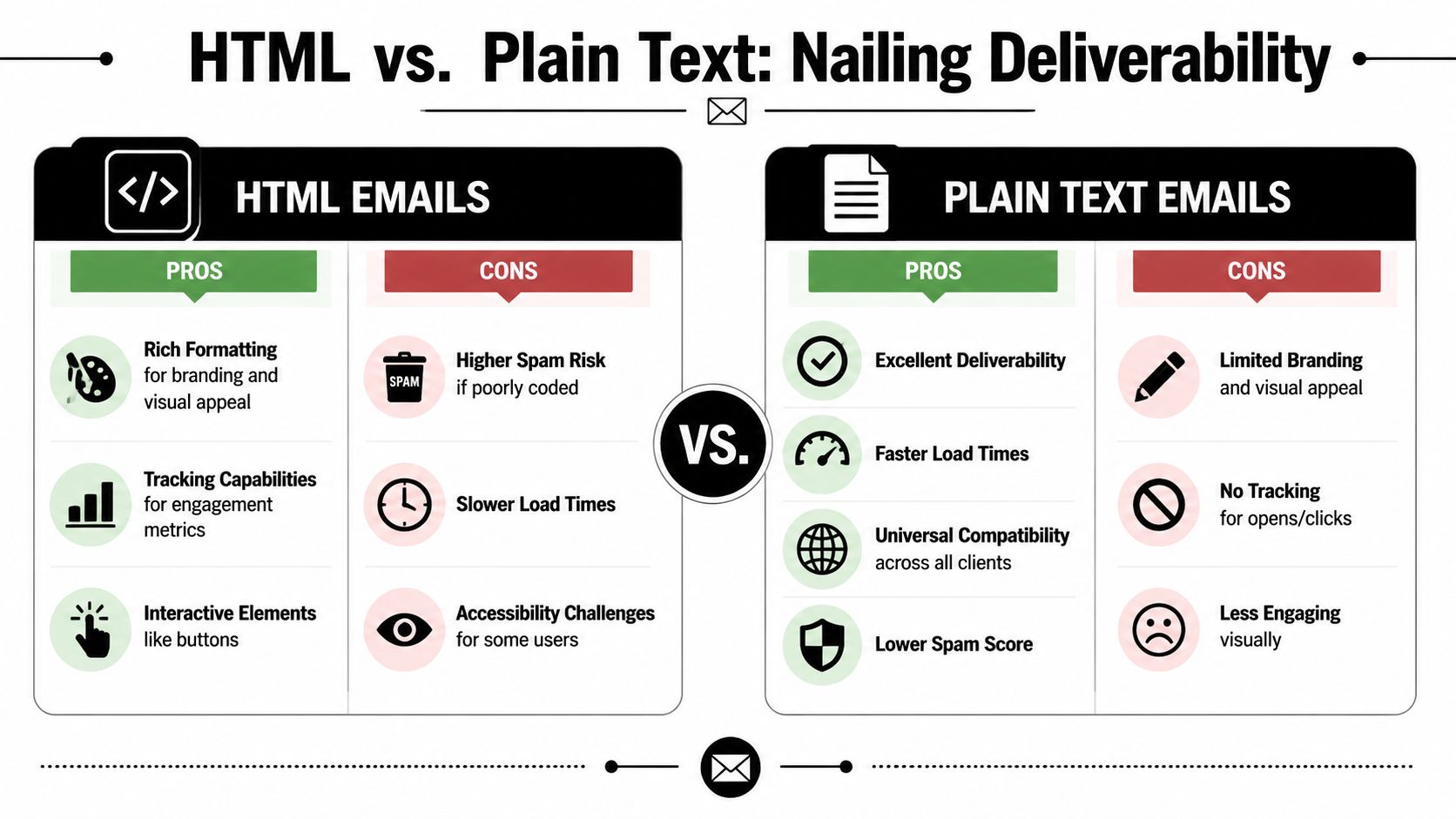
It looks like a real one-to-one message, loads cleanly, and gives filters less code to inspect. HTML still makes sense in some cases. Teams use it for signature control, link styling, legal footer consistency, or tighter formatting across reps. The trade-off is simple. Every extra visual element creates another chance for rendering issues, bloated markup, or a promotions-tab feel.
Here is the practical comparison:
| Factor | HTML Template | Plain-Text Template |
|---|---|---|
| Formatting control | Strong control over spacing, buttons, and layout | Minimal control, depends on email client |
| Deliverability risk | Higher if code is bloated or inconsistent | Usually safer for cold outreach |
| Branding | Easier to standardize visual identity | Very limited visual branding |
| Readability on mobile | Good when coded cleanly | Usually strong by default |
| Tracking options | More flexible | More limited |
| Maintenance | Requires QA across clients | Faster to write and test |
If you use HTML, keep it close to a personal email. One column. Minimal styling. No hero banners, divider-heavy layouts, or decorative blocks.
The coding rules that protect inbox placement
Deliverability-friendly templates are boring on purpose.
The safest standard is inline CSS, restrained formatting, and as little code as possible. Email clients strip styles unpredictably, and copied content from Google Docs, CRMs, or webpage builders often drags in messy markup that inflates HTML size. Large, cluttered emails are harder to render and easier to classify as bulk mail.
Use these rules:
-
Use inline CSS only. Many email clients ignore embedded or external styling.
-
Limit fonts and colors. A simple visual system reduces rendering problems and keeps the message from looking promotional.
-
Avoid JavaScript entirely. Email clients do not handle it reliably, and it adds risk without improving reply rates.
-
Keep images restrained. Outreach emails usually perform better when the message can stand on text alone.
-
Watch HTML weight. Heavy code, hidden formatting, and pasted content create unnecessary risk.
I have seen teams spend hours rewriting copy when the actual problem was a template exported from a design tool with bloated markup and five tracking links in the footer. The copy was fine. The template was the problem.
A separate issue is behavior. Sending practices, language patterns, and domain setup affect placement as much as design does. Before you scale, review the Thareja AI spam policies and make sure your team is following the same rules on claims, link usage, and volume.
Domain setup matters as much as the template
A clean template cannot rescue a poorly configured sending domain.
If SPF, DKIM, and DMARC are misconfigured, mailbox providers have less reason to trust your messages, especially at cold outbound volume. The same applies if you send from a fresh domain with no warm-up history, route campaigns through overloaded shared infrastructure, or rotate too many inboxes without monitoring reputation. For a practical setup guide, review these email authentication protocols for cold outreach.
Template work and infrastructure work belong together. At Fypion, we treat them as one system because inbox placement problems rarely come from a single cause.
Mobile and accessibility need QA, not assumptions
A cold email has to read cleanly on a phone. That includes line breaks, signature length, link spacing, and whether the first screen shows the actual message instead of a giant branded header.
If you use buttons or linked images, test them on mobile and in Outlook before launch. Designmodo’s guidance on mobile-friendly email formatting and touch target sizing is a useful reference point for layout decisions, especially when a team insists on adding visual elements to outbound templates.
This walkthrough is useful if you’re training a team on what clean formatting looks like in practice:
Accessibility also affects performance. Descriptive links, readable contrast, alt text, and a logical reading order reduce friction for real users and lower the odds of weird rendering across clients.
What usually hurts deliverability
Common failure points in broken campaigns include:
-
Overdesigned headers. They push the actual message below the fold and make the email look mass produced.
-
Heavy signatures. Logos, badges, social icons, and link stacks add promotional signals without helping reply rates.
-
Nested formatting junk. Content pasted from docs, webpages, or CMS editors bloats HTML fast.
-
Too many sections. Every extra block creates more rendering risk and more visual distance from a normal business email.
-
Link overload. Multiple CTAs, calendar links, case study links, and footer links can make a cold email look like marketing automation.
-
Tracking on everything. Open tracking, redirect links, and layered sales-engagement tags can create trust and deliverability issues if you overdo them.
The best-performing cold email templates usually look plain in the editor. That is often a sign that the setup is doing its job.
Real-World Examples and Copy-Ready Templates
Most guides stop at principles. In practice, teams need templates they can adapt without breaking tone, personalization, or deliverability. That’s where cold outreach gets harder than newsletter design.
A big gap in the usual advice is scale. Many resources don’t show how to create templates that can handle dynamic personalization without wrecking layout or trust. This problem is called out in Ometria’s image and template best-practice context, especially for outreach workflows that rely on reusable structures.
Template for a C-level prospect
Subject: quick question about pipeline coverage
Hi {{first_name}},
Reaching out because leaders in {{industry}} often hit a gap between revenue targets and the number of qualified conversations reps can create consistently.
We help teams add outbound meeting volume with messaging and targeting built for cold outreach, not newsletter-style campaigns.
Would it be unreasonable to compare notes on whether that could support {{company}} this quarter?
Best, {{sender_name}}
Why it works:
-
The opener speaks to executive pressure, not tactical features.
-
The middle stays outcome-focused.
-
The CTA is low-friction and doesn’t force a calendar commitment.
Template after a LinkedIn connection or event touchpoint
Subject: good connecting
Hi {{first_name}},
Good connecting recently.
You mentioned that {{pain_point}} is a current focus. That stood out because a lot of teams solve the top-of-funnel problem with more tools, but the core issue is usually message-market fit inside the outreach itself.
If useful, I can send over a few outbound angles that tend to resonate with {{role}} teams.
Best, {{sender_name}}
This version works because it uses light familiarity without pretending there’s a close relationship. It also offers value in the form of ideas, which is often easier to accept than a meeting request.
Keep follow-up templates slightly looser in tone. The prior interaction has already done some of the trust-building work.
Template for an industry pain-point angle
Subject: outbound for {{industry}} teams
Hi {{first_name}},
A common issue in {{industry}} is that sales teams burn time on outbound that looks personalized but still reads like mass email.
That usually leads to low reply quality, not just low volume.
We’ve found that simpler templates, tighter segmentation, and cleaner copy tend to produce better sales conversations than heavily branded sequences.
Interested in seeing a few examples specific to {{company}}?
Best, {{sender_name}}
This template works when you’re targeting a vertical with a clear communication problem. It avoids broad claims and focuses on a known operational pain point.
How to adapt these without ruining them
The easiest way to destroy a good template is to over-customize every line. Keep the structure fixed and swap only the parts that matter:
-
Change the opener by segment or trigger
-
Change the problem statement by role
-
Change the CTA by traffic temperature
-
Leave the core body intact unless testing shows a reason to revise it
If you need more formats to work from, a collection of best cold email template examples can speed up campaign buildout. Use them as scaffolding, not scripts.
A Framework for Testing and Optimizing Your Templates
Cold email templates usually fail for boring reasons. The team changed five things at once, sent to a mixed list, then called the result a copy test.
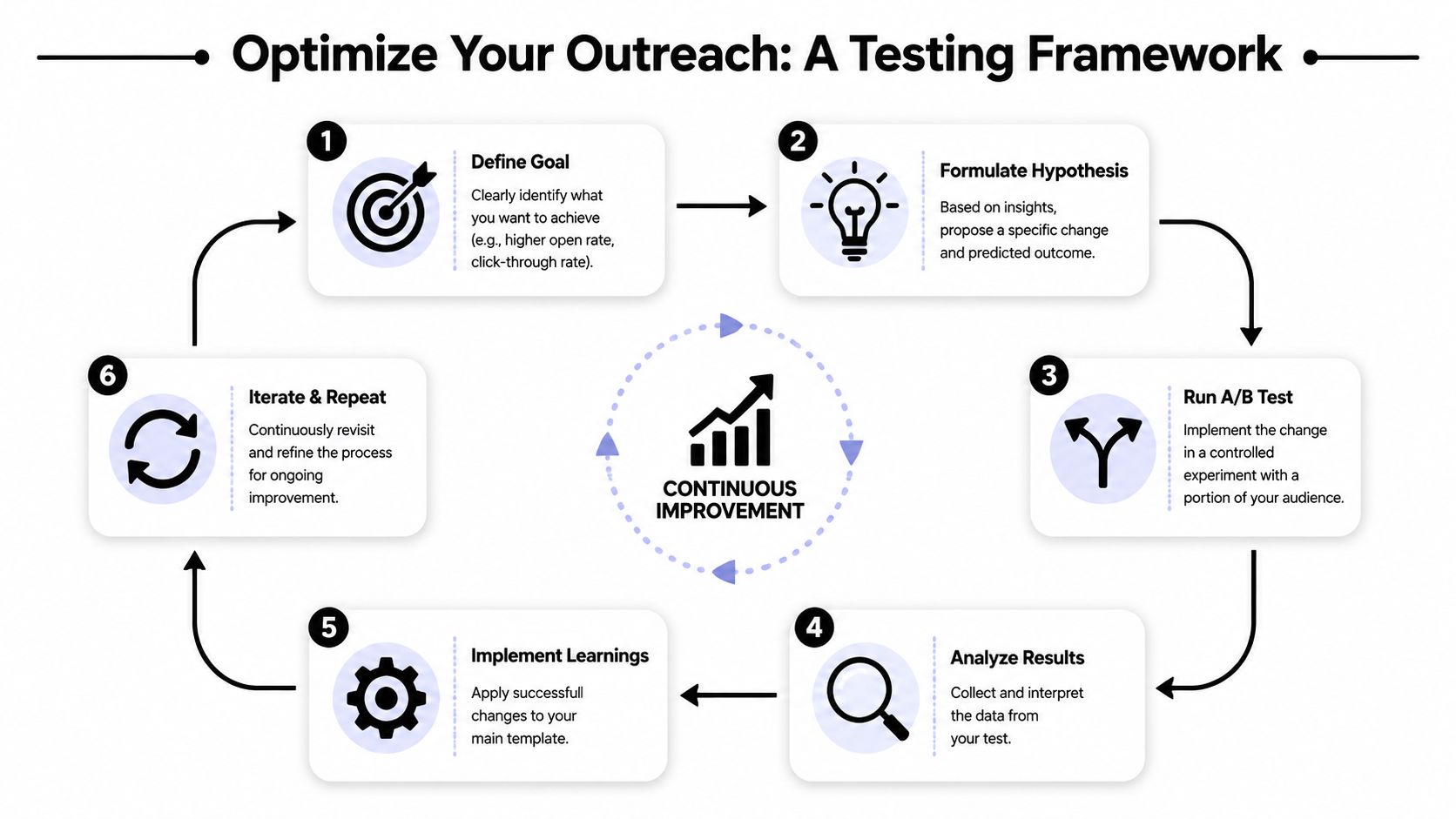
Useful optimization starts with control. A template is only testable when the audience, sending setup, and offer stay stable enough to isolate what changed.
Test one variable at a time
For B2B cold outreach, run tests in a fixed order. Start with the factor closest to the problem you are trying to solve.
-
Choose one goal Match the metric to the part of the email under review. Subject lines influence opens. The body influences replies. The CTA influences positive replies and meetings booked.
-
Change one element Test subject line against subject line, opener against opener, or CTA against CTA. If you rewrite the whole message, you will not know what produced the result.
-
Keep the audience consistent Send both versions to the same type of prospect, at the same seniority, in the same market. If one variant goes to VC-backed SaaS founders and the other goes to manufacturing sales leaders, the comparison is useless.
-
Judge quality before volume A template that lifts opens but attracts low-intent replies is not an improvement. “Send details” from poor-fit accounts can look good in a dashboard and still waste the sales team’s time.
Track the metrics that map to revenue
Open rate gets too much attention in outbound because it is visible and easy to compare. It is a directional metric, not a decision metric.
Use this hierarchy instead:
-
Inbox placement and bounce trends to catch infrastructure or list issues
-
Open rate to compare subject line direction
-
Reply rate to measure message relevance
-
Positive reply rate to filter out noise
-
Meeting rate to see whether the template creates pipeline, not just activity
If your team mixes these up, this breakdown of click-through rate vs open rate in email marketing is a useful reference point. Cold outreach lives and dies on replies and meetings, but the earlier metrics still help diagnose where the sequence is breaking.
Use a weekly optimization loop
The simplest review cadence works well because it forces restraint.
-
Monday: review results by segment, mailbox, and step in sequence
-
Tuesday or Wednesday: rewrite the weakest single variable
-
Friday: QA personalization logic, links, formatting, and suppression rules before the next batch goes live
This rhythm prevents random rewriting. I have seen teams scrap an entire sequence after one weak week, when the actual issue was a bad segment, a burned mailbox, or a CTA that asked for a 30-minute call too early.
Use a layer-by-layer order for decisions:
-
Audience fit
-
Subject line
-
Opener
-
Offer
-
CTA
That order matters. If the segment is wrong, better copy will not rescue it. If the targeting is right and replies are still weak, the opener or offer is usually where to look next.
The best outbound teams do not guess better. They run cleaner tests, protect deliverability while testing, and keep improving the parts of the template that impact booked meetings.
From Templates to a Predictable Sales Pipeline
Learning how to create email templates isn’t about saving time in Gmail. It’s about building a repeatable outbound system that can produce qualified conversations without reinventing the message every week.
The strongest templates do three things well. They make the email easy to read. They make the message easy to trust. They make the next step easy to take. Everything else is secondary.
Most underperforming cold outreach has the same root problem. The team treats templates as a writing shortcut instead of an operating standard. Good templates aren’t generic copy blocks. They’re controlled assets built for segmentation, testing, and deliverability.
That discipline is what turns outbound from random activity into pipeline infrastructure. When the structure is stable, the copy is relevant, and the technical setup is clean, you can scale with fewer surprises and better meeting quality.
If you want a team that handles the research, infrastructure, copy, testing, and optimization for cold outreach, Fypion Marketing helps B2B companies build predictable meeting flow with a performance-driven model centered on qualified booked meetings.