
Email Authentication Protocols: A Guide for B2B Marketers
You wrote a strong cold email sequence. The targeting is tight, the offer is clear, and the copy sounds human. Then the campaign underperforms for a reason often overlooked at first. The problem isn’t the message. The problem is that mailbox providers don’t fully trust the domain behind it.
That happens constantly in B2B outreach. Agencies spin up new inboxes, SaaS teams add a sequencing tool, marketing adds a newsletter platform, and sales ops connects a CRM. Mail starts flowing from several systems at once, but nobody steps back to verify whether the domain is authenticated correctly across all of them. Messages still send. They just don’t earn consistent inbox placement.
Email authentication protocols fix that. They give receiving mail systems a way to verify that your domain authorized the message, that the content wasn’t altered in transit, and that failures should be handled according to your policy. For cold outreach, that isn’t just a security project. It’s part of revenue infrastructure.
Your Foundation for Reaching the Inbox
A familiar outreach failure looks like this. A team launches from a fresh sending domain, connects Google Workspace, adds a cold email platform, and starts booking almost nothing. The instinct is to rewrite copy, rotate subject lines, or blame the list.
Sometimes the copy does need work. But a surprising amount of cold email underperformance starts lower in the stack. The domain is missing one record, DKIM was never enabled on a secondary tool, or DMARC exists but no one is reading the reports. The campaign doesn’t crash dramatically. It just leaks performance through spam placement, silent filtering, and inconsistent trust.
That is why email authentication protocols matter so much in outreach. They aren’t abstract IT work. They are the foundation that determines whether your sales message gets a fair chance to compete in the inbox at all.
If you’re troubleshooting poor inbox placement, resources like EmailScout’s deliverability advice can help you pressure-test the non-copy side of performance. The same goes for operational support around email deliverability services, especially when several sending tools are involved.
What this looks like in practice
Cold outreach lives or dies on predictability. You need replies from real prospects, not random swings caused by technical misconfiguration.
Teams usually notice authentication issues through symptoms such as:
-
Messages landing inconsistently: One mailbox provider accepts your mail while another pushes similar sends into spam.
-
New inboxes struggling to ramp: The domain looks valid to you, but the receiving system doesn’t see enough proof of legitimacy.
-
Third-party tools breaking trust: A CRM or sales platform sends on your behalf without proper alignment.
Practical rule: If your outreach stack includes more than one sender, authentication is no longer a one-time DNS task. It’s an ongoing control system.
Marketers often want deliverability to be a copy problem because copy is easier to change. But when the domain isn’t trusted, better copy won’t rescue the campaign. Authentication comes first.
Why Email Authentication Is Now Non-Negotiable

Mailbox providers changed the standard. In 2024, Gmail, Yahoo Mail, and Microsoft began requiring bulk senders to use email authentication, and by 2025 guidance for high-volume senders was to use all three core methods, SPF, DKIM, and DMARC according to Email on Acid’s explanation of authentication requirements. For senders that rely on outreach, that means deliverability now depends on correctly publishing and aligning DNS records.
This is the shift. Authentication used to be framed as a best practice. Now it’s part of basic operational fitness for anyone sending at scale.
Why mailbox providers care
Providers aren’t trying to make life harder for marketers. They’re trying to stop spoofing, phishing, and abuse on systems that process enormous volumes of mail. If your domain doesn’t present clear proof of authorization and identity, your legitimate campaign starts to resemble the same pattern bad actors use.
For B2B senders, this changes the job. A working SMTP path isn’t enough anymore. You need to prove:
-
Who is allowed to send: That is the authorization layer.
-
Whether the message stayed intact: That is the integrity layer.
-
How failures should be handled: That is the policy layer.
Without those controls, even good outbound programs become fragile. If you need a broader playbook for preventing placement issues, this guide on how to avoid the spam folder pairs well with authentication work.
What non-negotiable really means
It means you shouldn’t treat authentication as a launch checklist item that gets ignored after setup.
It also means outreach teams need to stop separating deliverability from security. In practice, they’re linked. A domain that can be easily impersonated is also a domain that mailbox providers trust less. A domain with incomplete DNS alignment sends mixed signals. Mixed signals lead to poor placement.
Your cold email program is only as strong as the weakest sender touching your domain.
This is especially true in B2B organizations where sales, marketing, customer success, and automation tools all send under the same brand. Authentication isn’t optional because the ecosystem no longer tolerates ambiguity from serious senders.
The Core Trio SPF DKIM and DMARC Explained
At the center of modern email authentication protocols are SPF, DKIM, and DMARC. Together, they let receiving systems verify who sent a message, whether the message was altered in transit, and what to do if authentication fails, as outlined in Texas A&M’s overview of email security protocols.
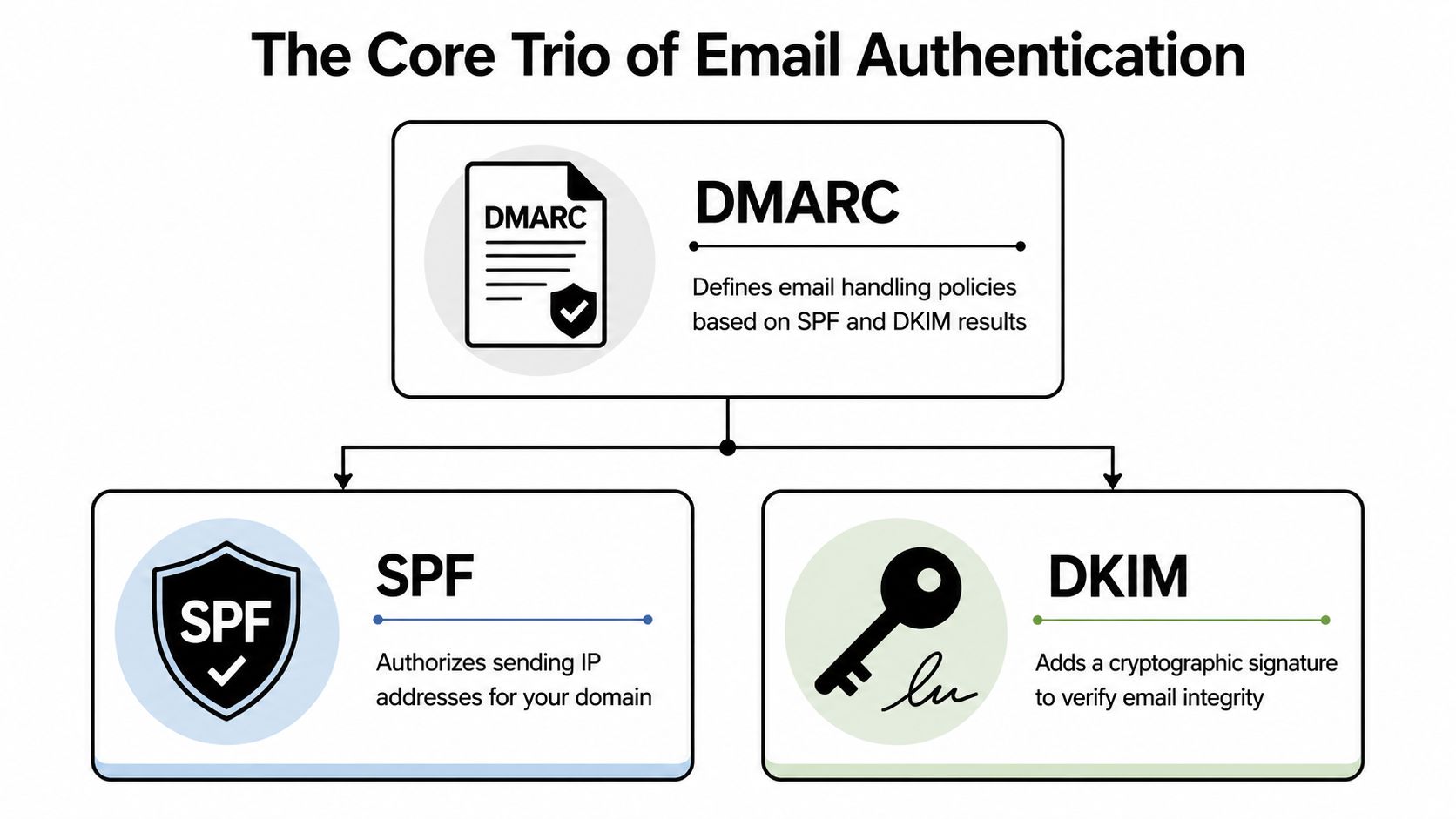
The easiest way to understand them is as an interlocking system, not three unrelated acronyms.
SPF is your authorized sender list
SPF tells the world which servers or services are allowed to send mail for your domain.
Think of it as the guest list at the door. If Google Workspace, your CRM, and your outreach platform are valid senders, SPF is the record that says those senders are approved. When a receiving server gets your message, it checks whether the sending source appears on that published list.
That matters in outreach because teams often add tools faster than they update DNS. The domain owner assumes the tool is configured because the tool can send. The receiving server sees something different. It sees a sender that may not have been authorized properly.
SPF is useful, but on its own it isn’t enough. It says who may send. It does not tell the receiver whether the visible message identity was protected in a way that survives every mail path.
DKIM is your tamper-evident seal
DKIM adds a digital signature to the message. That signature allows the receiving system to verify that the message was associated with your domain and that key parts of it were not altered in transit.
The physical analogy is a sealed envelope with a verifiable stamp. If the message arrives with the seal intact and the public key in DNS matches, the receiver gains confidence that the message is legitimate and unchanged.
For B2B marketers, DKIM does two practical things:
-
It strengthens identity validation: Your mail isn’t just coming from an approved source. It is cryptographically tied to the sending domain.
-
It reduces breakage in common mail flows: DKIM often holds up better than SPF in situations where mail gets relayed or passed through other systems.
If you’re setting up outreach infrastructure from scratch, a technical walkthrough like these step-by-step instructions for cold email setup helps connect the theory to real platform configuration.
DMARC is your policy and reporting layer
DMARC sits on top of SPF and DKIM. It tells receiving systems how to evaluate authentication results and what action to take if the message fails the checks defined by your policy.
This is the part many marketers underestimate. DMARC doesn’t just add protection. It also gives you reporting, which means you can see where mail is failing, where unauthorized sources may be attempting to use your domain, and whether your legitimate tools are aligned correctly.
A simple way to understand it:
| Protocol | What it answers | Why marketers care |
|---|---|---|
| SPF | Is this sender allowed? | Prevents unauthorized sending sources from claiming your domain |
| DKIM | Was this message signed and kept intact? | Adds trust to the message itself |
| DMARC | What should happen if checks fail? | Gives control, visibility, and anti-spoofing enforcement |
Why they work best together
Each protocol covers a different gap. SPF alone is incomplete. DKIM alone is incomplete. DMARC without solid SPF and DKIM underneath is mostly policy without dependable signals.
That is why experienced deliverability teams treat these as a stack:
-
SPF authorizes
-
DKIM signs
-
DMARC governs
For a marketer trying to improve campaign performance, this matters because mailbox providers don’t evaluate your message in the same simplified way a sending tool dashboard does. They assess the trustworthiness of the domain and message path as a whole.
If you want another practical walkthrough aimed at marketers, ReachInbox has a useful guide on mastering email deliverability that explains how these records work in live sending environments.
The mistake isn’t failing one protocol. It’s assuming one protocol can stand in for the others.
Building Your Authentication Stack A Step-by-Step Sequence
Most authentication problems don’t come from bad intentions. They come from bad rollout order. A team publishes one record, skips validation, enforces DMARC too early, and suddenly legitimate mail starts failing.
The safer path is sequential. Build the stack in the order that reduces risk and gives you visibility before enforcement.
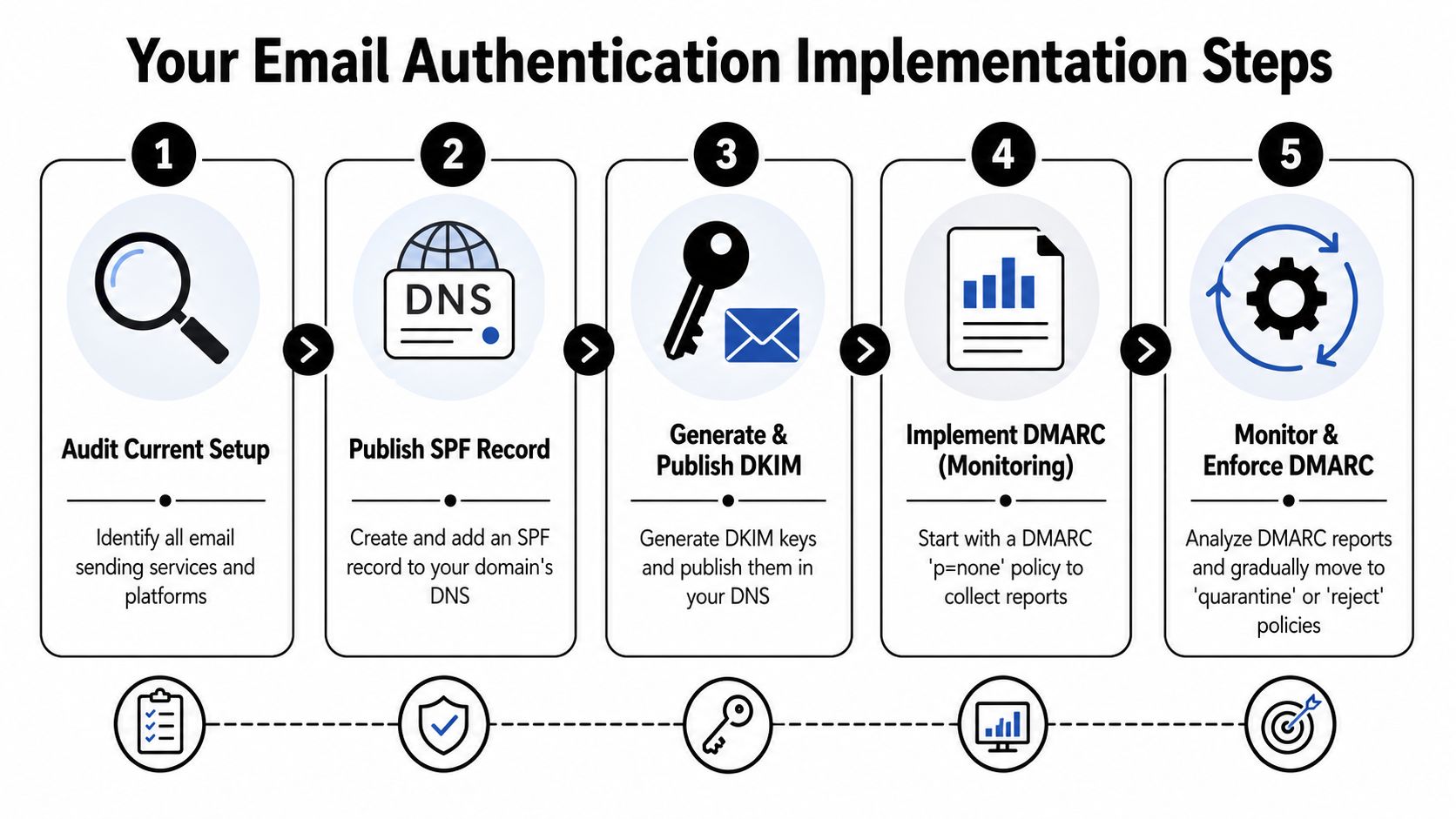
Start with an audit before you publish anything
Before touching DNS, list every service that can send mail using your brand.
That usually includes your mailbox provider, outreach platform, CRM, marketing automation tool, support platform, and any product notifications. Many domains fail authentication because one “minor” sender was forgotten.
Use this stage to answer a few basic questions:
-
Which domains and subdomains send mail today
-
Which vendors sign with DKIM and which rely on your setup
-
Which domain appears in the visible From line for each workflow
If you’re still building the sending environment, this guide to cold email infrastructure for high deliverability is a useful companion to the authentication sequence.
Publish SPF with restraint
Once you know your valid senders, create a single SPF record that reflects them clearly.
The discipline here is restraint. SPF is not the place to dump every service you’ve ever tested. It should reflect approved senders only. If an old platform is no longer used, remove it from your governance process and from the authentication plan.
A clean SPF record helps in two ways:
-
It reduces ambiguity: Fewer authorized senders means fewer trust questions.
-
It makes troubleshooting easier: When a failure appears, you can track it faster.
Enable DKIM on every active sender
After SPF, configure DKIM for each platform that sends mail on your behalf.
Many B2B stacks get messy. Google Workspace may be signed correctly, but the outreach platform isn’t. Or the CRM signs mail using a different domain than the one shown to recipients. One platform looks healthy in isolation, while the total system is not.
Treat DKIM as mandatory for every approved sender. If a vendor can’t support proper signing for your use case, that’s not just a technical inconvenience. It’s a risk to your outreach consistency.
Add DMARC in monitoring mode first
The safest first DMARC policy is . That lets you collect reports and inspect what is happening before you tell receiving systems to quarantine or reject failures.
This step matters because DMARC depends on alignment between the visible From domain and the domains authenticated by SPF and or DKIM. Microsoft notes that if alignment fails, DMARC can still quarantine or reject the message even when one underlying check passes, as explained in Microsoft’s documentation on email authentication and alignment.
That single point causes more confusion than almost anything else in authentication. Teams see an SPF pass or DKIM pass in a dashboard and assume they’re safe. DMARC may still fail if the domain relationship doesn’t line up properly.
Field note: Don’t move to enforcement because one test email passed. Move when reports show that your real sending ecosystem is aligned.
Enforce gradually after report review
Once monitoring shows that legitimate senders are authenticating and aligning consistently, then you can decide whether to move to a stronger DMARC policy.
A practical progression looks like this:
-
Monitoring first: Confirm who is sending and where failures come from.
-
Fix alignment issues: Resolve mismatches across platforms, subdomains, and visible From domains.
-
Tighten policy carefully: Move toward quarantine or reject only after valid mail is accounted for.
For outreach teams, the biggest mistake is rushing this last stage. DMARC enforcement is powerful because it blocks abuse, but it can also block your own mail if your implementation is incomplete. Good authentication work is conservative at the start and strict at the end.
Advanced Protocols for Maximum Trust BIMI and MTA-STS
Once the core stack is stable, some senders want more than basic acceptance. They want stronger trust signals and better control over how mail is transported. That is where BIMI and MTA-STS become interesting.
These aren’t replacements for SPF, DKIM, and DMARC. They are benefits you pursue after the basics are working reliably.
BIMI turns trust into visible brand presence
BIMI lets qualified senders display a brand logo in supported inbox environments. In practical terms, it turns strong authentication into a visible trust signal.
That matters more than many marketers assume. In a crowded inbox, recognizable branding can reinforce legitimacy before the recipient even opens the message. It is one of the few deliverability-adjacent controls that also affects perception at the point of attention.
There is also a strategic angle here. Adoption remains limited. About 80 to 85% of domains have SPF, only 20 to 25% publish DMARC records, and BIMI adoption is around 1 to 2%, according to Abusix’s summary of SPF, DKIM, DMARC, and BIMI adoption. That makes BIMI a meaningful differentiator for brands that are mature enough to support it.
MTA-STS protects the transport path
Where BIMI improves trust presentation, MTA-STS strengthens transport security. Its job is to help enforce encrypted transport between mail systems and reduce the risk of downgrade or interception problems during delivery.
For B2B senders, this usually matters most in environments where security expectations are high. Think SaaS companies selling into regulated industries, agencies handling sensitive client communications, or organizations that want tighter control beyond basic sender verification.
A practical way to think about the difference:
| Protocol | Primary role | Best fit |
|---|---|---|
| BIMI | Inbox trust and brand visibility | Brands with mature DMARC enforcement |
| MTA-STS | Secure transport expectations | Organizations raising email security posture |
When to prioritize these protocols
Not every outreach program should chase these immediately.
Prioritize them when the following are true:
-
Your core authentication is stable: No unresolved alignment gaps across major senders.
-
Your domain governance is mature: You know who sends, from where, and under which subdomain.
-
Your brand and security goals justify the effort: You want both stronger trust signals and stronger transport hygiene.
The operational lesson is simple. Advanced email authentication protocols pay off when they sit on top of a clean foundation. If your DMARC implementation is still in troubleshooting mode, finish that first.
Managing Authentication Across Multiple Sending Tools
The clean, textbook version of authentication assumes one sender, one domain, one path. Real B2B stacks don’t look like that.
A typical team may send from Google Workspace, HubSpot, Salesforce, a sequencing platform, a support desk, billing software, and a product notification system. Every one of those tools can affect domain trust. Some send from the root domain. Others use subdomains. Some support flexible DKIM setup. Others make assumptions that clash with your policy.
That is why authentication becomes an operations problem long before it becomes a DNS problem.
Build a sender inventory and keep it current
Proofpoint recommends inventorying all third-party senders, protecting all domains and subdomains, and checking SPF and DKIM alignment regularly, as described in Proofpoint’s guidance on email authentication governance.
That recommendation sounds simple, but it is the difference between stable outreach and recurring mystery failures.
A useful inventory should track:
-
Platform name: Google Workspace, HubSpot, Salesforce, Outreach, Customer.io, Zendesk, and similar tools.
-
Sending purpose: Cold outreach, newsletter, transactional, support, invoicing, or product alerts.
-
Domain or subdomain used: Root domain, outreach subdomain, marketing subdomain, support subdomain.
-
Authentication owner: The person or team responsible for DNS and vendor setup.
When teams skip this, they usually discover hidden senders only after DMARC reports expose them.
Use governance, not one-time setup
The common failure pattern is this. A domain is authenticated properly in January. In March, marketing adds a webinar tool. In May, sales tests a new outbound platform. In June, customer success enables a survey product. Nobody updates the sender inventory, and DNS drifts away from reality.
That is why governance matters more than heroic troubleshooting.
A workable governance rhythm includes:
-
Approval before new tools send mail
-
Authentication review during onboarding
-
Regular alignment checks across active senders
-
Retirement of unused vendors and old subdomains
If a tool can send as your brand, it belongs in your authentication review before it belongs in your stack.
Handle complexity with separation
One of the smartest operational choices in outreach is separation by function. Use distinct sending domains or subdomains for cold outbound, lifecycle marketing, support, and transactional traffic where appropriate.
That doesn’t eliminate the need for alignment. It does reduce blast radius. If one stream runs into trouble, it is less likely to contaminate another. It also makes reporting easier to interpret because each domain has a clearer purpose.
For agencies and SaaS teams, email authentication protocols become strategic. They are not just controls that satisfy mailbox providers. They are the framework that lets multiple tools send under your brand without creating chaos.
Your Cold Outreach Authentication Checklist
The fastest way to audit a sending setup is to stop thinking about authentication as three records and start thinking about it as one operating system. If any major sender sits outside that system, your outreach becomes less predictable.
Use this checklist as a working standard for every cold outreach domain.
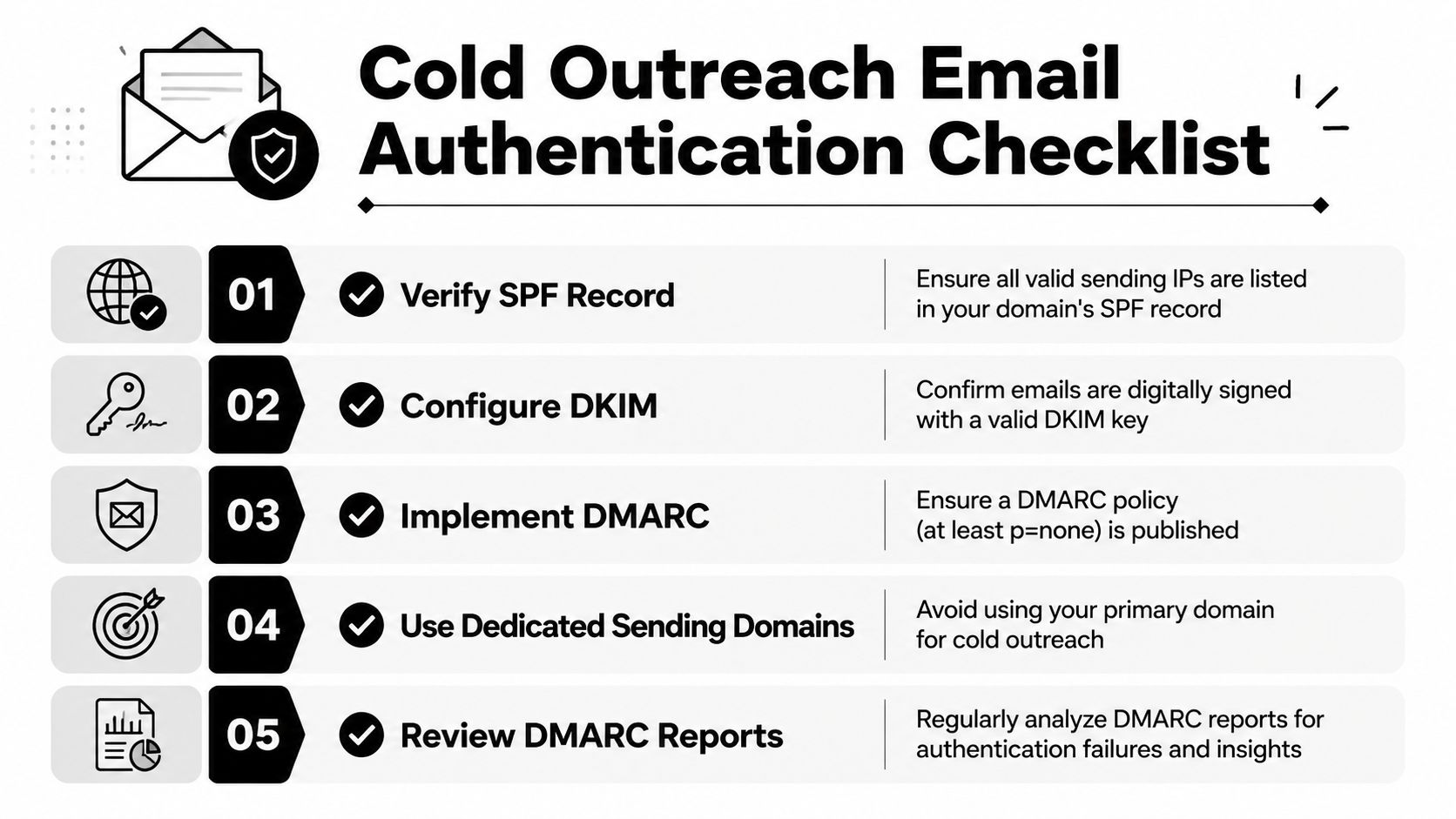
Core checks before you send
-
Audit all senders: List every platform, mailbox, and workflow that sends using your brand domain or subdomains.
-
Verify SPF coverage: Make sure approved senders are represented cleanly and that outdated services are removed.
-
Confirm DKIM signing: Check that each active provider signs mail correctly for the domain you intend to use.
-
Publish DMARC in monitoring mode: Start with visibility, not punishment, until your environment is understood.
-
Review alignment, not just passes: A green light on one protocol doesn’t guarantee DMARC success.
Ongoing checks after launch
-
Watch DMARC reports regularly: They reveal unauthorized sources, forgotten tools, and domain mismatches.
-
Separate traffic types: Keep cold outreach distinct from core business email where possible.
-
Review changes before rollout: Any new email tool should trigger an authentication review.
-
Protect compliance alongside deliverability: Cold outreach still needs operational discipline beyond authentication, including legal basics such as CAN-SPAM compliance.
Strong outreach domains don’t happen by accident. Someone owns the records, the reports, and the rules for every sender.
If you adopt that mindset, email authentication protocols stop feeling like technical overhead. They become part of the sales engine.
If you want a team that can build and manage the full cold email system, from infrastructure and authentication to copy, targeting, and booked meetings, Fypion Marketing is worth a look. They specialize in B2B cold outreach and operate on a performance-based model, which makes them a strong fit for companies that want pipeline growth without taking on the full technical and operational load internally.