
Mastering B2b Lead Generation Linkedin in 2026
A familiar problem shows up in almost every B2B team using LinkedIn right now. Reps are posting when they can, sending connection requests in bursts, running a few ads, and getting some replies, but the pipeline still feels uneven. One week looks promising. The next week is quiet. The leads that do come in often stall before they become real sales conversations.
That usually happens because LinkedIn is being treated like a complete lead generation system when it’s better used as part of one. Typically, LinkedIn works best at the top of the funnel. It gets you seen by the right buyers, starts conversations, and creates familiarity. Then a stronger sales motion, often email, CRM-based follow-up, and a clear qualification process, carries that attention into booked meetings.
The Modern B2B Lead Generation Challenge
Teams often don’t have a traffic problem on LinkedIn. They have a conversion design problem.
A founder posts thoughtful content and gets likes from peers instead of buyers. An SDR sends connection requests and gets accepted, but the follow-up messages go nowhere. A marketing team launches lead forms and celebrates volume, then sales says the meetings aren’t qualified enough. None of that means LinkedIn is broken. It means the channel is being used without a system.
The reason teams keep coming back to LinkedIn is simple. It remains the strongest social platform for B2B demand generation. About 80% of B2B social media leads come from LinkedIn, 89% of B2B marketers use it for lead generation, and its visitor-to-lead conversion rate is 2.74% according to Brenton Way’s LinkedIn marketing stats roundup. That combination is why serious B2B teams don’t treat LinkedIn as a side channel.
What trips people up is how they interpret that data. They assume more activity on LinkedIn automatically means more revenue. It doesn’t. Activity only matters when it moves a prospect into a repeatable sales process.
What usually goes wrong
-
Profiles look credible but not persuasive. Buyers visit, but they don’t quickly understand who you help and why they should reply.
-
Targeting is too broad. Teams chase anyone with the right title instead of narrowing to companies and situations that do buy.
-
Outreach starts cold and stays cold. There is no warm-up through content, comments, or relevant context.
-
Lead capture gets disconnected from follow-up. Interest exists, but nobody acts on it quickly enough.
Practical rule: If LinkedIn activity isn’t producing qualified conversations that can be handed to sales cleanly, the issue usually isn’t the platform. It’s the workflow around it.
The teams getting the most from B2B lead generation on LinkedIn are doing something more disciplined. They use LinkedIn to identify the right accounts, warm the prospect, create a reason to engage, and then move that prospect into a structured handoff. That’s where the rest of the playbook matters.
Foundation First Optimizing Your LinkedIn Presence
Before outreach, your profile has to do one job well. It has to answer a buyer’s silent question: “Why should I take this person seriously?”
Too many people still build LinkedIn like a resume. That approach wastes high-intent traffic. When a prospect clicks from your comment, ad, or message, your profile is functioning as a landing page.
LinkedIn’s audience is massive, with the platform approaching 1.3 billion members, and one recent industry source reports that leads from LinkedIn close at a 33% higher rate. That’s a strong reason to make profile positioning a revenue task, not a personal branding exercise, as summarized by Digital Applied’s 2026 LinkedIn statistics for B2B marketing.
Fix the above-the-fold section first
A buyer decides fast whether to keep reading. The top of the profile needs to carry most of the load.
-
Profile photo: Use a clear professional photo. Not overly polished, not casual.
-
Banner: Show the market you serve, the problem you solve, or the offer you want associated with your name.
-
Headline: Write for the buyer, not your ego. “Founder at X” says almost nothing. “Helping SaaS teams book qualified demos through outbound systems” says far more.
A strong headline usually includes three things:
-
Who you help
-
What result you help create
-
The channel or expertise you use
Write the About section like sales copy
The About section should sound like a sharp intro on a discovery call. It doesn’t need buzzwords. It needs clarity.
A simple structure works well:
| Section | What to say |
|---|---|
| Who you help | Name the audience as specifically as possible |
| Problem | State the pain they already recognize |
| Approach | Explain how you solve it in plain language |
| Proof assets | Mention resources, frameworks, or examples without inventing metrics |
| Call to action | Tell them what to do next |
For founders who struggle to post consistently after optimizing the profile, this playbook for busy founders is useful because it turns LinkedIn from a vague habit into a practical publishing rhythm.
Your Featured section matters too. Put the assets there that remove friction for the next step. That could be a case-study-style breakdown, a useful lead magnet, a short teardown, or a booking page.
Company pages should support the rep, not replace them
Company pages rarely close the deal on their own. They work better as credibility support.
Use the page to reinforce the same story your reps and founders are telling:
-
what market you serve
-
what pain you solve
-
what category you operate in
-
what kind of content buyers can expect
If you’re evaluating outside support, this overview of LinkedIn marketing agencies helps frame the different ways teams outsource strategy, content, and outbound execution.
A weak profile creates drag on every later step. A good one makes outreach feel less interruptive because the prospect can quickly validate relevance.
Pinpointing Your Ideal Customers with Sales Navigator
Most LinkedIn campaigns don’t fail in the message. They fail in the list.
When someone says LinkedIn outreach “doesn’t work,” the first place to look is targeting. Sales Navigator is where B2B lead generation on LinkedIn becomes practical instead of random. The tool isn’t valuable because it gives you more leads. It’s valuable because it helps you build fewer, better lists.
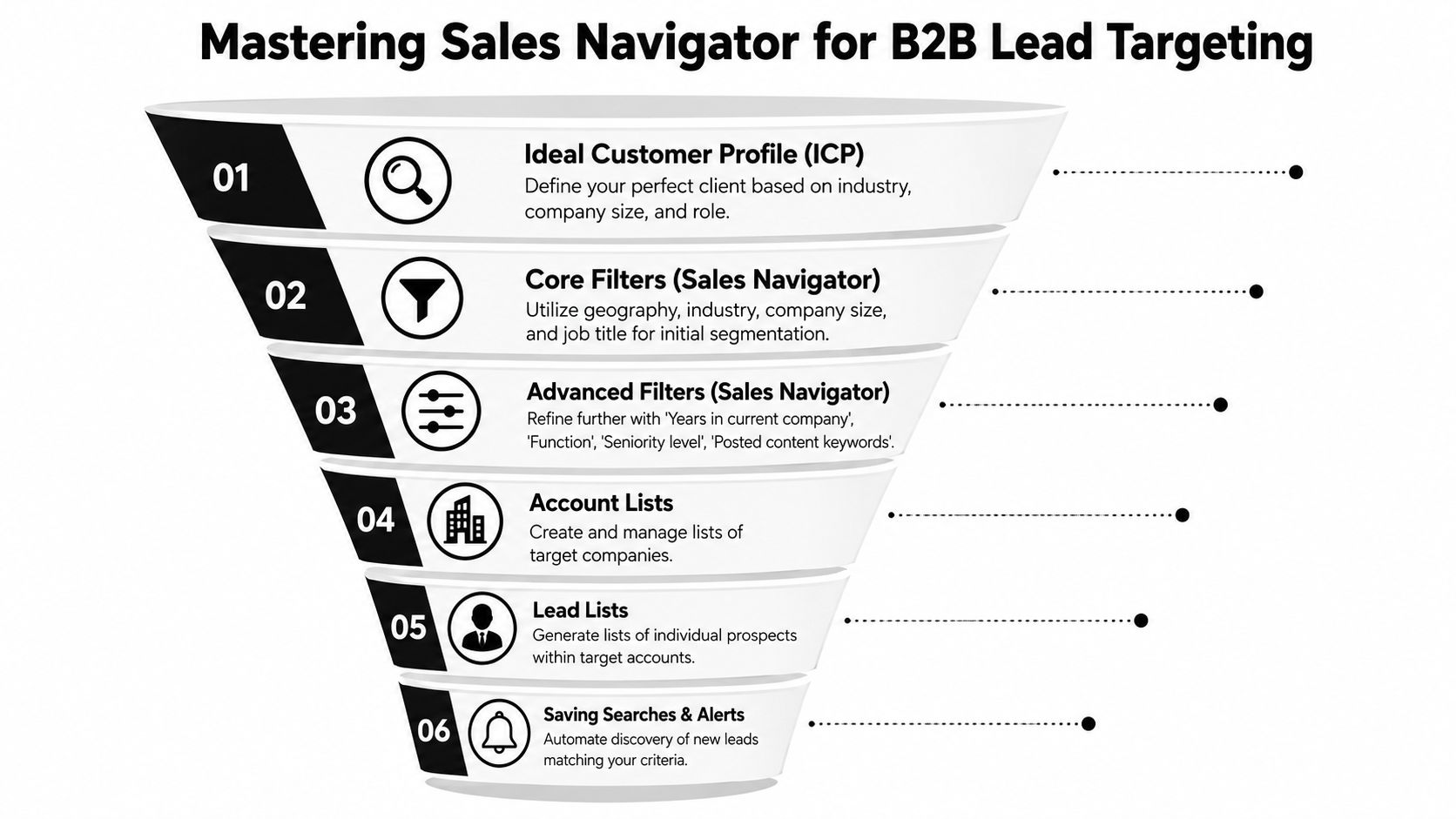
The strongest methodology starts with Sales Navigator segmentation by job title, industry, company size, seniority, and trigger events, then adds pre-contact engagement before outreach, as described in Belkins’ guide to generating B2B leads on LinkedIn.
Turn your ICP into filters
Take a hypothetical SaaS company selling customer support software to mid-market fintech firms. A weak targeting setup might search for “Head of Support” and call it done. A stronger one maps the actual buying environment.
Start with the account layer:
-
industry
-
company headcount
-
geography
-
growth stage or business model if visible
-
whether the company fits your deal size and onboarding capacity
Then build the lead layer:
-
function
-
seniority
-
title variants
-
years in role
-
signs of activity on the platform
Many teams benefit from tightening their definition of fit before launching campaigns. A practical framework for doing that sits in this guide to a B2B ideal customer profile.
Use account lists before lead lists
A lot of reps search for people first. That creates a messy database.
Build account lists before lead lists whenever possible. If the account isn’t right, the contact usually isn’t worth working. This also helps when multiple stakeholders are involved in the purchase.
A clean process looks like this:
-
Build target accounts Save companies that fit your market, budget reality, and use case.
-
Find relevant stakeholders inside those accounts Pull decision-makers, influencers, and operational owners.
-
Tag by buying relevance Separate direct buyers from adjacent stakeholders.
-
Save searches and alerts Let Sales Navigator surface changes you can act on later.
Spot signals before you message
The best lists aren’t just filtered. They’re timed.
Useful signals include:
-
a recent job change
-
recent posting activity
-
a visible company initiative
-
active hiring in a related department
-
engagement with topics tied to your solution
Those signals don’t guarantee intent, but they give you context. Context turns a cold message into a relevant one.
Don’t build broad lists and hope personalization will save them. Precision needs to happen before copywriting starts.
A practical segmentation example
Here is how I’d structure a focused search for an outbound service aimed at SaaS founders and sales leaders:
| Layer | Example filter choice |
|---|---|
| Industry | SaaS, software, tech-enabled services |
| Company size | Mid-market or growth-stage firms your team can realistically serve |
| Role set | Founder, CEO, CRO, VP Sales, Head of Growth |
| Seniority | Owner, partner, C-level, VP, director when relevant |
| Activity clue | Posted recently or fits a timely business trigger |
That list is smaller than what is usually desired. That’s the point. Smaller, cleaner segments produce better conversations and make follow-up far easier.
Crafting Connection Scripts and Outreach Sequences
A bad LinkedIn message usually reveals itself in the first line. It asks for too much, too soon, with no reason for the prospect to care.
The common version sounds like this: “Hi Sarah, I help companies like yours generate more leads. Would love to connect and show you how.” That’s not personalization. That’s a generic pitch with a first name attached.
The better version starts with context, not the seller.
What a strong connection request actually does
A connection request doesn’t need to sell the service. It needs to lower resistance.
Compare the difference:
| Weak request | Stronger request |
|---|---|
| ”I’d love to connect and explore synergies." | "Saw your post on SDR ramp time. Sharp point on message fatigue. Sending a connection request because we work on adjacent outbound problems." |
| "We help firms scale with AI-powered lead gen." | "Noticed your team is hiring in sales. I work with B2B teams on outbound systems and thought it made sense to connect.” |
The strong version works because it shows you did the work. It also doesn’t force an immediate meeting.
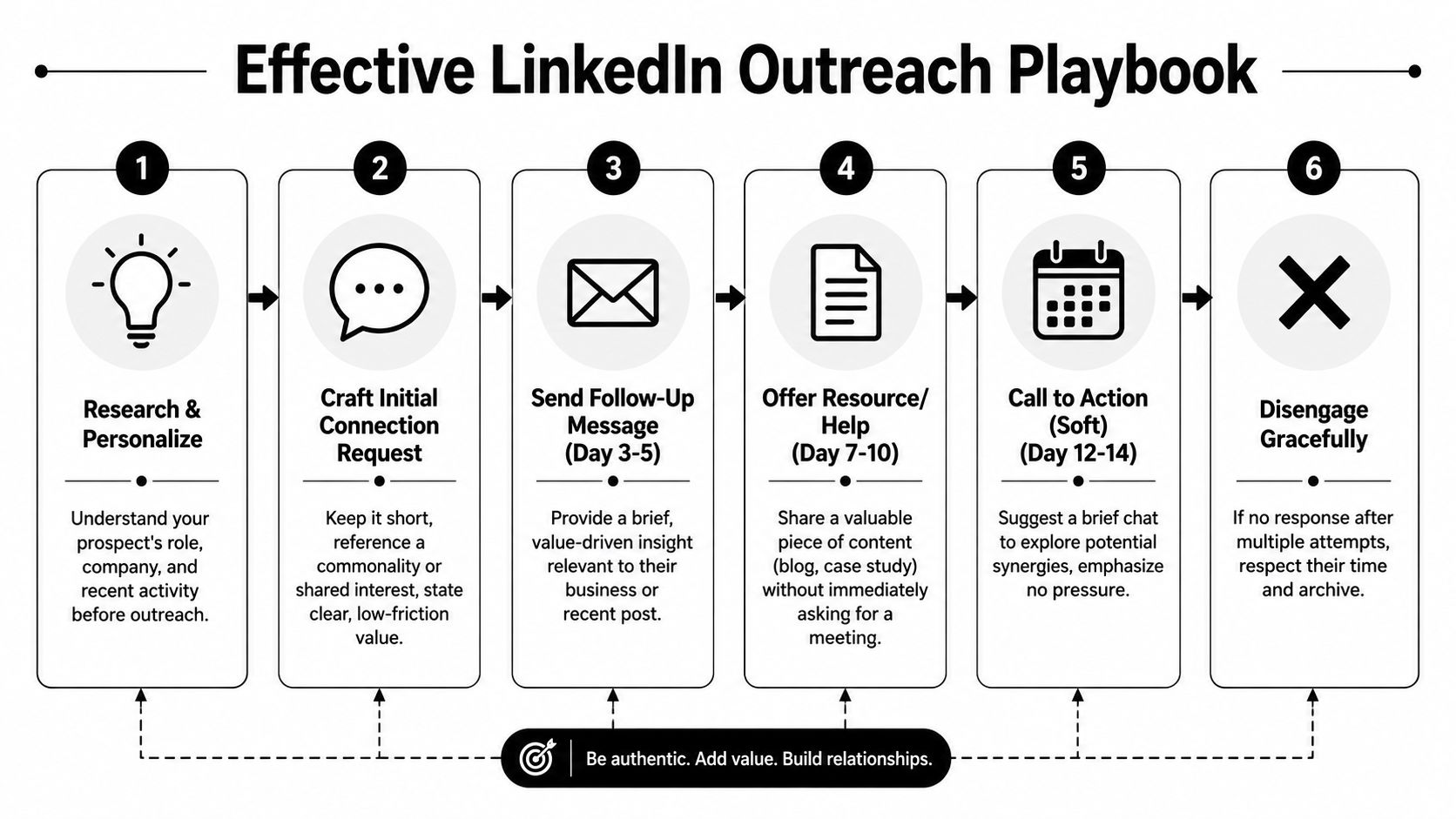
A practical sequence that doesn’t feel spammy
Many organizations need fewer messages, not more. The sequence below is enough for many prospects if the targeting is good.
Touch 1. Connection requestKeep it short. Use one reason for relevance. Don’t attach a brochure in sentence form.
Touch 2. Value follow-upAfter they accept, send a brief note that gives an observation, not a pitch. Mention a challenge you see in their space or react to something they posted.
Touch 3. Soft askOnly after some context or engagement should you ask whether a conversation makes sense.
A simple example:
-
Connection note “Saw your team is expanding outbound. We work with B2B companies on outreach systems, so I thought it made sense to connect.”
-
Follow-up “One thing we’re seeing a lot is LinkedIn getting attention, but email doing the actual meeting booking. A lot of teams mix those roles up.”
-
Soft ask “If that’s relevant, happy to share how teams are structuring the handoff between LinkedIn engagement and outbound follow-up.”
This walkthrough is also worth watching because it shows message structure in a practical format:
Timing matters more than clever phrasing
Messages should breathe. If the prospect doesn’t respond, don’t pile on pressure with daily nudges.
A healthy sequence usually has:
-
a gap after the connection request
-
another gap before the value message
-
a final low-pressure ask
-
then a stop
That last part matters. Good outreach includes a graceful exit.
If your sequence needs five follow-ups inside LinkedIn to create interest, the list is probably wrong or the positioning isn’t sharp enough.
Personalization should use real signals
You don’t need deep custom research for every prospect. You do need honest relevance. Good personalization can come from:
-
a recent post
-
a hiring move
-
a role change
-
a clear company announcement
-
a recognizable market challenge tied to their role
If you’re building your own messages, this collection of cold LinkedIn message templates is a helpful reference point for different contexts and tones.
What to avoid every time
-
The instant pitch after acceptance
-
The fake compliment that could fit anyone
-
The paragraph dump that reads like a mini sales page
-
The calendar link too early before any interest is established
-
The automation smell where every message sounds machine-produced
The point of LinkedIn messaging isn’t to close the sale in chat. It’s to start a real business conversation with enough context that the next channel can convert it.
Warming Prospects with Content and Engagement
The phrase “cold LinkedIn outreach” is often misleading. On LinkedIn, prospects can see your profile, your comments, your posts, your mutuals, and your point of view before they ever reply. That means you have opportunities to warm the interaction before the message lands.
Teams that skip this step usually rely on volume. Teams that do it well create familiarity first.
Engagement makes your outreach less interruptive
If a target account executive posts about churn, onboarding, hiring, or pipeline pressure, that post is an opening. A thoughtful comment does more than a silent profile visit because it places your name in a useful context.
The goal isn’t to farm attention. It’s to show that you understand the business problem the buyer lives with.
A simple engage-first rhythm works well:
-
save a list of target prospects
-
watch recent posts
-
leave a real comment where you have something to add
-
wait before sending the request
-
make the message consistent with the public interaction
This approach is slower than blasting invites. It’s also safer and usually produces better conversations because the prospect has already seen your name attached to something relevant.
The warm-up isn’t busywork. It’s the part that gives your message a chance to feel timely instead of intrusive.
Your own content should support outbound
Posting on LinkedIn doesn’t need to turn you into a creator. It needs to make buyers think, “This person understands the problem.”
Three content types are usually enough:
Problem breakdowns
Write short posts that explain a common issue in plain language. For example, why many companies confuse lead volume with sales readiness, or why handoff failures kill outbound performance.
Buyer-pattern observations
Share what you’re noticing across calls, campaigns, or market conversations. Keep it rooted in operational reality.
Proof-shaped content
This doesn’t require invented stats. It can be a teardown of a campaign structure, a messaging lesson, or what changed after improving targeting quality.
If you want prompts and examples for social proof-driven posts, this Testimonial content playbook is useful because it gives practical angles without pushing you into polished corporate content.
A simple content and nurture relationship
LinkedIn content should not sit in isolation from your pipeline motion. It should support it.
| Content action | Pipeline effect |
|---|---|
| Post about a buyer pain point | Gives reps a relevant asset to reference in messages |
| Comment on target accounts | Increases familiarity before outreach |
| Publish operational insights | Builds authority without forcing a pitch |
| Share customer lessons | Helps sales validate fit during follow-up |
That same logic applies after someone engages. Once a prospect interacts, they should move into a broader nurture path. This guide on how to nurture B2B leads is useful for building that next step outside the platform.
What doesn’t work well anymore
Purely automated outreach tends to create a visible disconnect. The message arrives with no social context, no sign of relevance, and no evidence that the sender understands the account.
Content alone doesn’t work either. Posting every week without a prospecting motion usually produces applause from peers and silence from buyers.
B2B lead generation on LinkedIn works best when content and outreach support each other. One creates familiarity. The other turns that familiarity into a conversation.
Scaling Your Efforts with Ads and Safe Automation
A common failure pattern looks like this. The team gets LinkedIn outreach working, replies start coming in, then leadership asks for more volume. They add ads or automation too fast, quality drops, reps chase weak leads, and booked meetings stall.
LinkedIn can scale. It just needs a different job in the system.
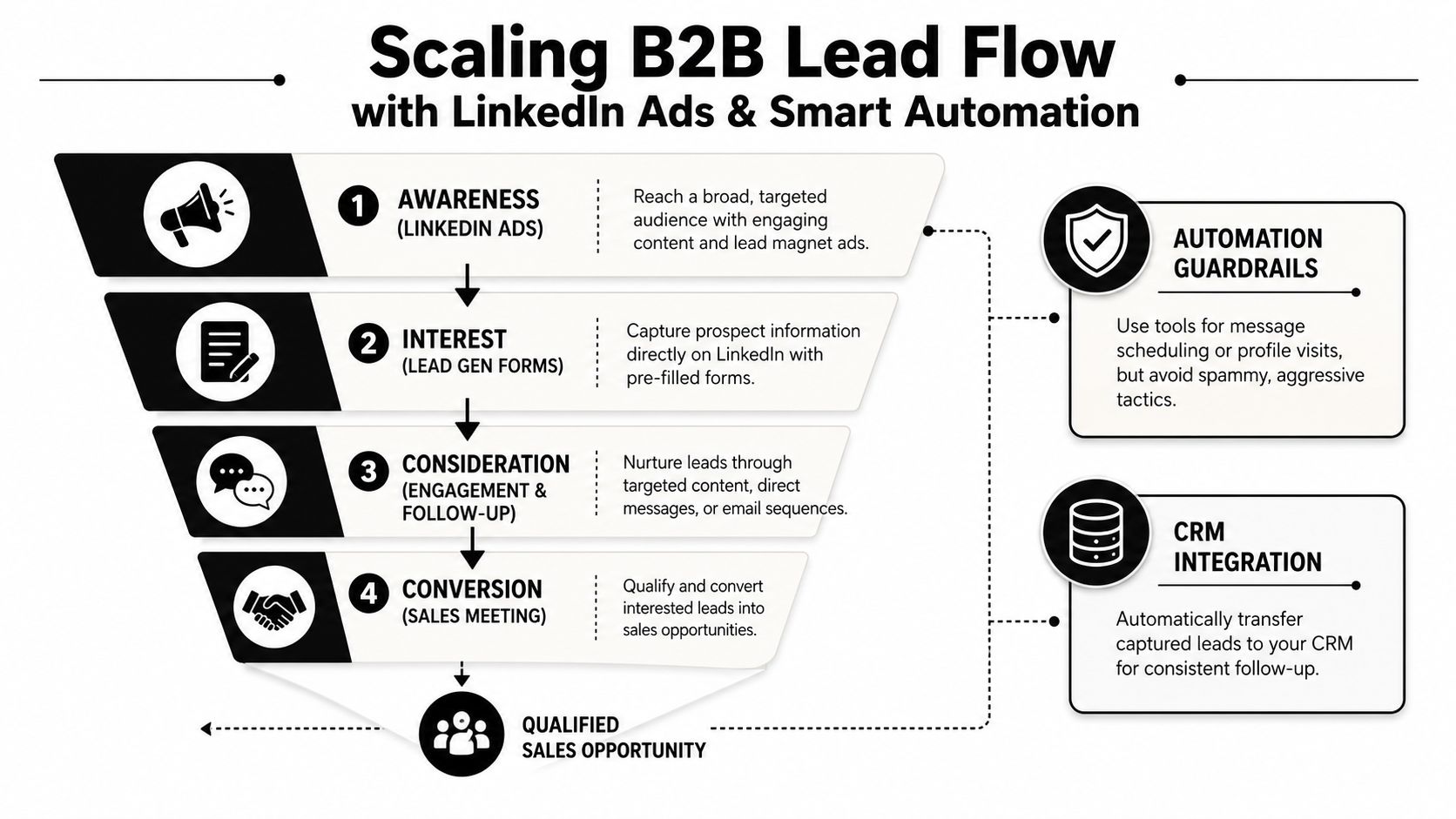
Paid campaigns are useful when the goal is broader top-of-funnel capture, especially for content offers, webinar signups, or category education. Direct outreach is still better for narrow account lists and high-consideration offers where message relevance decides whether a conversation starts.
A practical paid setup uses LinkedIn’s Lead Generation objective with Lead Gen Forms, keeps targeting reasonably constrained, and pushes new leads into CRM fast so follow-up happens while intent is still fresh, according to Genroe’s LinkedIn B2B lead generation guide.
Where ads fit in the system
Lead Gen Forms reduce friction because the form is prefilled. More people submit. That helps when LinkedIn is feeding the top of a larger outbound machine rather than trying to close demand on-platform.
The trade-off is lead quality. Easier forms usually bring in more low-intent conversions, so the form should collect only the fields needed to route and qualify the lead. Then the handoff needs structure. A clear sales process flowchart for lead routing and follow-up helps teams decide which responses go to SDR outreach, which go to nurture, and which are not worth sales time.
Organic, paid, and hybrid use cases
| Motion | Best use case | Main risk |
|---|---|---|
| Organic outreach | High-fit accounts, nuanced offers, founder-led sales | Harder to scale quickly |
| Lead Gen Forms | Top-of-funnel capture, content offers, targeted demand generation | More noise if qualification is weak |
| Hybrid approach | Warm accounts with ads, then qualify through outbound follow-up | Requires tighter CRM and rep workflows |
The hybrid model is usually the strongest option for B2B lead generation on LinkedIn. Ads create familiarity. Outreach, email, and sales process do the qualification work and move the right prospects toward meetings. If your site also needs to capture and route traffic from LinkedIn, these chatbot strategies for lead capture can support that layer without forcing every conversion through a rep.
Automation should remove admin work
Safe automation is operational. It saves time around list hygiene, routing, alerts, and task creation.
Use it for:
-
syncing lead data into CRM
-
alerting reps when a form fill or reply comes in
-
assigning owners by segment or territory
-
enriching records before follow-up
-
triggering the next step in email or sales sequences
Avoid automation that impersonates human relevance. Mass connection requests, generic follow-ups, fake engagement, and fully automated messaging create obvious pattern signals. They also weaken results because the targeting and copy stop reflecting the account.
One option in the broader outbound stack is Fypion Marketing, which focuses on performance-based B2B lead generation through cold email rather than forcing LinkedIn to carry the whole conversion burden. That setup works well when LinkedIn warms the prospect and email does the meeting booking.
Use LinkedIn to create attention. Use ads to widen the top of the funnel. Use automation to speed up clean execution. Then let your sales motion convert warmed demand into pipeline.
The Handoff Integrating LinkedIn Leads into Your Sales Funnel
Most LinkedIn programs break because the conversation starts well, the buyer shows interest, and then nothing structured happens next.
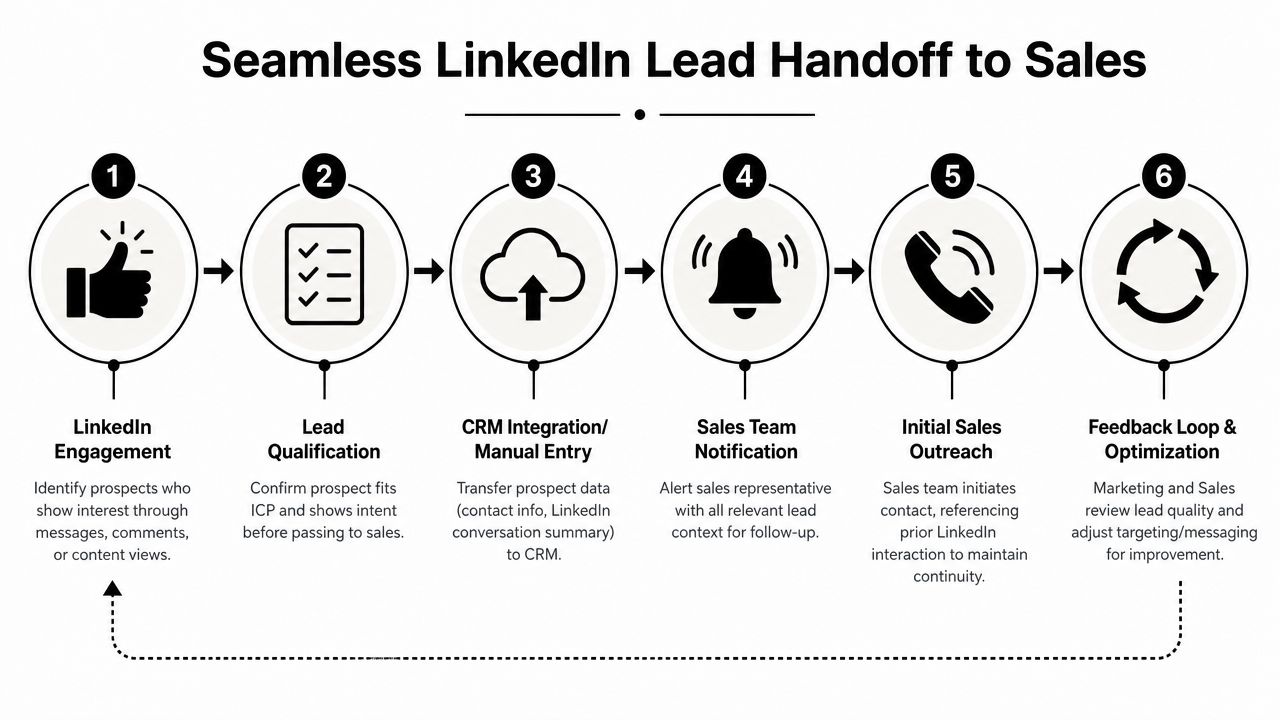
The strongest programs don’t force LinkedIn to do everything. They combine LinkedIn with email and use the platform as the attention layer while a dedicated sales motion handles meeting creation, as noted in PowerIn’s review of LinkedIn lead generation tools.
A clean handoff looks like this
When a prospect replies positively, don’t leave the next step vague. Capture:
-
who the person is
-
why they engaged
-
what pain point was mentioned
-
whether they fit your ICP
-
what follow-up channel should be used
Then move the lead into CRM with the LinkedIn context attached. Sales should know what happened before they make contact.
A practical sales team benefits from mapping this transition clearly. This sales process flowchart guide is a good reference for turning scattered conversations into a usable funnel.
LinkedIn warms, sales converts
A handoff can happen in different ways:
-
direct booking link if intent is clear
-
warm intro to an AE
-
personalized email follow-up that references the LinkedIn exchange
-
entry into a short outbound sequence built around the exact topic discussed
That last option is often the strongest. If someone has seen your content, accepted your request, or replied on LinkedIn, email follow-up no longer feels fully cold. It feels continuous.
LinkedIn should create familiarity and context. Your sales process should turn that context into a qualified meeting.
That distinction is what makes B2B lead generation on LinkedIn more predictable. The platform starts the conversation. The funnel closes the loop.
If your team wants a system where LinkedIn warms the market and outbound turns interest into qualified meetings, Fypion Marketing is one option to consider. They focus on performance-based B2B lead generation through cold email, which fits companies that want LinkedIn to support awareness and trust while a dedicated outreach engine handles booking and qualification.