
Sale Process Flowchart: Drive B2B Qualified Meetings

Your outbound engine probably looks busy on paper. Contacts are loaded. Sequences are live. Replies are coming in. Calendars even have a few meetings.
But the team still feels friction. SDRs chase soft interest that never turns into real pipeline. Account executives join calls with people who cannot buy. Marketing says leads are engaged, sales says they are not qualified, and forecasting turns into guesswork.
That is usually not a volume problem. It is a sale process flowchart problem.
In cold email, especially under a pay-per-meeting model, a generic stage map is not enough. You need a process that shows who qualifies, when they qualify, what happens when a prospect goes sideways, and which replies should never become meetings in the first place. If the flowchart does not reflect real buyer behavior, you pay for activity and get very little revenue signal back.
Why Your Generic Sales Flowchart Fails at Cold Outreach
Many teams inherit a simple pipeline model. Lead comes in. Rep reaches out. Discovery happens. Demo happens. Proposal goes out. Deal closes.
That looks clean in a CRM. It fails fast in cold outreach.

Cold email does not move in a straight line
The biggest flaw is assuming interest moves forward in one direction. It does not. Most sales process flowchart content focuses on standardized stage frameworks but misses the prospect psychology and non-linear paths that stall deals. Prospects often pause at proposal review, ask for another demo, or loop back into negotiation, which creates friction that generic templates miss (Instantly).
That matters even more in high-volume outbound. A cold reply is not a qualified opportunity. It is just a signal.
A prospect may reply with:
-
Curiosity: “Can you send details?”
-
Deflection: “Talk to my colleague.”
-
Delay: “Reach back next quarter.”
-
Polite rejection: “Not a priority.”
-
Interest: “Let’s discuss this week.”
If your flowchart treats all positive replies the same, reps waste time on inbox noise. The result is padded pipeline and weak meetings.
Generic stages blur the handoff from reply to real opportunity
In a pay-per-meeting environment, that blur becomes expensive. You are not trying to maximize reply count. You are trying to maximize qualified meetings that can progress.
That means your flowchart needs to sit much closer to campaign execution than a standard sales diagram. It should account for list quality, message-market fit, reply intent, triage rules, stakeholder routing, and meeting acceptance criteria.
A lot of teams improve once they study more structured effective sales outreach strategies and then tie them back to process design, not just copywriting.
Practical rule: If your SDR cannot tell within a few steps whether a reply deserves a calendar link, your process is too vague.
A clean pipeline can still hide wasted effort
I have seen teams with tidy dashboards and messy reality. They report booked calls, but half of those calls should never have reached an AE.
The fix is not another template. It is a flowchart built around real outbound behavior. That includes triage paths, disqualification routes, and clear movement from cold lead to sales-accepted meeting. If your team needs a sharper outbound operating model, this cold email playbook is a useful reference: https://www.fypionmarketing.com/post/a-modern-playbook-for-b2b-cold-email-outreach
Blueprint Your Path from Cold Lead to Qualified Meeting
A rep opens the inbox at 9:07 a.m. and sees three “interested” replies from the morning send. One prospect wants pricing, one asks whether you work with companies their size, and one says, “Happy to chat next week.” If your sale process flowchart treats all three replies the same, your team books a meeting that should have been screened, sends pricing too early, and misses the chance to route the correct buyer into the thread.
A usable outbound flowchart starts before the first email goes live. Meeting quality is set upstream by list rules, targeting discipline, and reply handling standards. In a pay-per-meeting model, those choices decide whether booked calls turn into pipeline or refund risk.
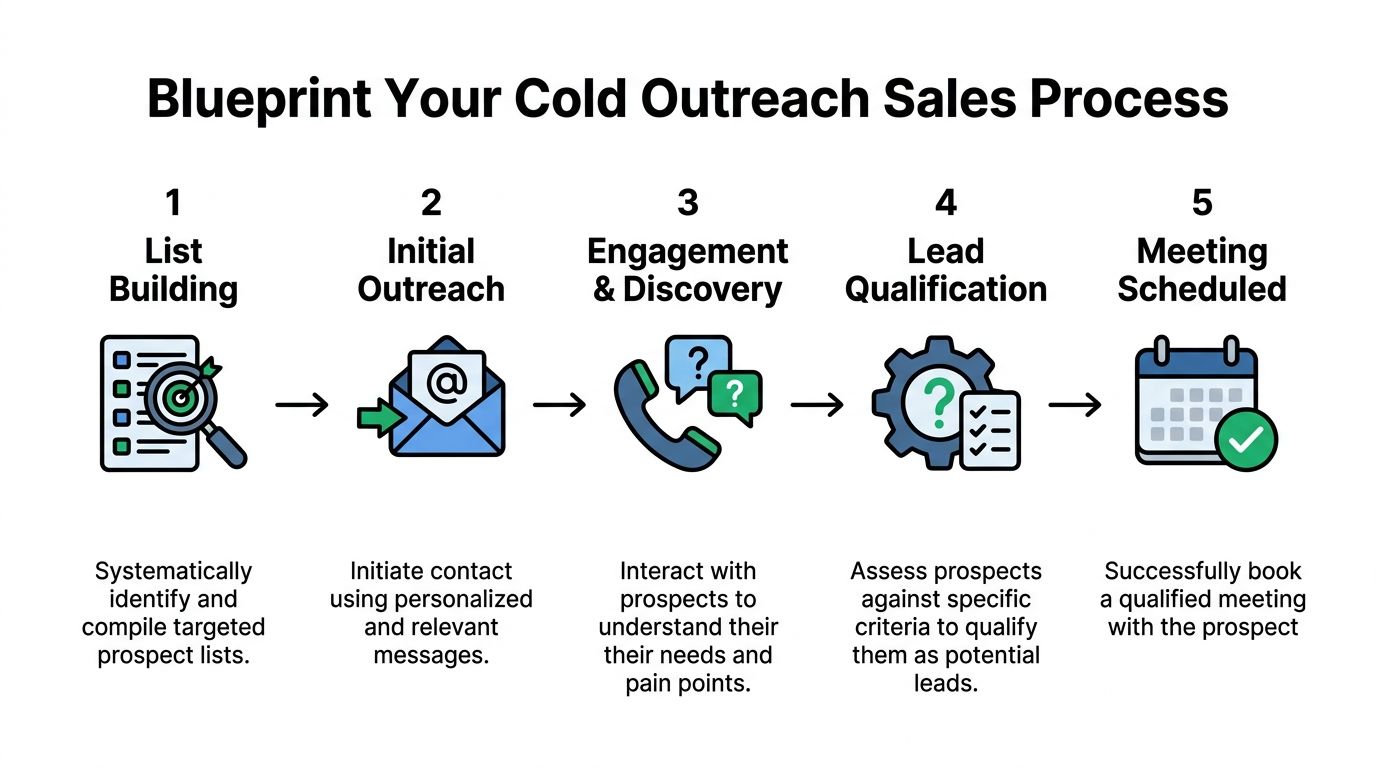
Stage one builds the target list
List building is the first qualification gate, not admin work.
Set an entry standard for both the account and the contact. Account fit usually includes industry, company size, geography, and whether the business can realistically buy your offer. Contact fit means the person can influence, own, or strongly shape the problem you solve. Basic enrichment should give the rep enough context to write a relevant email without inventing pain points.
Keep the exit criteria strict:
-
Account fit confirmed: The company matches your ICP and buying profile.
-
Contact relevance confirmed: The person is close enough to the problem or decision.
-
Basic enrichment complete: The team has usable context for outreach.
If any of those are missing, the lead should not enter sequence yet.
Stage two starts initial outreach
Now the campaign starts, but the goal is not “activity.” The goal is signal.
This stage ends when a reply gives enough information to classify intent. Opens, clicks, and vague engagement do not move the lead forward in a cold email program. A reply does. Even then, the reply still needs sorting. “Interested,” “not now,” “wrong person,” “send more info,” and “not a fit” should each trigger a different path.
Good cold email keeps the ask narrow. Ask for interest, fit, or ownership. Do not run discovery in the inbox.
Stage three handles positive reply and initial triage
Positive reply triage protects AE calendars better than any reporting cleanup later.
A prospect who says “sure, send times” may still be a poor fit, too junior, outside your ICP, or looking for something you do not offer. The flowchart should force a short check before scheduling. Confirm role relevance, confirm there is at least a plausible use case, and decide whether another stakeholder needs to be added before a meeting link goes out.
This is also the point where teams either gain efficiency or lose it. Reps who book first and qualify later create calendar volume. Reps who triage first improve sales productivity because they stop pushing weak replies into expensive meetings.
Log the context that will matter at handoff. Capture the pain point in the prospect’s own words, stakeholder status, urgency, buying path clues, and any constraints that could block progress. For outbound teams, qualification starts at the first useful reply, not after the meeting is already on the calendar.
Stage four performs deeper qualification
Once reply triage shows real potential, move into deeper qualification. The format can vary. Some teams handle it in email. Some use a short screening call. Some qualify through a scheduler form plus one follow-up question before confirming the meeting.
The method matters less than the acceptance standard.
Use explicit checks for problem fit, authority or access to authority, realistic timing, and a next step your AE can advance. In high-volume outbound, the trade-off is simple. Loose standards increase booked meeting count and lower show quality. Tight standards reduce volume and give sales a calendar they trust.
A simple model looks like this:
| Stage | Entry signal | Exit signal |
|---|---|---|
| List building | ICP defined | Contact ready for outreach |
| Initial outreach | Email launched | Reply intent identified |
| Reply triage | Positive or mixed reply | Prospect deserves qualification |
| Deep qualification | Fit appears plausible | Meeting meets acceptance standard |
| Meeting booked | Qualified prospect agrees to meet | AE handoff complete |
Stage five confirms the meeting is qualified
The handoff point needs a hard definition.
In a pay-per-meeting model, “booked” is not enough. The meeting should count only when the prospect matches the qualification standard, the right stakeholder is involved or identified, and the AE has enough context to run a useful conversation. That keeps delivery, sales, and reporting aligned.
Key takeaway: The meeting is not the goal. The qualified meeting is the goal.
If your team needs a sharper definition of that threshold, this guide to qualified meetings in appointment setting is a useful reference.
One more rule helps keep the flowchart honest. If a prospect reaches proposal or proof-of-concept territory and then stalls for too long, the opportunity should be reviewed instead of lingering in “active” status. I usually treat 45 days as the warning line. Past that point, either the deal lacks urgency, the stakeholder mix is wrong, or qualification was too soft earlier in the process. Your flowchart should flag those cases so weak opportunities do not inflate pipeline or distort outbound performance.
How to Map Every What If in Your Sales Workflow
A solid sale process flowchart uses decision diamonds aggressively. Cold outreach creates edge cases every day, and the process needs to tell the team what to do next without debate.
Advanced flowcharts map multiple decision points and branches, not a single path. About 30-40% of deals do not follow the primary path, because prospects say no, ask for more time, or need more information. Teams that map those branches explicitly reduce deal cycle time (Miro).
The five reply branches that matter most
You do not need twenty branches. You need the right ones.
Not interested
This branch should end cleanly. Mark the reason if the prospect gives one. If they are a poor fit, suppress them from future sequences. If the fit is good but timing is bad, move them to a controlled nurture path.
What does not work is letting reps freestyle endless follow-up because they feel the account “looks good.”
Follow up later
This branch needs a date and a trigger.
“Circle back later” is not enough. Your flowchart should require one of these:
-
a month or quarter,
-
a stated internal event,
-
or a budget cycle cue.
If none exists, treat it as low-confidence nurture, not active pipeline.
Wrong person
This is a routing problem, not a rejection.
The flowchart should tell the rep to do one of three things:
-
ask for the right owner,
-
source the likely stakeholder independently,
-
keep the original contact copied if that helps transfer trust.
Without this branch, teams often lose valid accounts because they mistake misrouting for lack of interest.
Send me more info
This is the most mismanaged reply in outbound.
Sometimes it means interest. Sometimes it means “I do not want a meeting.” Your process should force a second check before scheduling. Send a tight asset or short explanation, then ask a qualifying question that reveals urgency, ownership, or relevance.
Yes, interested
This branch should not jump straight to booking unless your qualification standard is already met.
High-performing outbound teams confirm fit fast. They do not celebrate early and push junk meetings downstream.
Put qualification inside the branch, not after it
Many teams qualify too late. They book first, discover later, and then complain about show quality.
A better model places qualification at the branch point. Before the calendar link goes out, the rep should answer a short checklist.
Cold Outreach Qualification Checklist
| Criteria | Question to Answer | Why It Matters |
|---|---|---|
| Problem fit | Does the prospect describe a pain your offer solves? | Prevents meetings built on vague curiosity |
| Role relevance | Is this person involved in the problem or decision? | Avoids calls with spectators |
| Authority path | Can they buy, influence, or bring in the buyer? | Keeps the deal from stalling after first call |
| Timing | Is there a live initiative, review cycle, or active interest now? | Protects AE time from distant opportunities |
| Commercial fit | Does the account resemble deals your team can serve well? | Stops pipeline inflation with poor-fit accounts |
| Process visibility | Do you know what happens after the first meeting? | Helps forecast next-step probability |
This kind of routing discipline does more to improve sales productivity than adding more outreach volume to a weak process.
Tip: Every branch should have one owner, one next action, and one exit condition. If any branch lacks those three items, leads will sit there.
Keep the chart clear enough to use
A decision-rich flowchart can still become unusable if it gets too clever.
One practical standard matters here. A new hire should be able to understand the chart quickly. If the visual takes too long to decode, reps will stop using it and go back to memory. That defeats the point.
The best version is usually one page in Miro, Lucidchart, or Whimsical, supported by a written SOP in your CRM or wiki. If you are rebuilding the process from scratch, this sales workflow resource can help frame the operational side: https://www.fypionmarketing.com/post/sales-process-optimization-build-your-revenue-machine
Who Does What and When A Guide to Ownership and SLAs
A sale process flowchart without ownership turns into wall art.
Most outbound issues are not strategic. They are handoff failures. A lead replied, but nobody triaged it. A rep qualified it, but the AE got poor notes. The AE asked for a follow-up, but the SDR thought the deal was paused.

Assign people, not departments
“Sales owns this” is too vague. The flowchart should name the responsible role at each step and, if the team is small, the actual person.
A practical outbound setup often looks like this:
-
Campaign operator: Owns list uploads, sequence launches, inbox health monitoring, and reply routing.
-
SDR or appointment setter: Owns reply triage, qualification, and scheduling.
-
AE: Owns the first substantive sales meeting and next-step advancement.
-
Sales manager: Owns exception handling, stuck deals, and SLA enforcement.
-
RevOps or CRM admin: Owns stage definitions, automation, and reporting accuracy.
This mirrors what works in branching flowcharts generally. Decision points need specific ownership tied to action, not generic responsibility labels.
Put SLAs on momentum-sensitive moments
Cold outreach decays fast. A warm reply sitting untouched until tomorrow is often a lost chance.
Your SLA should focus on moments where delay kills progress:
| Workflow point | Owner | SLA example |
|---|---|---|
| New positive reply | SDR | Triage same working block |
| Wrong-person response | SDR | Re-route quickly with updated contact path |
| Qualified meeting booked | SDR | Send notes to AE before the meeting |
| AE follow-up request | SDR or AE | Confirm next action immediately after call |
| Stalled opportunity | Manager | Review in pipeline check and assign action |
You do not need fancy SLA math to start. You need consistency.
Define the handoff package
An AE should never open a calendar invite and wonder why the meeting exists.
Before handoff, require:
-
contact and account context,
-
original outreach angle,
-
reason for reply,
-
qualification notes,
-
known stakeholders,
-
any timeline or process clues.
That turns the flowchart into an operating system instead of a drawing.
For teams training this motion, a short walkthrough helps more than another document:
Use the flowchart in manager reviews
The process becomes real when managers coach against it.
If a rep books weak meetings, the manager should inspect where the path broke. Was the branch wrong? Was qualification skipped? Was ownership unclear? A flowchart is useful because it makes that diagnosis visible.
If your team is sorting out role boundaries, this overview of the SDR function is a practical reference: https://www.fypionmarketing.com/post/what-is-a-sales-development-representative
Manager rule: Review misses by process step, not by vague rep effort. That is how you fix repeatable problems.
Visualizing Your Sales Process Flowchart in Action
Theory helps. Examples make the sale process flowchart usable.
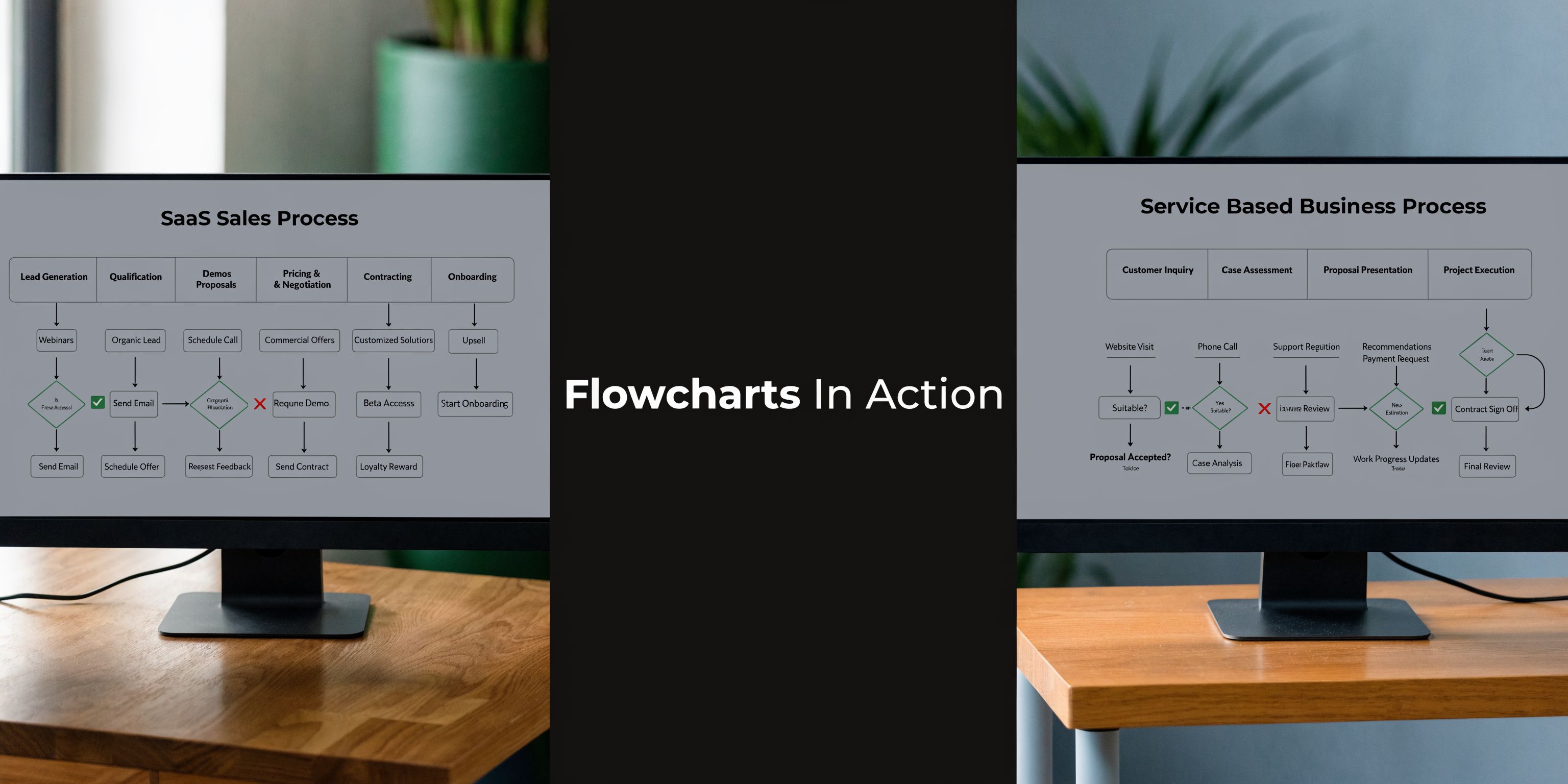
Example one for a mid-market SaaS company
This flow works well when the product sale involves multiple stakeholders and a more structured evaluation path.
The flow starts with targeted list building by segment. Outreach goes to a likely operational owner first, often someone close to the problem. Replies branch immediately:
-
no response stays in sequence,
-
wrong person triggers contact rerouting,
-
send info triggers lightweight education plus a qualifying question,
-
interest triggers triage.
From there, the SDR checks whether the respondent can bring in the right buyer and whether there is an active initiative. If yes, the meeting is booked with qualification notes attached.
After the meeting, the AE path branches again:
-
fit confirmed moves to a customized demo,
-
unclear pain loops back to discovery,
-
missing stakeholder pauses advancement until the right people join.
For SaaS teams, the visual should also include legal, security, and procurement review branches. Those are often the hidden delays that wreck forecast confidence.
Example two for a service business booking appointments
A service company usually needs a tighter front-end filter.
The outreach message often tests for a live pain, current interest, and market fit at once. When a prospect replies, the SDR triages quickly:
-
Is this the right company type?
-
Is the need close enough to what the service team can solve?
-
Is the person either the buyer or close to the buyer?
Only then does the process move to booking. If the prospect wants details first, the flow sends a short explanation plus one question that reveals seriousness. If the reply is vague, the lead goes to nurture, not the calendar.
This structure is especially useful in pay-per-meeting models because it prevents “curious but irrelevant” conversations from being counted as success.
Tools that work well for this job
Different tools fit different teams.
Miro
Strong for collaborative mapping. Good when sales, marketing, and operations need to shape the flow together. It handles branching logic clearly.
Lucidchart
Better when you want cleaner documentation and more formal diagrams. Good for orgs that care about process governance.
Whimsical
Fast and simple. Good for smaller teams that want something visual without heavy setup.
One additional option is a service partner that maps the flowchart directly into outbound execution. Fypion Marketing offers cold email lead generation and, based on its published materials, supports sales process visualization as part of sales process optimization. That can be useful for teams that do not just want a diagram, but also want the outreach workflow tied to qualification and booked-meeting standards.
What the finished chart should include
A practical chart is not just boxes and arrows. It should show:
-
Entry criteria for each stage
-
Decision diamonds for common reply types
-
Owner labels for every action
-
Acceptance rules for qualified meetings
-
Loop-back paths for stalled but valid opportunities
-
Exit routes for bad-fit leads
A good test is simple. Hand it to a new SDR and ask them what happens after “send me more info.” If they cannot answer fast, the chart is not finished.
Your Sales Process Flowchart Questions Answered
How often should I review the flowchart
Review it whenever the team starts seeing repeat friction. In practice, that usually means revisiting it during regular pipeline reviews and after a noticeable change in reply quality, meeting quality, or handoff reliability.
Do not wait for a full process overhaul. Small adjustments matter more than occasional rewrites.
What is the biggest mistake people make
They design the chart around internal stages instead of buyer behavior.
That creates a neat visual and a weak process. A real sale process flowchart for outbound has to reflect hesitation, misrouting, budget delays, extra stakeholder checks, and the fact that some replies should never become meetings.
How do I get the team to use it
Tie it to daily work.
Use the flowchart during onboarding. Use it in deal reviews. Use it when a meeting gets rejected by sales. Use it when an SDR asks what to do with a vague reply. Once the chart helps people make faster decisions, adoption stops being a change-management issue.
Tip: If a rep needs a separate training session just to interpret the flowchart, simplify the chart.
Can I use the same version for inbound leads
Usually no.
Inbound leads often arrive with stronger intent and more context. Outbound leads need more routing, more qualification discipline, and more careful meeting acceptance criteria. You can keep the later sales stages aligned, but the front end should be different.
Should every positive reply get a meeting link
No. That is one of the fastest ways to lower meeting quality.
Some replies deserve more questions first. Some should be rerouted. Some belong in nurture. The meeting link should appear only after the prospect meets the standard your sales team accepts.
How detailed should qualification be before booking
Enough to protect the AE calendar, but not so much that you create drag.
For cold outreach, qualification should confirm role relevance, pain fit, buying path, and basic timing. Anything deeper can happen in the first meeting, assuming the meeting itself is justified.
Where does SQL fit into this flow
SQL should sit after initial interest but before the AE treats the opportunity as active pipeline. If your team calls every responder an SQL, forecasting will get noisy fast. This guide gives a useful framework for thinking about that handoff point: https://www.fypionmarketing.com/post/what-is-a-sales-qualified-lead-your-complete-guide-to-sqls
A sale process flowchart works when it removes ambiguity. The team knows what counts, what happens next, and who owns the move. In outbound, that clarity is what turns campaigns into qualified meetings instead of inbox activity.
If your team wants a cold email system built around qualified meetings rather than raw activity, Fypion Marketing works on a pay-per-meeting model and focuses on outbound process execution, qualification standards, and booked-meeting outcomes for B2B companies.