
Marketing Automation for B2B: A Practical Guide for 2026

Most advice on marketing automation for B2B gets the sequence wrong. It starts with software demos, workflow builders, and AI features. That’s backward.
Automation doesn’t fix weak targeting, stale records, or generic messaging. It scales them. If your list is poor, your automation gets worse faster. If your positioning is unclear, automated nurture just delivers irrelevant emails on a precise schedule.
The profitable way to think about automation is simpler. Build a clean audience, define what a qualified lead looks like, connect marketing and sales data, then automate the repeatable parts. That’s how teams turn systems into meetings instead of noise.
Why B2B Marketing Automation Is No Longer Optional
The biggest myth in this category is that automation is a magic button. Buy a platform, switch on a few sequences, and pipeline appears. In practice, automation is an amplifier. It makes a good go-to-market system faster and more consistent. It also makes a bad one more expensive.
That said, the market has moved past the point where B2B teams can ignore it. Marketing automation has reached near-universal adoption in enterprise B2B, with 95% of enterprise marketing teams and 78% of mid-market B2B organizations running at least one platform in 2026, according to this roundup of 2026 marketing automation data. If your team still relies on manual follow-up, spreadsheet segmentation, and ad hoc handoffs, you’re competing against organizations that respond faster and operate with more discipline.
A lot of teams don’t need more tactics. They need operating principles. That’s why a strong playbook for B2B growth marketers is more useful than another vendor checklist. Automation works best when it’s attached to clear demand generation logic, not when it’s treated as a separate tech purchase.
The same issue shows up in funnel design. Teams often automate top-of-funnel activity before they’ve agreed on stage definitions, sales handoff rules, or lifecycle triggers. If that sounds familiar, this guide to a B2B marketing funnel is a useful reference point because it forces the harder question first. What exactly should happen after a prospect engages?
Practical rule: Automate the path, not the chaos.
What automation actually changes
Used properly, marketing automation for B2B helps teams do three things that are difficult to do manually at scale:
-
Respond faster: Trigger follow-up when a lead takes a meaningful action.
-
Segment better: Treat a VP at a target account differently from a student downloading a template.
-
Coordinate sales and marketing: Share the same engagement history and qualification signals.
What it does not do
It doesn’t create product-market fit. It doesn’t rescue a weak offer. And it doesn’t make cold traffic warm just because an email sequence exists.
That’s why the best B2B teams don’t ask, “Which platform has the most features?” They ask, “Which parts of our revenue process are repetitive, measurable, and worth automating?”
Thinking Beyond Software What Is B2B Automation Really
Teams often define automation too narrowly. They think of it as email scheduling plus a few if-then rules. That’s only one piece of it.
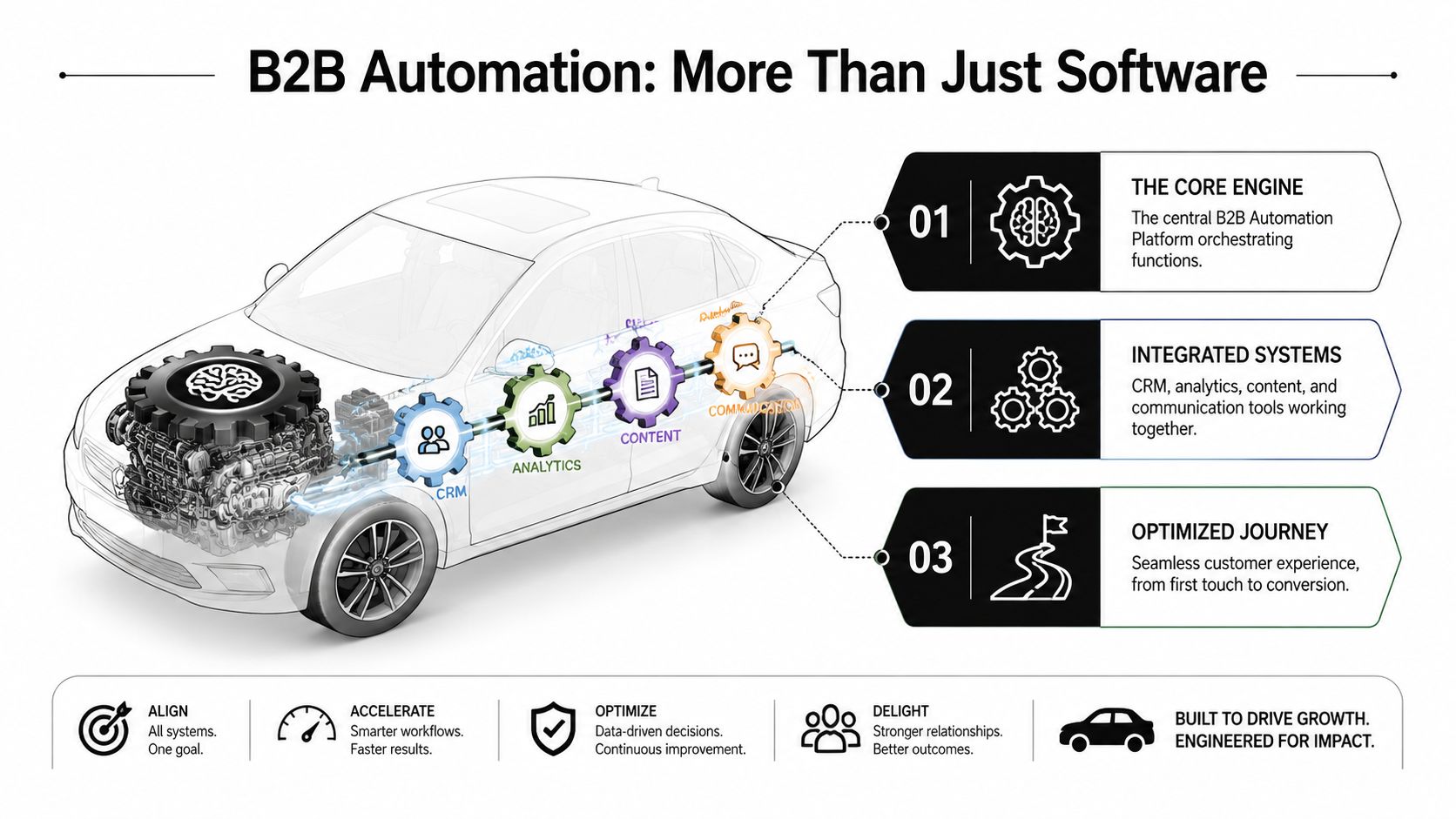
A better way to think about marketing automation for B2B is to compare it to a modern car. The platform is the engine, but the engine alone doesn’t get you where you need to go. You also need navigation, fuel, sensors, and working connections between systems.
The engine is execution
The platform handles repetitive actions that humans shouldn’t do manually all day. It sends nurture emails, routes leads, updates lifecycle stages, suppresses unqualified contacts, and notifies sales when a contact crosses a threshold.
That’s the obvious part. It saves time and reduces operational drift.
The GPS is intelligence
Without rules, automation is just motion. The intelligence layer decides where a lead goes next and why. That includes segmentation logic, lead scoring, campaign triggers, and stage-based branching.
If marketing says a lead is ready and sales disagrees every time, the issue usually isn’t effort. It’s classification. Revenue teams need shared definitions and a working model for lead quality. Strong sales and marketing alignment matters more than another sequence branch, and this piece on how to align sales and marketing gets to the operational side of that problem.
The fuel system is content and messaging
Automation doesn’t create relevance. It distributes relevance, or irrelevance, at scale.
You still need useful offers, thoughtful copy, and messaging that matches buyer stage. A pricing-page visitor should not get the same email as someone who downloaded an introductory guide. A target account already in an active sales cycle should not remain in a generic nurture stream.
Good automation feels timely because the system knows what happened and the message fits that moment.
The integrated system view
When teams buy software without designing the system around it, they end up with activity but not momentum. The healthier approach is to treat automation as a business capability built from connected parts:
-
Efficiency at scale: Repeatable tasks run without constant manual intervention.
-
Personalized engagement: The system changes what people receive based on profile and behavior.
-
Actionable intelligence: Sales sees not just that a lead exists, but what the lead has done.
That’s the difference between “we have a platform” and “we have a working revenue engine.”
From First Touch to Sales-Ready Key Automation Workflows
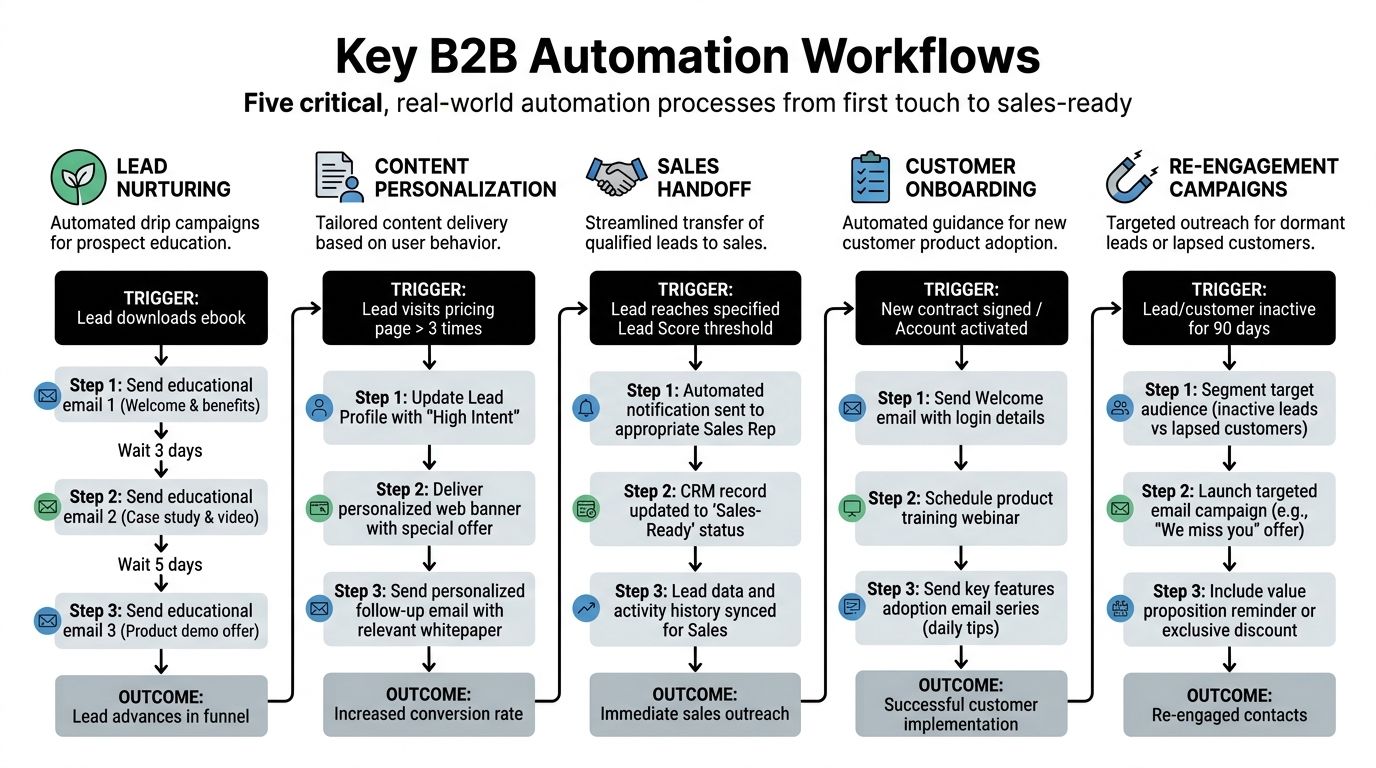
A useful automation setup follows the buyer, not the org chart. One prospect enters through a form, another through outbound, another through a webinar or content download. Different doors, same requirement. The system needs to decide what happens next without creating confusion for sales.
A clean visual helps before you build anything.
Workflow one: capture and classify
The first job is not sending. It’s labeling.
When a lead enters the system, automation should standardize source, tag campaign, assign lifecycle stage, and check whether the record matches your ideal customer profile. By doing so, teams separate “new contact” from “actual prospect.”
That classification becomes the base layer for every later action.
Workflow two: segment and personalize
A SaaS founder at a target account and a consultant outside your market shouldn’t enter the same stream. Segmentation needs to reflect fit and context.
Some teams overbuild this and end up with dozens of tiny lists no one can maintain. A better setup starts with a manageable structure:
-
Fit-based segments: Industry, company size, role, and market.
-
Intent-based segments: Pricing page visits, demo interest, repeat engagement.
-
Journey-based segments: Early research, active evaluation, recycled lead, customer.
If you want examples of how these sequences can be structured in practice, this collection of email drip campaign examples is a solid way to compare approaches before building your own.
Workflow three: score for sales readiness
Many B2B programs either become useful or stay noisy at this stage. Effective lead scoring combines firmographic signals like job title and company size with behavioral signals like pricing page visits and content downloads. When teams use this dual-data model, MQL-to-SQL conversion rates typically increase by 20 to 30%. That benchmark is included in the verified data provided for this article.
In practical terms, a VP at a good-fit company who visits the pricing page multiple times should rise faster than a poor-fit lead who opens every newsletter. Sales needs a priority model, not just engagement volume.
Working rule: Fit tells you who matters. Behavior tells you when to act.
Workflow four: nurture without flooding the inbox
Nurture should help a lead make progress, not just keep your platform busy. That means the sequence changes based on what the lead does.
For example, a lead who downloads an educational asset might receive follow-up content that addresses problem awareness, then a stronger proof-oriented message if they return. A lead who clicks pricing or case-study content may need a lighter sequence with stronger commercial intent and a sales notification.
Many teams are reviewing platforms with this exact problem in mind. If you’re comparing tooling options, this guide to compare lead nurturing solutions is useful because it frames differences in workflow depth rather than just email features.
Later in the process, video can do some of the teaching work that email can’t. This walkthrough is a helpful primer for teams designing nurture logic and handoff timing:
Workflow five: handoff, onboarding, and re-engagement
The handoff to sales should be explicit. Once a lead reaches your qualification threshold, the system should assign ownership, alert the right rep, and show the engagement history in one place. No scavenger hunt.
After that, automation still matters. It can support customer onboarding, trigger adoption content, and identify dormant leads or lapsed accounts for re-engagement. That’s where the system becomes more than a lead machine. It becomes part of the full revenue lifecycle.
The common mistake is trying to launch all of these at once. The better move is to get one path working cleanly, then add complexity only when the team can support it.
Connecting Marketing and Sales with CRM Integration
CRM integration is the point where automation either starts producing pipeline or starts creating noise. If marketing activity lives in one system and sales activity lives in another, both teams work from incomplete records. That usually shows up fast. Reps chase cold leads, marketers keep nurturing active opportunities, and reporting turns into guesswork.

The software connection matters, but the data model matters more. Bad lead data synced perfectly is still bad lead data. I see this mistake all the time. Teams buy an automation platform, connect it to the CRM, and assume the handoff problem is solved. It is not. If the lead list is weak, fields are inconsistent, or lifecycle stages mean different things to marketing and sales, automation only helps bad inputs spread faster.
What good CRM integration actually does
A useful setup does more than send form fills into the CRM. It keeps contact and account records current, logs campaign engagement where reps can see it, updates routing and ownership rules, and changes automation based on pipeline status.
That gives both teams the same operating view. Sales can see what the buyer cared about before outreach. Marketing can see whether a lead became a meeting, an opportunity, or a closed-lost account. Operations can spot duplicate creation, field mismatches, and broken routing before those issues corrupt reporting.
For teams still treating this as a technical box to check, this explanation of what CRM integration means in practice is a useful baseline.
The real goal is clean handoffs
Integration should answer a few simple questions without manual digging:
-
Who owns this lead right now
-
What did this person do before sales reached out
-
Should marketing keep running nurture
-
Has this account already entered an open opportunity
-
Is the record complete enough to trust
If a rep has to ask for campaign history in Slack, the setup is not working.
This is also why a pay-per-performance model makes more sense than buying software and hoping usage creates revenue. The return does not come from having more features. It comes from building a process that routes qualified people to sales at the right time, with enough context to book a real conversation.
Where integrations usually fail
The breakdown is rarely caused by missing tools. It usually comes from weak operating discipline.
A few common examples:
-
Lead source values are inconsistent, so attribution reports become unreliable.
-
Marketing-qualified and sales-accepted stages are defined differently by each team.
-
Routing rules ignore territory, segment, or account ownership.
-
Duplicate records split engagement history across multiple contacts.
-
Old lists keep getting reintroduced into campaigns, which pollutes scoring and triggers the wrong follow-up.
These are not minor admin issues. They directly affect meeting quality and sales efficiency.
One more point gets overlooked. CRM integration is only as useful as the surrounding stack design. Teams that are cleaning up automation often also need to review handoff logic, data ownership, enrichment, and reporting structure. This article on best practices for a SaaS tech stack is helpful because it frames the system as operating infrastructure, not a collection of apps.
The practical fix is boring, which is why teams skip it. Define lifecycle stages in plain language. Set source-of-truth rules for key fields. Decide exactly when marketing pauses and sales takes over. Audit the lead list before it enters automation. Then test the edge cases, not just the happy path.
That is how CRM integration improves revenue work. It gives sales better context, gives marketing cleaner feedback, and prevents bad data from scaling into a bigger problem.
How to Choose the Right Automation Platform
Most buying mistakes happen before the demo. Teams ask for the best platform when they should be asking for the right category.
A startup with a lean sales team, one marketer, and a straightforward outbound motion doesn’t need the same stack as a mature enterprise running multi-region campaigns and complex account routing. Platform choice should match your go-to-market motion, team capacity, and integration requirements.
Start with operating reality
Before evaluating vendors, define these points:
-
Primary motion: Inbound, outbound, product-led, ABM, or a mix.
-
Team ownership: Who will build workflows, maintain data, and troubleshoot issues.
-
CRM environment: Native fit matters more than feature volume.
-
Content capacity: An advanced platform won’t help if the team can’t feed it relevant campaigns.
For teams auditing this broader setup, this guide on best practices for a SaaS tech stack is useful because it frames tool choice as architecture, not shopping.
B2B Marketing Automation Platform Categories
| Platform Category | Ideal User | Core Strength | Typical Pricing Model |
|---|---|---|---|
| All-in-One Suites | Mid-market teams that want one system for campaigns, forms, reporting, and contact management | Centralized workflow management and broad feature coverage | Subscription based on contacts, users, or plan tier |
| Email-Focused Tools | Smaller teams that mainly need nurture, outbound support, and list-based messaging | Fast setup and straightforward email automation | Lower-cost subscription, often tied to contacts or send volume |
| CRM-Native Solutions | Companies already committed to one CRM ecosystem | Tighter data alignment and easier handoff between marketing and sales | Subscription tied to CRM ecosystem and feature tier |
| Specialist Applications | Teams with a narrow use case like ABM, enrichment, outbound, or event-triggered journeys | Depth in one motion or workflow | Modular or add-on pricing based on usage or seats |
What to prioritize in selection
Different categories win in different environments. The question isn’t which one has the longest feature list. It’s which one your team will run well.
A practical scorecard should include:
-
Workflow flexibility Can the platform handle branching logic without requiring constant workarounds?
-
CRM depth Native integration usually reduces maintenance. Middleware can work, but it adds complexity.
-
Data usability Can you score, segment, suppress, and route records cleanly?
-
Operational overhead Some tools need dedicated marketing operations support. Others are easier to maintain.
-
Commercial fit If your model depends on qualified meetings rather than software ownership, a service-based option can make more sense. In that context, providers such as Fypion Marketing offer a pay-per-qualified-meeting model instead of asking teams to absorb platform cost and execution risk internally.
A useful buying question
Don’t ask, “Can this tool do automation?” They all can.
Ask, “Can our team keep the data clean, maintain the workflows, and turn activity into sales-ready conversations with this category of tool?” That question usually leads to a better purchase.
Avoiding the Automation Graveyard Common Mistakes
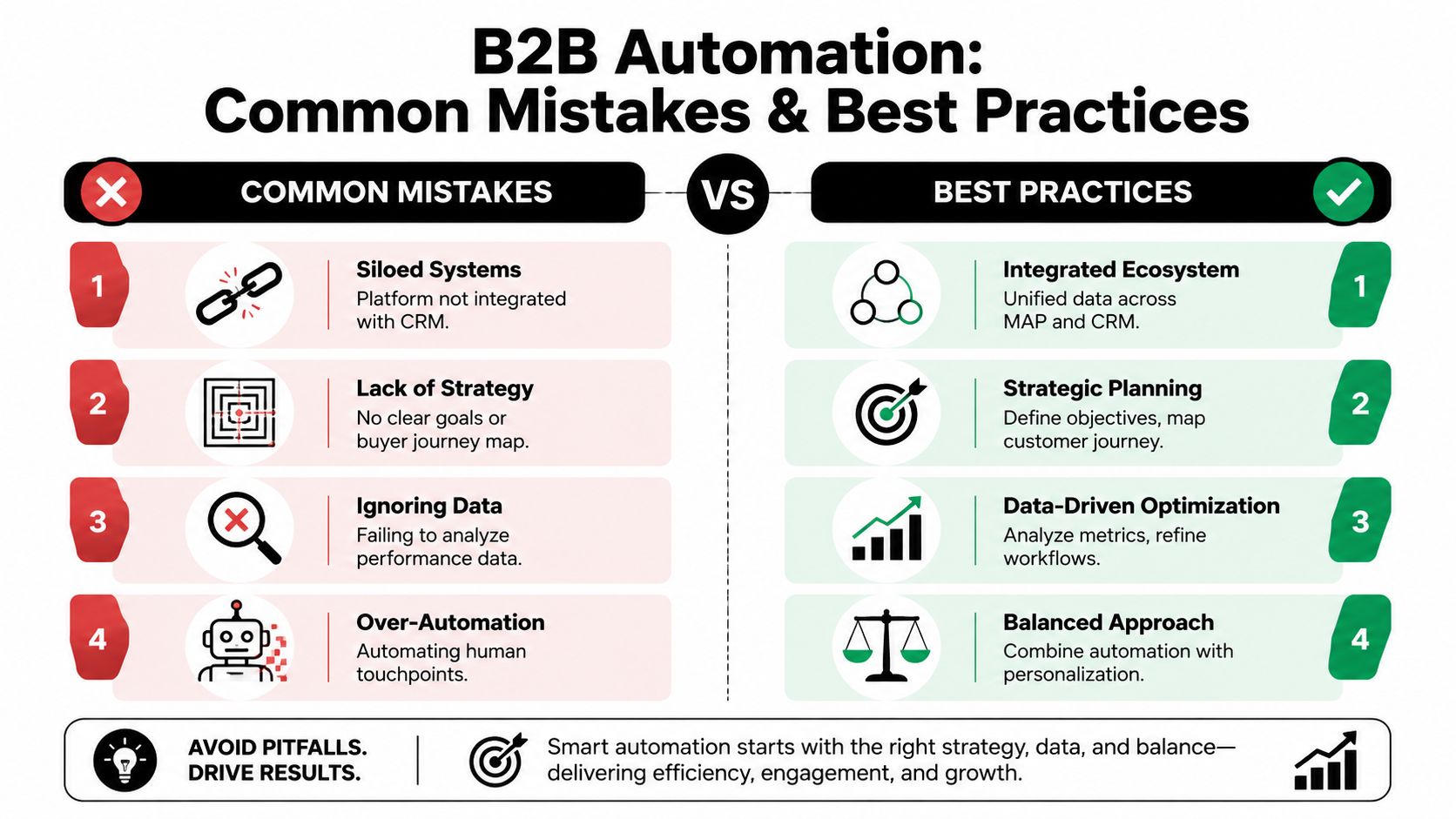
Automation rarely fails because the workflow builder is weak. It fails because the inputs are weak, the rules are loose, and nobody owns quality once campaigns go live.
That is why profitable B2B automation starts before the first sequence. A clean lead list, clear fit criteria, and human review matter more than another set of triggers or templates. Teams that ignore that usually create more activity, more noise, and fewer qualified meetings.
Mistake one: automating a bad list
This is the fastest route to wasted spend. If the list is weak, automation increases the speed of failure.
I see this pattern constantly. A team buys a platform, imports old event leads, scraped contacts, partner lists, and stale CRM records, then wonders why reply rates stay low and sales rejects the handoffs. The tool is doing its job. The targeting is not.
A workable fix is plain and disciplined:
-
Tighten ICP rules: Define exclusion criteria as clearly as inclusion criteria.
-
Review list sources: Separate opted-in inbound leads, verified outbound prospects, and legacy database records instead of pooling them together.
-
Gate workflow entry: Require minimum fit, valid contact data, and a defined use case before a record enters nurture or outbound.
This is also where a pay-per-performance model has an advantage. If the commercial model depends on qualified meetings, the provider has a strong reason to protect list quality. Software alone does not create that discipline.
Mistake two: over-automating cold outreach
Cold outreach still needs judgment. Buyers can tell when a message was assembled by a machine and pushed live without context.
Analysts at Forrester found that B2B buyers respond better to outreach that keeps a human involved in review and approval, rather than fully automated sequences, as noted earlier in the article. That lines up with what works in-market. AI can draft first passes, summarize account context, suggest subject lines, and queue follow-up tasks. A person should still check relevance, timing, and whether the message is worth sending at all.
The trade-off is obvious. Full automation creates more volume. Human-reviewed automation creates fewer, better conversations.
Mistake three: ignoring deliverability and trust signals
A sequence can be well written and still underperform because it never reaches the inbox. Domain setup, sender reputation, authentication, and complaint rates all shape results long before copy becomes the issue.
Teams often blame messaging first. I would check infrastructure first, especially if open rates collapse across campaigns or replies disappear after an early spike. This guide to email authentication protocols for B2B senders covers the technical setup that protects inbox placement and sender trust.
If the domain is misconfigured, every send becomes harder to recover from.
Mistake four: optimizing for activity instead of revenue
Automation platforms make it easy to celebrate the wrong metrics. Open rates, clicks, workflow completions, and MQL volume are useful diagnostic signals. They do not prove the program is profitable.
The scorecard should stay close to revenue creation:
-
qualified meetings booked
-
sales acceptance rate
-
reply quality and context
-
pipeline progression after handoff
-
opportunity creation by source and workflow
A campaign that produces fewer leads but more sales-ready conversations is the better campaign. B2B automation should reduce manual work and improve meeting quality. If it only increases activity, it belongs in the graveyard.
Your First 90-Day B2B Automation Implementation Plan
The fastest way to waste a quarter is to buy the platform first and fix the inputs later. B2B automation gets profitable when the list quality, qualification rules, and human review process are set before the team starts sending at scale.
A 90-day rollout works best when it is narrow, measurable, and tied to meetings. Start with one path to revenue. Prove that it produces sales-accepted conversations. Then expand.
Days 1 to 30
Use the first month to clean the foundation.
Define one revenue goal and one audience. Write down your ideal customer profile, disqualification rules, lifecycle stages, and the exact point where marketing hands a record to sales. If those rules stay vague, automation will amplify every disagreement between teams.
Then audit the data. Check whether titles are standardized, duplicate records are merged, ownership is clear, and suppression rules prevent bad sends. A polished sequence cannot rescue a weak list or broken CRM fields.
Keep scope tight:
-
one target segment
-
one primary offer
-
one source of truth for contact and account data
-
one agreed definition of a qualified meeting
Days 31 to 60
Launch one workflow that can teach the team something quickly. For many B2B teams, that means inbound follow-up for qualified demo or contact form submissions. For others, it means a tightly scoped outbound sequence aimed at a validated segment with clean data.
Keep a human in the loop. Analysts at Forrester have reported that B2B buyers respond poorly to outreach that feels fully automated. That matches what I see in practice. AI can help draft, score, and route. Humans should still approve targeting, review message quality, and step in when intent signals are strong.
Build the workflow around those trade-offs. Automate the repetitive steps, not the judgment:
-
route leads by territory or segment
-
trigger follow-up tasks and reminders
-
personalize outreach from approved data fields
-
flag high-intent actions for manual review
-
send qualified responses to sales with context
That structure does less volume than a fully automated blast. It usually produces better replies and fewer junk handoffs.
Days 61 to 90
Now review the output against revenue signals, not dashboard activity.
Look at reply quality, meeting acceptance, sales feedback, and pipeline movement after handoff. If the workflow generated names but sales rejected the conversations, the problem is usually upstream. Bad targeting, weak qualification logic, or missing context in the handoff are more common causes than the software itself.
Improve one variable at a time:
-
Refine scoring: remove low-intent actions and raise the weight on buying signals
-
Tighten segmentation: cut poor-fit records and separate messaging by role, industry, or stage
-
Fix handoff friction: include firmographic context, source details, and last engagement before sales reaches out
-
Add one adjacent workflow: re-engagement, post-demo nurture, or expansion into a second validated segment
A disciplined first 90 days gives the team something better than a busy automation dashboard. It gives them a system they can trust because the inputs are clean, the outreach still sounds human, and the output is qualified meetings.
If you want help building a B2B automation system that starts with qualified list building, human-reviewed cold outreach, and meeting-based outcomes, Fypion Marketing is one option to evaluate. Their model is built around qualified booked meetings rather than charging upfront software and setup fees, which can be a practical fit for teams that care more about sales conversations than managing another platform internally.