
Sales Process Automation: Your 2026 Implementation Guide
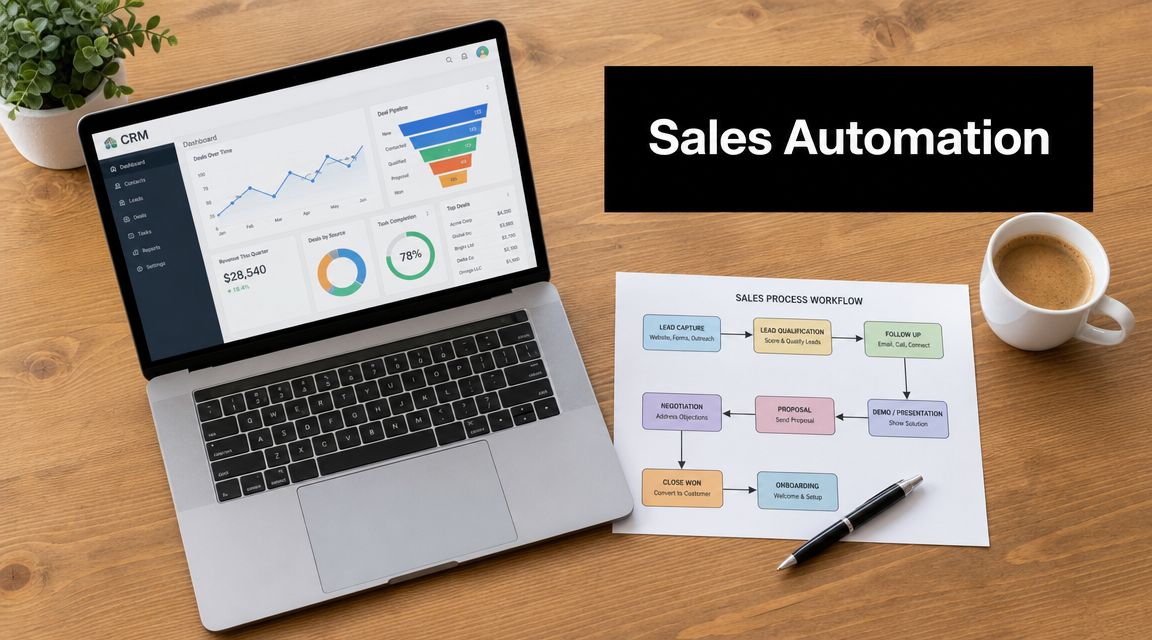
Your reps are probably doing work that looks busy but doesn’t move revenue. They log notes after calls, clean up contact records, reassign leads, chase follow-up reminders, and rebuild the same reports every week. In most B2B SaaS teams, that drag shows up before leadership names it. Pipeline review gets noisy. Response times slip. Good reps start working around the CRM instead of inside it.
That’s where sales process automation matters. Not as a shiny AI project, and not as a stack of disconnected tools, but as a workflow system that handles repeatable work with consistency. McKinsey found that more than 30% of sales-related activities can be automated, with potential 10% to 15% improvements in sales results and up to a 10% sales uplift from automation-driven changes, according to McKinsey’s sales automation research.
From Manual Grind to Automated Growth
The warning signs are familiar. A prospect fills out a demo form, but no one owns the handoff. An AE updates deal stages at the end of the week from memory. SDRs follow different follow-up cadences because each one built their own system in a spreadsheet or task app. The team isn’t failing because people are lazy. The system is forcing talented sellers to do clerical work.
Sales process automation fixes that when you treat it as operating design, not software procurement.
What sales process automation actually is
At a practical level, sales process automation is the use of rules, integrations, and triggers to move data and tasks through the sales motion without manual intervention. A lead comes in. The system qualifies basic criteria, creates or updates the CRM record, assigns ownership, alerts the rep, and launches the next step. Nobody has to copy data between tabs or remember what happens next.
That shift is bigger than it sounds. When low-value work gets handled automatically, reps get more time for discovery, multi-threading, proposal strategy, and stakeholder management. Those are the moments that decide complex B2B deals.
Practical rule: If a task happens the same way every time, it probably belongs in a workflow.
What it is not
Automation isn’t “send more emails.” It isn’t “buy a sequencer and hope adoption follows.” And it definitely isn’t removing humans from every customer touchpoint. In startup environments, the teams that get this right usually start by tightening the process first. Then they automate the parts with clear rules.
If your current sales motion is still loose, documenting it matters as much as the tools. A clean workflow always outperforms a messy one with more software. That’s the same thinking behind building a repeatable revenue engine in this guide to sales process optimization.
What works is straightforward. Automate the repetitive steps. Keep human judgment where complexity is high. Connect the systems so your team can sell inside one flow instead of stitching together five half-truths from five different apps.
Unpacking the Core Components of Sales Automation
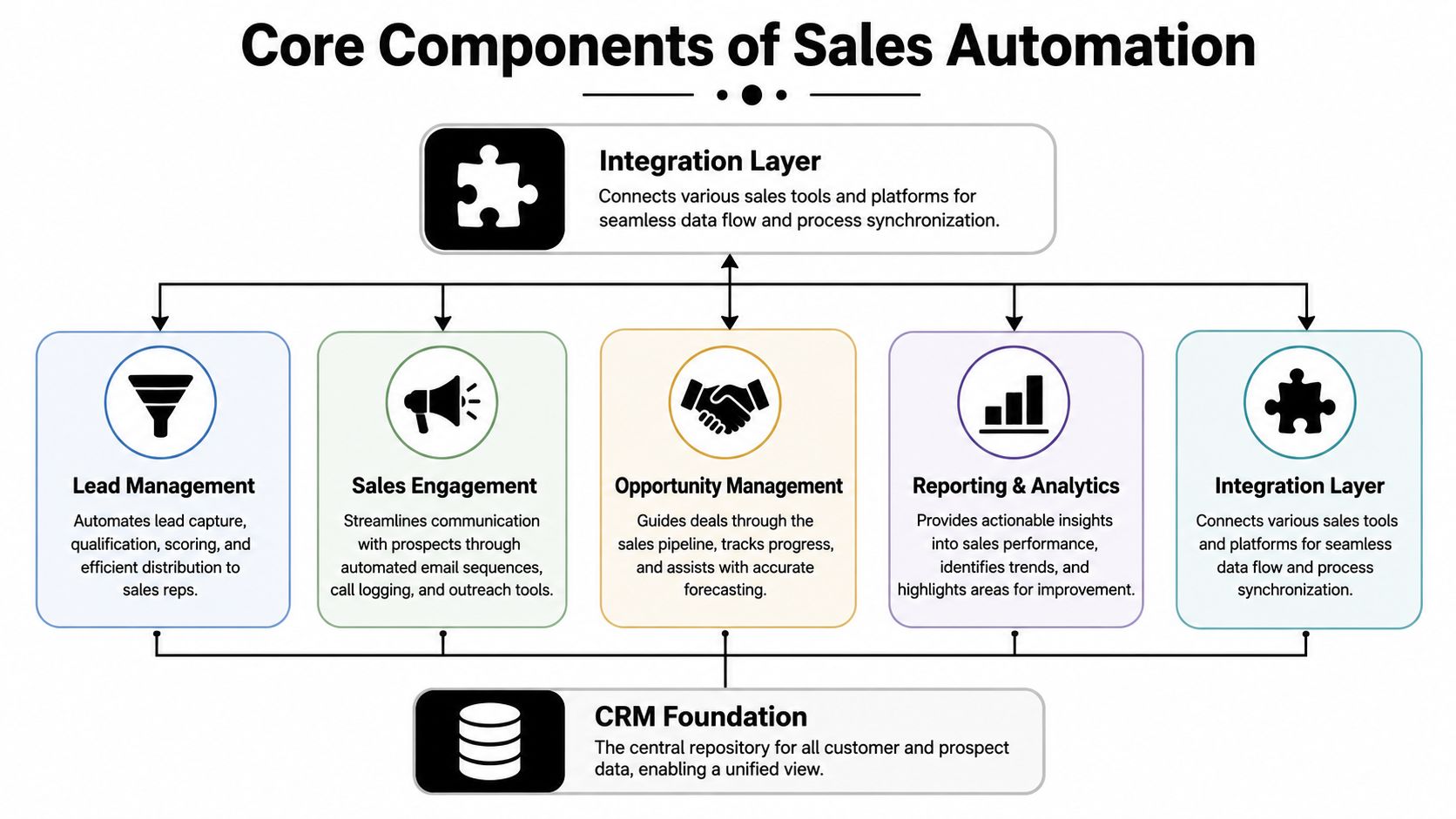
Automation is often considered as a list of tools. CRM, sequencer, enrichment, routing, reporting. That’s useful for budgeting, but it’s not how a working system behaves. A strong setup acts like a connected workflow with three layers: data, logic, and action.
The data layer
The data layer is the foundation. This is usually your CRM plus the inputs feeding it, such as website forms, inbound demo requests, prospecting tools, call activity, and account data. If this layer is messy, every downstream workflow gets worse.
In practice, the CRM should be the system of record. It should know who the account is, who owns it, what stage it’s in, what happened last, and what should happen next. If reps are maintaining that record manually across multiple systems, automation hasn’t solved the underlying problem yet.
For teams still sorting out system handoffs, a primer on CRM integration is often more useful than another vendor demo.
The logic layer
The logic layer decides what happens when something changes. It encompasses routing rules, lead scoring thresholds, territory ownership, lifecycle transitions, and task triggers.
Nintex describes effective sales process automation as an integrated workflow layer connecting CRM, email, and analytics. It gives a practical example where an event-driven rule can route a qualified lead to the right rep, log the action in the CRM, and trigger a follow-up sequence, all inside the same flow, as explained in Nintex’s overview of sales process automation.
That’s often overlooked. The value isn’t in one automated action. The value is in chaining actions together so no step depends on memory.
The action layer
The action layer is what users feel. Emails send. Tasks appear. Alerts fire. Records update. Reports refresh. Quotes generate. Meetings get scheduled. This is the visible output of the workflow engine.
A few examples from B2B SaaS:
-
Inbound demo flow: Form submit creates contact and account, checks owner rules, assigns the lead, sends a confirmation email, and creates an SDR task.
-
Outbound engagement flow: Prospect reply pauses the sequence, logs the reply, alerts the owner, and updates status for reporting.
-
Pipeline hygiene flow: Deal stage changes trigger required fields, next-step tasks, and manager visibility when a deal stalls.
Good automation feels boring. The right thing just happens, on time, every time.
For teams using messaging alongside email, it also helps to connect channels into the same workflow. If you want to streamline GHL WhatsApp campaigns, the useful principle is the same. Centralize triggers, keep contact state synced, and avoid one channel operating blind to another.
The Tangible Business Impact of Automating Sales
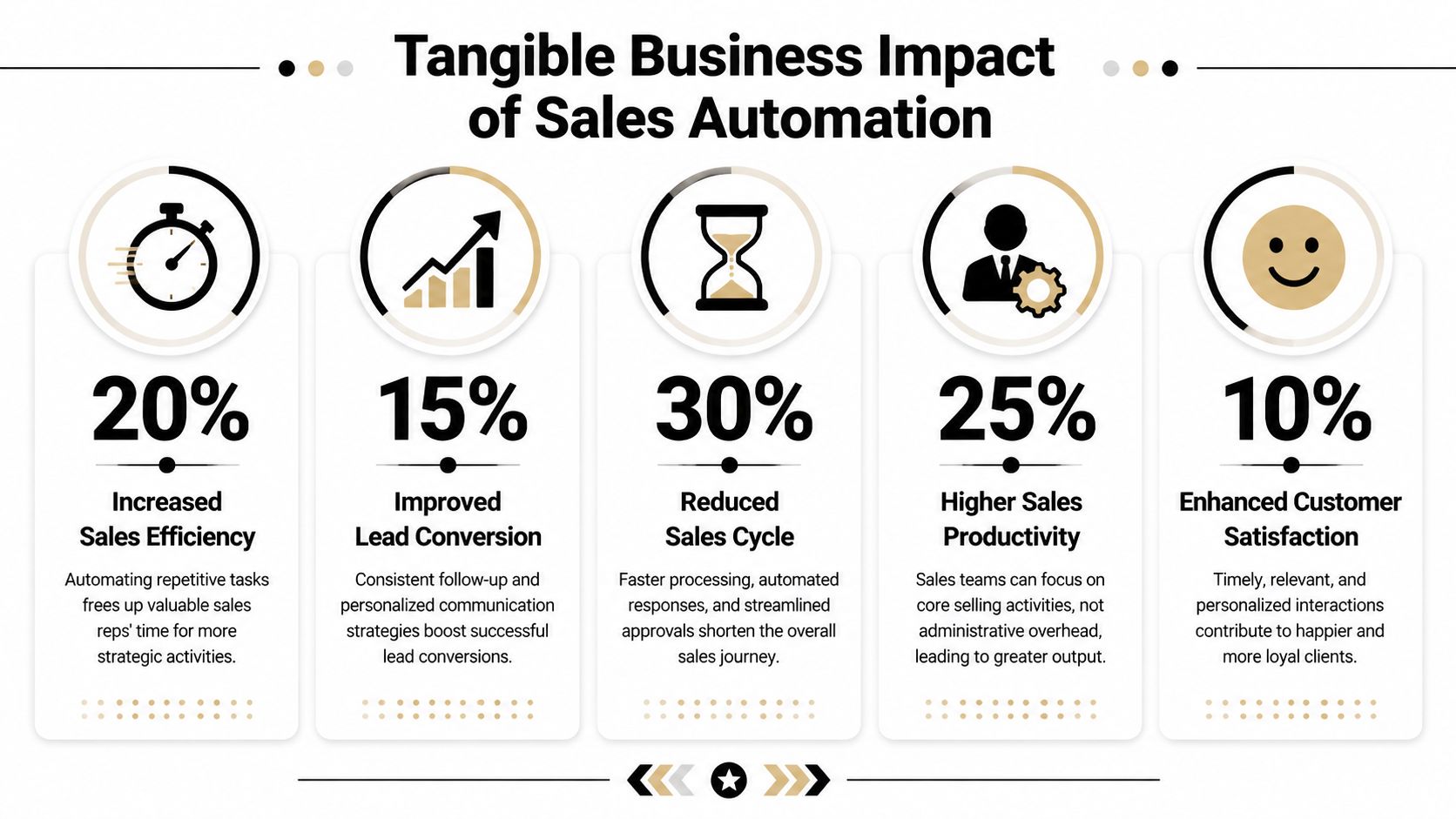
Automation only matters if it changes outcomes. Time savings are nice, but revenue leaders care about a narrower set of questions. Does the team respond faster? Does pipeline data get cleaner? Do reps spend more time selling? Do deals move with less friction?
The business case is stronger than commonly understood. Kissflow reports that teams using automation tools are 14.5% more productive on average, can make 23% more calls per day, may close deals 20% faster, and that 76% of companies see ROI within the first year, as summarized in Kissflow’s automation statistics roundup.
Where the value actually shows up
The first gain is usually speed. Leads get routed instantly instead of waiting in a queue or inbox. Follow-ups happen on schedule. Managers stop chasing reps for basic CRM hygiene because the system captures more activity automatically.
The second gain is consistency. Every rep follows the same core motion for lead assignment, follow-up timing, and stage progression. That doesn’t make the team robotic. It removes avoidable variation from the parts of the process that shouldn’t vary.
The third gain is decision quality. When your CRM updates in real time and handoffs happen through workflows instead of Slack messages, forecast review gets sharper. Leadership sees actual deal movement instead of cleanup work done the night before the meeting.
A practical SaaS example
Take a common startup problem. Marketing drives inbound volume, but lead ownership is still managed manually. A demo request comes in after hours. The SDR manager sees it the next morning, checks territory, pings the rep, and hopes someone follows up fast. That process doesn’t break because people are careless. It breaks because assignment depends on a person being available.
Once routing, alerts, and first-touch follow-up move into a workflow, the handoff gets much tighter. Response time drops from “whenever someone checks” to “when the trigger fires.” That doesn’t guarantee conversion, but it removes one of the most common self-inflicted leaks at the top of the funnel.
A useful companion read for that kind of workflow redesign is Tooling Studio’s sales process guide, especially if you’re trying to connect process cleanup to revenue operations.
Here’s a quick explainer on where teams usually see impact first:
The fastest ROI usually comes from removing waiting time, not from adding more activity.
A Step-by-Step Guide to Implementing Sales Automation
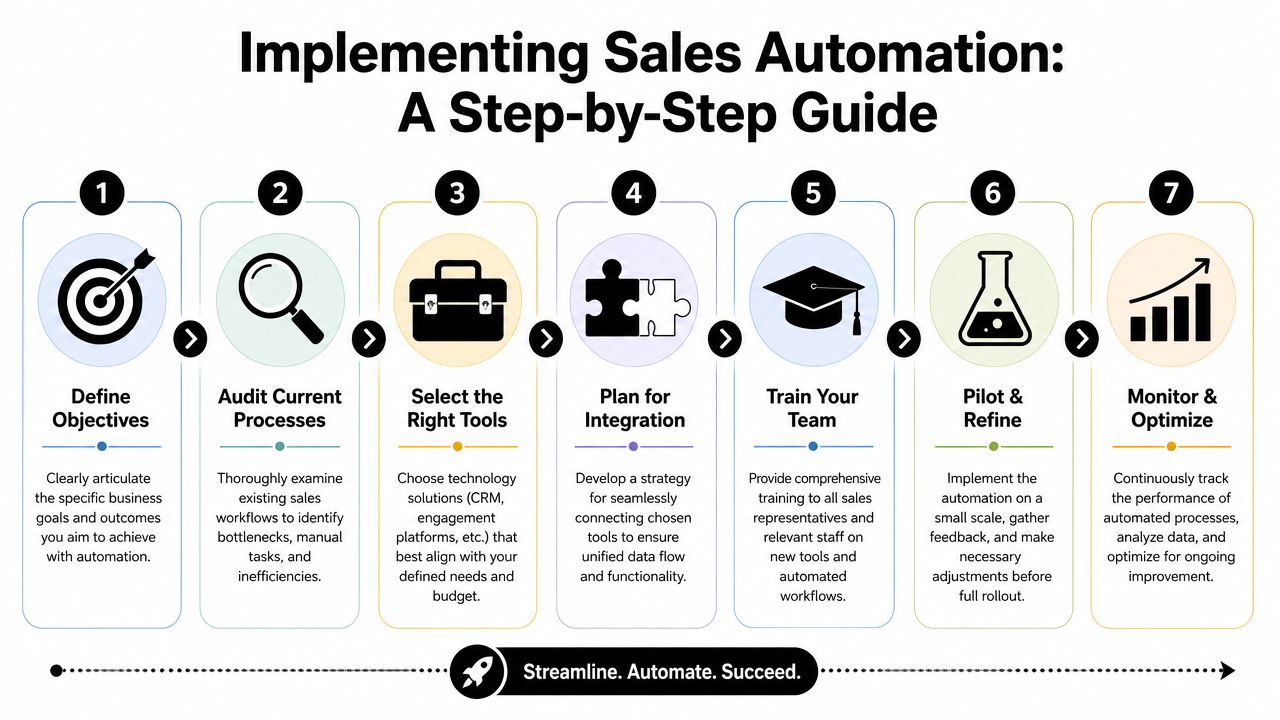
Most failed automation projects don’t fail because the tool was weak. They fail because the team automated too much, too early, on top of a fuzzy process. The right approach is crawl, walk, run. Start with one workflow that has clear rules, obvious friction, and direct revenue relevance.
Map the current process before buying more software
Write down the actual process, not the one in the sales deck. Follow a lead from first touch to closed-won and list every handoff, update, delay, and manual step. This should include inbound capture, qualification, assignment, sequencing, meeting booking, stage changes, quote generation, and reporting.
Look for friction in places like:
-
Manual entry: Reps copy notes, contacts, and activities into the CRM after the fact.
-
Ownership gaps: Leads sit unassigned because territory logic lives in someone’s head.
-
Follow-up drift: Reps mean to follow up, but timing depends on memory.
-
Reporting lag: Managers review stale pipeline because updates happen late.
If your team hasn’t documented its motion clearly, building a sales process flowchart is a practical starting point.
Prioritize high-friction tasks with clear rules
Not everything deserves automation first. Start with repetitive tasks that have low ambiguity. KBMax notes that a robust automation stack is layered, with a CRM as the system of record, marketing automation for nurture, and analytics for pipeline visibility. It also emphasizes automating high-friction, repetitive tasks such as manual data entry and lead routing first because those workflows offer the highest reliability and fastest ROI, according to KBMax’s discussion of sales process automation.
A simple prioritization filter works well:
| Workflow | Revenue relevance | Complexity | Good first candidate |
|---|---|---|---|
| Inbound lead routing | High | Low | Yes |
| Activity logging | Medium | Low | Yes |
| Meeting scheduling reminders | Medium | Low | Yes |
| Proposal approval routing | High | Medium | Usually |
| Discovery call handling | High | High | No |
| Negotiation strategy | High | High | No |
Build the stack around workflow, not logos
A working stack usually has a few layers:
-
CRM as the source of truth
-
Marketing automation for nurture and segmentation
-
Engagement tools for outreach execution
-
Analytics for pipeline visibility
-
Optional CPQ or quoting layer if proposals are complex
The mistake is buying each category separately without deciding how information should move between them. Before adding any new tool, ask two questions. What event should trigger the workflow? Where should the resulting data live?
For example, when a prospect books a demo, the workflow might need to create or update a contact, assign ownership, log the meeting, send a confirmation, and notify the rep. If each step lives in a different tool with no clean integration, the process will look automated from the outside and still create manual cleanup inside the team.
Pilot one workflow end to end
Start with one flow. In most startups, that’s inbound lead capture and routing, or outbound reply handling.
A good pilot includes:
-
Trigger definition: What event starts the workflow
-
Ownership logic: Who gets the lead or task
-
System update rules: What gets written to the CRM
-
Fallback path: What happens if required data is missing
-
Success criteria: What operational change you expect to see
Keep the first version simple. It’s better to launch a reliable workflow that handles the majority case than a “smart” workflow full of exceptions nobody trusts.
Train for adoption, not just usage
Reps don’t care that the automation is elegant. They care whether it removes admin, reduces dropped balls, and helps them close. Show them exactly what changes in their day. Show managers how it improves inspection. Show RevOps how to troubleshoot when records don’t sync.
One option in teams that want help connecting outreach execution to CRM and sequence workflows is Fypion Marketing, which states it helps configure CRM stages, automate data entry where possible, and set up automated email sequences as part of outbound lead generation operations.
Manager check: If reps are creating side spreadsheets after rollout, the workflow still has a trust problem.
Measure, then refine
After launch, watch operational metrics closely. Focus on issues like routing failures, duplicate records, stuck tasks, missing required fields, and low rep adoption. Then look at stage-by-stage effects. Are more leads getting worked on time? Are fewer opportunities going dark because nobody owned the next step?
The strongest systems get better through small refinements. Tighten one rule. Remove one extra click. Add one useful alert. That’s how automation becomes part of the sales engine instead of another layer the team tolerates.
Adopting Best Practices and Avoiding Common Mistakes
The biggest mistake in sales process automation is over-automation. Teams get excited, see that workflows can do a lot, and start automating customer-facing moments that still need judgment. That’s when messaging becomes generic, qualification gets sloppy, and reps lose confidence in the system.
McKinsey advises against automating the whole sales function at once and recommends a staged approach: eliminate non-value-added work, standardize processes, then automate repetitive tasks. That guidance matters because it protects the moments where seller judgment still carries the deal.
What should stay human
In complex B2B sales, some tasks are rule-based and repeat often. Those are ideal for automation. Others involve nuance, objection handling, or stakeholder politics. Those should stay manual.
Here’s a practical decision framework:
| Task Category | Automate (High-Volume, Low-Complexity) | Keep Manual (Low-Volume, High-Complexity) |
|---|---|---|
| Lead intake | Form capture, record creation, enrichment checks | Edge-case qualification decisions |
| Routing | Territory assignment, round-robin distribution, ownership alerts | Exception handling for strategic accounts |
| Follow-up execution | Reminder tasks, sequence enrollment, no-show follow-ups | Personalized re-engagement for senior buyers |
| CRM hygiene | Activity logging, stage prompts, required field enforcement | Judgment on opportunity quality and close plans |
| Meetings | Scheduling links, reminders, confirmations | Discovery calls and stakeholder mapping |
| Pipeline movement | Internal approvals, task generation, status syncing | Negotiation, pricing trade-offs, deal rescue work |
Common failure modes
A few patterns show up repeatedly in startups and growth-stage SaaS teams:
-
Automating a broken process: If the handoff logic is unclear today, automating it just scales confusion.
-
Ignoring data quality: Bad inputs create bad workflows. Duplicate records, weak lifecycle definitions, and inconsistent owner fields will break trust quickly.
-
Buying tools before process mapping: Tool-first projects often create more overlap than value.
-
Skipping rep buy-in: If sellers think automation exists to monitor them instead of help them, adoption drops.
-
Replacing qualification with scoring alone: A model can prioritize, but it shouldn’t replace good judgment on fit and timing.
The human side matters most in qualification. Teams that want a sharper intake process should tighten their standards before adding more automation. A straightforward framework for qualifying sales leads helps prevent bad-fit accounts from moving through a beautifully automated but fundamentally weak funnel.
A simple test for every workflow
Before automating any step, ask:
-
Is the task repeated often?
-
Does it follow stable rules?
-
Would inconsistency hurt revenue or data quality?
-
Does the buyer benefit from speed and accuracy here?
-
Would automation remove admin without reducing trust?
If the answer is yes across the board, automate it.
If the task requires listening, context, or commercial judgment, keep a person in the loop.
Don’t automate persuasion. Automate preparation, timing, routing, and record-keeping so reps can persuade better.
The Next Wave of Automation in B2B Sales
The next wave isn’t about squeezing more activity from the team. It’s about using automation to improve decisions. That distinction matters because a sales org can increase touches and still miss targets if the system is pushing the wrong accounts, mistiming follow-ups, or masking forecast risk.
Outreach points to a more outcome-focused direction for sales automation, and one of the stronger signals in that conversation is that machine learning can triple the predictive power for identifying customer churn, as noted in Outreach’s discussion of sales automation in the AI era. That’s the useful lens for modern teams. Not “what can AI do faster?” but “what decisions can become sharper?”

Where AI helps most
The strongest use cases usually sit one layer above basic workflow automation:
-
Prioritization: Better lead and account ranking based on fit, engagement, and timing signals
-
Risk detection: Earlier visibility into stalled deals, churn likelihood, or weak pipeline coverage
-
Follow-up timing: Smarter sequencing and task triggers based on buyer behavior
-
Forecast support: Cleaner view of stage health and slippage patterns
What still doesn’t work well is handing complex buying conversations entirely to automation. In enterprise and mid-market SaaS, buyers still expect relevance, fluency, and judgment. AI can prepare the rep, surface patterns, and improve next-step discipline. It shouldn’t own the room during discovery or negotiation.
Why this matters for outbound teams
Cold outreach gets stronger when automation supports relevance instead of replacing it. The practical gains come from better segmentation, cleaner handoffs, smarter follow-up timing, and tighter CRM feedback loops. That’s especially true when the outreach team connects campaign activity directly into sales workflows instead of treating outbound as a separate machine.
For teams building scalable outbound, cold outreach automation becomes useful. Not because it lets you send more by default, but because it helps your team keep message, timing, ownership, and reporting aligned.
A good sales automation system should do two things at once. It should reduce admin friction, and it should make the commercial team smarter. If it only increases activity, you’ll feel busier without becoming more effective.
If your team needs a cleaner sales workflow, tighter CRM handoffs, and outbound systems that book qualified meetings without adding operational drag, Fypion Marketing is one option to evaluate. They work with B2B companies on cold email outreach, campaign setup, targeting, messaging, and the workflow pieces that connect prospecting activity to the rest of the sales engine.