
What Is CRM Integration
Your outbound engine looks busy. SDRs are sending cold emails from Instantly or Smartlead. Marketing is collecting demo requests. Support is answering pre-sales questions in a help desk. The founder wants one clear view of pipeline, but every answer lives in a different tool.
That’s where most SaaS teams get stuck. Not because outreach is weak, but because the systems around it are disconnected. A rep gets a reply in the cold email platform, but the CRM isn’t updated. A prospect books a call, but marketing can’t tie it back to the campaign. Support learns about a buying blocker, but sales never sees it before the next meeting.
CRM integration fixes that. It turns scattered activity into one operating system for revenue. Instead of asking three people and checking five dashboards, your team can see who was contacted, how they engaged, what happened next, and what action should happen now.
Your Data Is Talking but Your Tools Are Not Listening
A common B2B setup looks fine on the surface. You have a CRM, a cold email platform, a form builder, calendar scheduling, Slack alerts, maybe a support desk, and a spreadsheet someone still insists is “the cleanest version.” Each tool does its job. The problem is they don’t share context well enough to support fast sales execution.
That creates very specific lead generation problems. A prospect replies positively to a cold email, but the rep has to manually create the contact in HubSpot or Salesforce. Another lead fills out a website form after seeing your brand twice in their inbox, but attribution gets lost because the outreach activity never made it into the CRM. A founder asks which niche is producing the best meetings, and nobody can answer without stitching together exports.
Why this becomes a growth problem fast
For SaaS companies, especially those scaling outbound, disconnected systems slow down revenue in small but expensive ways:
-
Leads get delayed: Reps respond later because handoffs depend on manual updates.
-
Context disappears: The person running the sales call can’t see prior cold email replies or objections.
-
Reporting breaks: You can’t tell whether outbound, inbound, referrals, or partnerships are creating qualified pipeline.
-
Teams work from different truths: Marketing thinks a contact is new. Sales already spoke to them. Support already handled a question.
If you’re building lists for niche outbound campaigns, resources on prospecting for importing companies show how targeted account selection starts upstream. But that targeting only pays off if the response data reaches your CRM cleanly and quickly.
CRM integration matters because this isn’t a niche ops problem anymore. One industry roundup projects the global CRM market will reach $126.2 billion by 2026 and $254.3 billion by 2032, reflecting how CRM integration has shifted into core infrastructure for unified customer data and faster execution, according to Flowlu’s CRM market roundup.
For teams trying to build a modern outbound engine, connected systems are part of strategy, not cleanup work. A useful companion read is this guide to a 2026 B2B marketing automation strategy that actually wins, because automation only works when the underlying data flows are reliable.
What Is CRM Integration in Simple Terms
If a founder asks, “What is CRM integration?” the simplest answer is this: it’s the setup that makes your CRM communicate with the rest of your revenue stack automatically.
CRM integration is the data-exchange layer that connects your CRM to other systems so customer records, activities, and workflow updates stay synchronized instead of living in separate tools.
A lot of people confuse this with importing a CSV. That’s not integration. Importing data is a one-time transfer. Integration is ongoing. It keeps records aligned as new information appears, changes, or triggers an action somewhere else.
Think of it like your company’s nervous system
Your CRM should work like a central nervous system. Marketing sends signals. Sales sends signals. Support sends signals. Product usage tools, forms, calendars, and outbound platforms all send signals. The CRM receives that information, organizes it, and helps the business respond in a coordinated way.
Without integration, each limb moves on its own. Sales might chase a lead that support already flagged as a bad fit. Marketing might nurture someone who already booked a demo. Outbound might keep emailing a prospect after they’ve entered an open opportunity.
With integration, the CRM becomes the place where everyone sees the same customer story.
What this means for cold email teams
For outbound-led SaaS companies, this usually shows up in practical ways:
-
Replies become visible: Positive replies from tools like Instantly or Smartlead can create or update contact records.
-
Meetings get tied to campaigns: When a prospect books through Calendly, the CRM can connect that action to the account and rep.
-
Follow-ups stay relevant: Reps can see the full outreach history before they call or email again.
-
Lead status stays current: If a contact becomes an opportunity, your outbound system can stop or change messaging.
An integrated CRM doesn’t just store names and emails. It helps your team decide what to do next, based on complete context.
If you want a broader operational view, Orbit AI’s CRM workflow automation guide is useful for seeing how integrated workflows reduce repetitive handoffs.
This also connects directly to pipeline management. A CRM that’s only a database won’t help much. A CRM that updates the pipeline automatically becomes a working system for revenue. That’s why sales leaders should also understand what sales pipeline management actually involves.
How Different Integration Methods Work
The mechanics sound technical, but the business logic is simple. CRM integration is a data-exchange layer between the CRM and other systems. IBM notes that the strongest setups treat the CRM as a single source of truth by mapping fields, normalizing source data, and validating formats, because mismatches in things like date formats or text casing are common causes of sync errors, as explained in IBM’s overview of CRM integration.
If that sounds abstract, three common methods make it easier to picture.
APIs act like a restaurant menu
An API lets one system ask another system for something specific.
Your cold email tool might ask the CRM, “Does this contact already exist?” Your CRM might ask your calendar tool, “Was a meeting booked?” The API defines what can be requested and how the answer should be returned.
The restaurant analogy works well here. You don’t walk into the kitchen and grab ingredients. You order from the menu. The menu tells you what’s available and how to ask for it properly.
For a SaaS sales stack, APIs are useful when you need structured actions such as:
-
Create a contact when a new reply comes in
-
Update a lifecycle stage after a meeting is booked
-
Pull account ownership so the right rep gets assigned
-
Write activity history back into the CRM timeline
Webhooks behave like instant notifications
A webhook pushes information when a specific event happens.
Instead of one system constantly asking, “Anything new?” a webhook says, “Something happened. Here’s the update.” If a prospect replies, unsubscribes, or submits a demo form, that event can trigger a message to another platform immediately.
For outbound teams, that’s often the difference between fast follow-up and stale leads. A webhook can notify the CRM the moment a warm reply lands, then trigger routing, task creation, or a Slack alert for the account owner.
Practical rule: Use event-driven updates for moments where timing affects conversion, such as replies, demo bookings, handoffs, and lead qualification changes.
Middleware and iPaaS work like a translator hub
Middleware, often delivered through an iPaaS platform, sits in the middle and manages multiple systems at once. Think Zapier, Make, Workato, or Tray as examples of tools companies use for this layer.
This approach makes sense when the workflow spans more than two tools. For example, a reply in Smartlead may need to update HubSpot, alert Slack, assign a rep, create a task, and push a row into a reporting sheet. A central integration layer handles that logic more cleanly than building separate point-to-point connections every time.
Here’s the quick difference:
| Method | Best for | Trade-off |
|---|---|---|
| API | Precise, custom actions between systems | More setup and maintenance |
| Webhook | Fast event-based updates | Narrower use per event |
| Middleware / iPaaS | Multi-step workflows across several tools | Can become messy if logic isn’t documented |
The method matters less than the discipline behind it. If your fields are mapped badly, if “Interested” means one thing in the cold email tool and another in the CRM, or if names and dates arrive in different formats, the integration will create confusion faster than manual work ever did.
From Silos to Revenue Engines Key B2B Use Cases
The easiest way to understand CRM integration is to follow one lead through an outbound funnel.
A SaaS company launches a cold email campaign to operations leaders. The list is solid, the messaging is relevant, and replies start coming in. Without integration, the outbound tool shows engagement, the CRM shows partial records, and the sales manager has to guess which campaign is creating actual opportunities.
With integration, the lead journey becomes visible and usable.
Use case one, capture every outbound response properly
A prospect replies to a cold email with interest. That reply should do more than sit in an inbox.
A working integration can:
-
Create or update the contact: The CRM record appears automatically instead of waiting on a rep.
-
Attach the outreach source: The team can see which campaign, sequence, or angle generated the reply.
-
Assign ownership: The right rep gets the account without a manual handoff.
-
Open the next task: Someone is prompted to follow up while the lead is still warm.
That sounds basic, but it fixes one of the most common outbound leaks. Positive intent shows up in one tool, but action is expected in another.
Use case two, give sales the full conversation before the call
When a prospect books a meeting, the AE shouldn’t enter the call blind. They should see the cold email thread, any objections the lead raised, previous touchpoints, and whether the contact also came through another channel.
Integrated activity history matters. It prevents generic discovery calls. If the lead already said, “We’re exploring alternatives because onboarding is too manual,” the rep can start there instead of wasting ten minutes rediscovering it.
The value isn’t just saved admin time. It’s better conversations because the rep walks in with actual context.
Use case three, stop duplicate or conflicting outreach
Disconnected tools create embarrassing moments. Marketing nurtures someone who already has a live sales cycle. SDRs keep emailing a contact who booked a meeting yesterday. A founder forwards a warm intro, but outbound doesn’t know and keeps pushing a cold sequence.
An integrated CRM can suppress, pause, or reroute those actions based on status changes. Once the opportunity is open, the system can remove the contact from outbound automation. Once a prospect becomes disqualified, the team can update messaging or hand them to a different sequence later.
Use case four, fix attribution for real pipeline decisions
Founders and revenue leaders usually feel this pain most. They don’t just want activity. They want attribution they can trust.
If cold email replies, meetings, and opportunity updates all land in the CRM, you can answer questions like:
-
Which ICP segment is booking the best conversations
-
Which message angle creates replies but not qualified meetings
-
Which reps are converting warm replies into pipeline
-
Which channels influence the same deal before it closes
For sales and marketing teams trying to operate as one unit, this matters more than any single dashboard feature. That’s also why alignment work matters. This guide on how to align sales and marketing is a useful companion, because integration only creates value when both teams agree on stages, definitions, and ownership.
Use case five, connect service signals to revenue conversations
In SaaS, buying decisions often involve support or success signals before the deal is done. Maybe a prospect asks a technical question through chat. Maybe an existing user from a freemium account opens a ticket that reveals expansion intent. If those interactions never reach the CRM, reps miss buying signals.
Connected systems let your team treat those signals as part of the revenue process, not separate operational noise. That’s how silos turn into a revenue engine. The CRM stops being a record-keeping tool and starts acting like a decision tool.
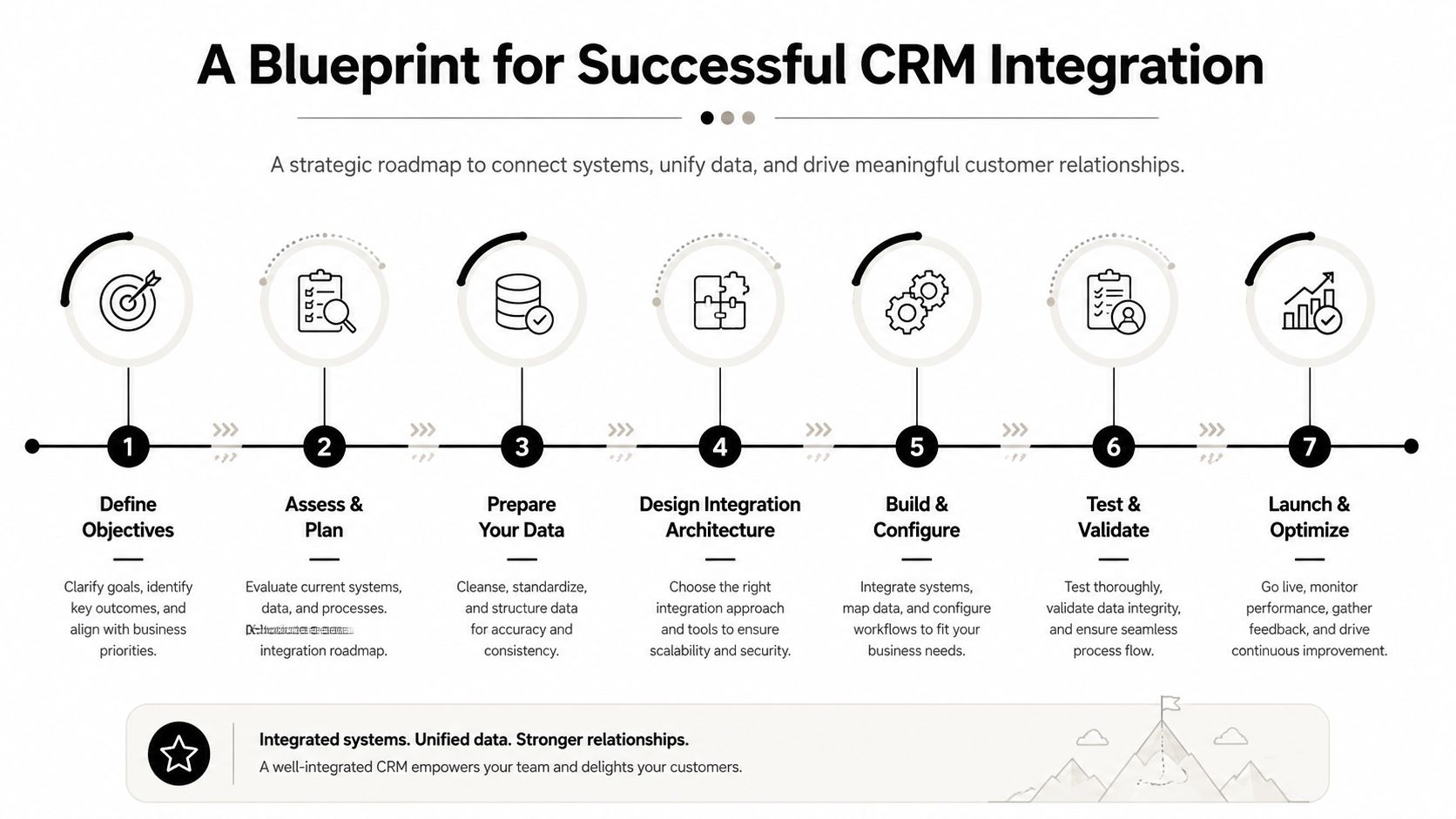
A Blueprint for Successful CRM Integration
Most CRM integration problems don’t start in the connector. They start in planning. Teams rush to “connect the tools” before they decide what outcome the integration should produce.
Start with one commercial problem
Don’t begin with every possible workflow. Begin with one revenue problem that’s costing you money or speed.
Good examples include:
-
Warm outbound replies aren’t reaching reps fast enough
-
Meetings booked from campaigns aren’t tied to source
-
Sales can’t see prior outreach before qualification calls
-
Reporting is split between the CRM and outbound platform
That first problem should determine what gets integrated first.
Audit the stack and define the source of truth
List every system that touches lead data. CRM, cold email platform, forms, scheduler, enrichment tool, support desk, Slack, analytics, and any spreadsheet still being used as a patch.
Then decide which system owns what. If the CRM is the source of truth for lifecycle stage and account ownership, don’t let another tool overwrite that casually. If your outbound platform owns sequence status, define exactly what should sync back and what should remain local.
A clean audit usually answers three questions:
| Question | What to decide |
|---|---|
| What data matters | Contacts, companies, replies, meetings, stages, owners |
| Where it originates | Form, outbound tool, scheduler, rep update, support event |
| Who can change it | CRM only, tool only, or bidirectional with rules |
Choose sync timing deliberately
Synchronization mode is one of the biggest practical decisions. DCKAP notes that teams usually choose between real-time, near-real-time, or scheduled batch, and that real-time is important when immediate lead routing or customer service context is needed, while batch lowers API pressure. DCKAP also points out that testing API rate limits, authentication, and data integrity is essential because those are common failure points in multi-system setups, as covered in DCKAP’s guide to CRM data integration.
For outbound teams, real-time or near-real-time usually makes more sense for reply handling, routing, and meeting creation. Batch can work for lower-stakes reporting updates.
If your team needs to act on an event today, don’t design the sync like it can wait until tomorrow morning.
Map fields before you automate
Data inconsistencies cause many projects to get sloppy. “Job title” in one system may not match “Title” in another. Status labels often differ. Reply categories can be inconsistent across tools.
Map the key fields first. Then test edge cases:
-
Duplicate contacts: What happens if the email already exists?
-
Formatting differences: Are names, dates, and text values standardized?
-
Ownership rules: Who gets the lead if territory data is missing?
-
Update conflicts: Which system wins if both records change?
Once the core workflow works, expand carefully. That approach fits broader revenue planning too, especially if you’re building a repeatable growth engine. This playbook on sales process optimization and building your revenue machine is a smart next read for that larger operational view.
Measuring the ROI of Connected Systems
CRM integration is easy to undervalue if you measure it like a software setup project. The better lens is revenue efficiency. How much faster does your team move, how much cleaner is your pipeline data, and how much more confidently can you invest in channels that create qualified opportunities?
The broad business case is already strong. Organizations using CRM report an average return of $8.71 for every $1 spent, along with a 29% increase in sales, a 34% improvement in sales productivity, and a 42% rise in sales forecast accuracy, according to this roundup of CRM ROI statistics.
What to measure in practice
For a sales-led SaaS company, the most useful ROI measures usually fall into four groups:
-
Speed metrics: Time from reply to rep action, time from form fill to qualification, time from meeting booked to opportunity creation.
-
Productivity metrics: Manual record creation avoided, less admin per rep, fewer duplicate updates across tools.
-
Pipeline quality metrics: More complete source data, cleaner stage progression, fewer unattributed meetings.
-
Forecasting metrics: Better visibility into which outbound campaigns produce real opportunities and closed revenue.
Where integration creates financial value
The value often shows up in places leaders already care about, but don’t always connect back to integration work.
A rep who spends less time copying replies into the CRM has more time for follow-up. A manager who can trust attribution can fund the campaigns that produce qualified pipeline. A founder who can see source, sequence, and deal stage in one place can make better hiring and budget decisions.
The ROI of CRM integration rarely comes from the connector itself. It comes from faster action, fewer mistakes, and cleaner decisions across the revenue team.
If you need to make the business case internally, build a before-and-after model around response speed, meetings created, rep admin time, and forecast confidence. This guide on how to calculate marketing ROI is useful for framing that discussion in operational and financial terms.
Navigating Risks and Future-Proofing Your Strategy
Plenty of integrations “work” in the narrow sense that data moves from one tool to another. That doesn’t mean the setup is safe, accurate, or durable.
The most common failures are mundane. Bad field mapping creates duplicate records. Loose permissions expose data to too many systems or users. Scope creep turns a focused project into a tangled web of automations nobody wants to own. And once teams stop trusting the data, they go back to spreadsheets and side channels.
The risks that show up first
Watch for these early warning signs:
-
Status confusion: Different tools use similar labels with different meanings.
-
Record pollution: Contact and company records get overwritten with incomplete values.
-
Hidden failures: Syncs break unannounced and nobody notices until reporting looks wrong.
-
Workflow drift: The original process changes, but the integration logic doesn’t.
A healthy integration has an owner. It has documentation. It has rules about who can change mappings and automations. It also gets reviewed when your sales process changes.
AI raises the stakes
The next layer is more serious. Salesforce’s CRM integration guidance frames the new frontier as the intersection of integration, AI, and privacy. When the CRM becomes the hub for AI-assisted prospecting, forecasting, or automation, the question shifts from “How do we connect the apps?” to “What data should be integrated at all?” Poor permissions can turn convenience into a compliance and accuracy problem, as discussed in Salesforce’s overview of CRM integration and AI.
That matters for outbound teams using AI to score accounts, draft follow-ups, summarize calls, or prioritize leads. If your CRM is feeding those systems, then every integration decision becomes a model-input decision too.
Don’t integrate data just because a connector allows it. Integrate data because a business process needs it, a user should see it, and your governance rules support it.
Future-proofing your setup means treating CRM integration as an operating discipline. Define the minimum data needed. Limit access deliberately. Review what flows into AI-enabled tools. And keep asking a harder question than most vendors advertise: not whether you can connect the systems, but whether the connection improves revenue execution without creating new risk.
If your team is generating interest through outbound but struggling to turn fragmented activity into clean pipeline, Fypion Marketing can help. They build and manage cold email systems focused on qualified meetings, not vanity metrics, so your sales team gets a steadier flow of real opportunities without taking on the setup and optimization work internally.